Einleitung

  1. MLHABsnoWrK2PVVL
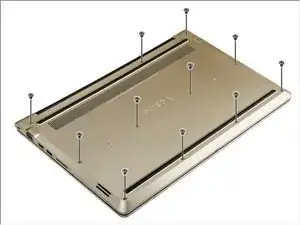
    • Entferne die Schrauben, mit denen die Bodenplatte am Computer befestigt ist.

  2. AV1msJDANZGAeXhr
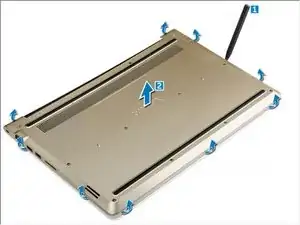
    • Nimm ein geeignetes Werkzeug aus Kunststoff und heble die Bodenplatte rundum ab.

    • Hebe die Bodenplatte vom Gerät ab.

    Orientation: the bottom of the laptop facing up, hinge on the opposite side from you.

    Be careful if you want to open up the screen after undoing the top left corner screw. This is the only screw on this side attaching the hinge to the baseplate, so if it's removed, the hinge might pry up the corner (upon opening the laptop).

    This can also aid in creating the first gap where you can insert a prytool.

    kepeter97 -

Abschluss

Um dein Gerät wieder zusammenzubauen, folge den Schritten in umgekehrter Reihenfolge.

Johnathan Hammond

Mitglied seit: 28/02/18

45306 Reputation

Ein Kommentar

hi my backcover for dell vostro 5568 is broken can you suggest some website for purchasing it

Vinith Velan -