Einleitung

So tauschst du den Akku eines Dell XPS 13 9370 Laptops aus. Die Bilder und Informationen in dieser Anleitung stammen aus der Bedienungsanleitung dieses Computers.

    • Speichere und schließe alle geöffneten Dateien und beende alle geöffneten Anwendungen.

    • Schalte deinen Computer aus. Klicke auf Start > Power > Herunterfahren.

    • Trenne den Computer und alle angeschlossenen Geräte von den Steckdosen.

    • Trenne alle über Netzwerk oder Kabel angeschlossenen Geräte, wie Tastatur, Maus und Monitor, von deinem Computer.

    • Entferne ggf. Speicherkarten und andere Datenträger (CDs, DVDs, etc.) aus dem Computer.

  1. 5oseldGCluaA3ZhU
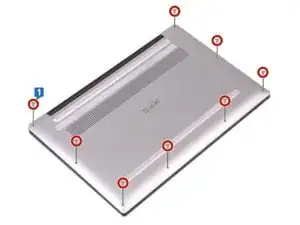
    • Entferne die acht Schrauben (M2x3, Torx), mit denen die untere Abdeckung an der Handballenablage befestigt ist.

    Use a magnifying glass to help see the screw heads. Pick the tool driver to match. Be in a clean environment with white paper to set the screws on and a bright overhead light. Go slow.

    M A -

  2. vKjK6vctNUAyZS5L
    vKjK6vctNUAyZS5L
    Jw5CCrILTQkQCLMP
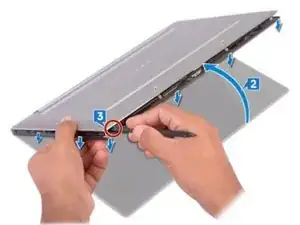
    • Leg den Computer kopfüber hin, sodass die untere Abdeckung oben ist. Öffne den Computer dann ein Stück.

    • Heble die untere Abdeckung mit einem Spudger von der Handballenauflage ab.

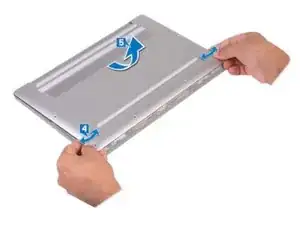
    • Bewege die untere Abdeckung von links nach rechts und löse die Clips, mit denen die untere Abdeckung an der Handballenablage befestigt ist.

    • Hebe die untere Abdeckung von der Handballenablage ab.

  3. 5NkASNLvoRbxtDSl
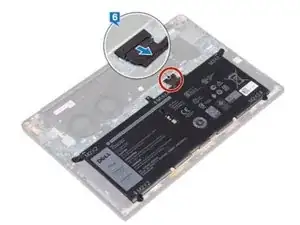
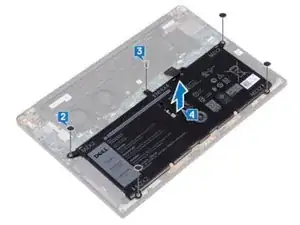
    • Trenne das Akkukabel vom System Board.

  4. WQkPLXdAeQ2X4kVi
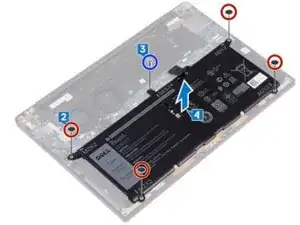
    • Entferne die vier Schrauben (M2x2), mit denen der Akku an der Handballenablage befestigt ist.

    • Entferne die Schraube (M1,6x4), mit der der Akku an der Handballenablage befestigt ist.

    • Hebe den Akku von der Handballenablage ab.

    • Drehe den Computer um, öffne das Display, und drücke die Netztaste für etwa 5 Sekunden, um den Computer zu erden.

    Perfect guide! Many thanks.

    I didn’t have a spudger bu my wife’s tweezers were an excellent substitute - and also invaluable for dealing with tiny screws.

    Daman Singh -

    The M1.6x4 screw fit a phillips #0 much better than a #00 for me.

    Andrew -

Abschluss

Um den neuen Akku einzubauen und das Gerät wieder zusammenzubauen, folge den Schritten dieser Anleitung in umgekehrter Reihenfolge.

Max Kletskov

Mitglied seit: 22/04/20

41027 Reputation

10 Kommentare

Is the battery an original dell battery?

mnyousafva -

Why doesn’t it say what tools are needed?

Noah Guirguis -

Excellent guide. Took me about 25 minutes. Works perfectly.

Jeff Doremus -

Instructions were perfect, thanks for the great guide!

surfdaworld -

Boom, in a good way! I fixed it!

Chris Cox -

Instructions were perfect, thank you.

Oliver J. Morais -

Instructions were helpful, the battery was replaced after 20 minutes. But then I needed more than an hour to recover from the loss of BIOS information. I have a dual boot Linux/Windows laptop and after the battery replacement the disk mode was set to "raid" but my previous settings were "AHCI". After having fixed that the laptop insisted to boot into Windows. I had to add another entry in the boot menu with the correct boot loader that engaged the grub boot loader. The new battery from DELL lets me survive again more than one day with the laptop.

Wolfgang Friebel -

Replaced my dell battery with the one from Ifixit, wen’t perfectly for a month or so and today the computer just won’t charge the battery. I am pretty desperate about this, any one have advices ?

Max Jgr -

Small screwdrivers needed are listed in parentheses. Great instructions. Only thing I'd add is be careful pulling the cover off at the back edge. Very delicate tabs broke off my machine because I pulled up at the back... should have spludged more carefully.

Allison Cherry Ostriker -

Worked great. Just go slow and precise. Use the iFixit tools or something equivalent. 20-30 minutes for a first time fixer.

M A -