Einleitung
Entlädt sich dein Dell XPS 15 9500 schneller als früher, könnte ein defekter Akku der Grund sein. Sollte dein Laptop ohne Stromkabel gar nicht mehr angehen, könnte dies ein weiteres Anzeichen eines (teilweise) defekten Akkus sein. Sollte der Laptop selbst mit Stromkabel nicht angehen, lässt sich das Problem möglicherweise lösen, indem man es mit einem anderen Stromkabel probiert.
Dank des Akkus kann man den Laptop auch ohne Stromkabel nutzen, allerdings haben Akkus nur eine gewisse Lebensdauer und verlieren mit der Zeit Kapazität oder können auch vollständig kaputt gehen.
Bei der Reperatur und dem anschließenden Umgang mit dem Akku darf dieser auf keinen Fall beschädigt werden - es besteht Brandgefahr! Sollte der Akku "aufgebläht" (also gewölbt) sein, findest du hier Tipps zum Umgang damit.


Ersatzteile

-
-
Speichere alle Änderungen und schließe alle offenen Anwendungen.
-
Fahre den Computer herunter.
-
Stecke alle Kabel ab.
-
Trenne alle angeschlossenen Geräte und Netzwerkverbindungen ab, z.B. Maus, Tastatur und Monitor.
-
Wenn noch Speicherkarten eingesteckt sind, dann entferne sie.
-
-
-
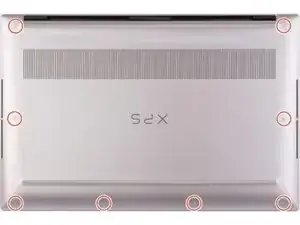
Entferne die acht 3 mm langen Torx T5 Schrauben, mit denen die Bodenplatte an der Baugruppe aus Handballenablage und Tastatur befestigt ist.
-
-
-
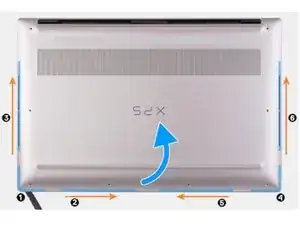
Setze einen Spudger zuerst in die untere linke Ecke ein und schiebe ihn in die durch Pfeile angezeigte Richtung, bis sich Bodenplatte löst.
-
Fasse die Bodenplatte an der rechten und linken Seite an und entferne sie.
-
-
-
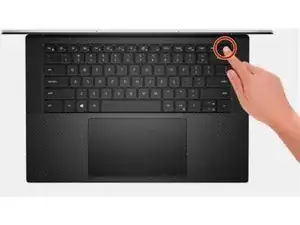
Drehe den Akku herum und halte die Einschalttaste fünfzehn Sekunden lang gedrückt, um die Restladung abzubauen.
-
-
-
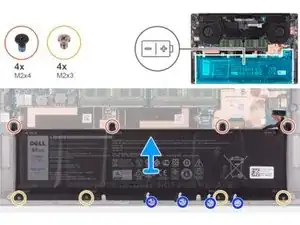
Verwende einen Kreuzschlitzschraubendreher #0, um die vier Schrauben (M2x4) zu entfernen, mit denen der Akku an der Baugruppe aus Handballenablage und Tastatur befestigt ist.
-
Entferne die vier Schrauben (M2x3), mit denen der Akku an der Baugruppe aus Handballenablage und Tastatur befestigt ist.
-
Löse die Klebebänder ab, mit denen das Lautsprecherkabel am Akku festgeklebt ist.
-
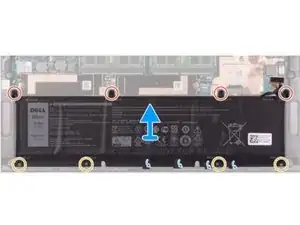
Hebe den Akku heraus.
-
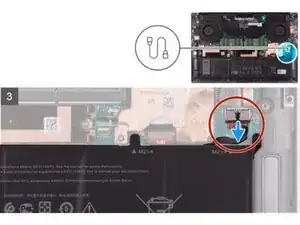
Um den Akku auszutauschen und das Gerät wieder zusammenzubauen, folge den Anleitungsschritten in umgekehrter Reihenfolge.

12 Kommentare
It seems there are issues with replacement Dell batteries causing the touchpad to behave erratically (https://www.dell.com/community/XPS/xps-1...), with impaired action of the left 'mouse button' on the pad, and the left button either clicking randomly or appearing to be held down. Have returned a (so-called) compatible 3rd party battery for my XPS15 9500 and now going to try an original Dell replacement. The problem seems to be battery thickness, i.e. not giving the touchpad room to correctly operate.
Interesting point. I just removed my original Dell battery b/c the cells swelled and pushed the bottom of the touchpad up causing the corners to no longer left/right click. Also, some keys stopped working. Waiting on my replacement "compatible" battery to arrive.
It should also be noted that most replacement batteries don't come with the battery connection cable, so you need to remove it from the existing battery and install it on the replacement. The cable seems to come off with a slight pull (once unstuck and the securing tape next to the connector is lifted), and inserts onto the new battery by just pushing it down onto the connector.
Actually I think this may the best way to install the battery. I could easily see damaging the motherboard trying to disconnect the cable from the motherboard.
Jeff G. -
Seconding for the missing battery connection cable; there are no instructions for moving this from the old battery to the new, and it doesn't come with one. Caveat Emptor!