Einleitung
Lenovo Yoga Book X90F – Modellnummer: Lenovo YB-J912F
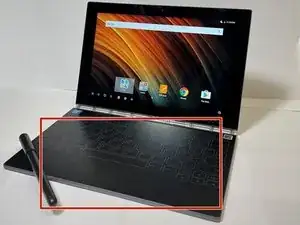
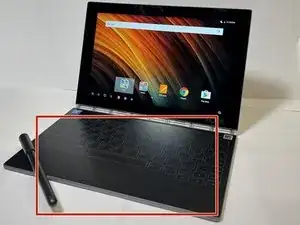
Diese Anleitung zeigt, wie die Tastatur ersetzt werden kann, falls sie nach dem Einschalten nicht funktioniert. Diese Tastatur ist besonders nützlich, wenn das Lenovo Yoga Book im Laptop-Modus verwendet wird.
Der relevante Abschnitt zur Fehlerbehebung ist über diesen Link zu finden.
Bitte beachte, dass beim Austausch des Bildschirms eine hohe Wahrscheinlichkeit besteht, dass dieser zerbricht und ebenfalls ersetzt werden muss. Gehe vorsichtig vor, da der Bildschirm aus Glas besteht.


-
-
Schalte das Gerät aus und trenne es von der Stromversorgung, bevor du mit diesem Vorgang beginnst. Ein Heißluftgebläse oder ein Haartrockner eignet sich, um den Kleber, der den Bildschirm hält, zu erwärmen. Erwärme die gesamte Fläche des unteren Bildschirms.
-
-
-
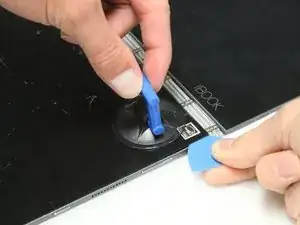
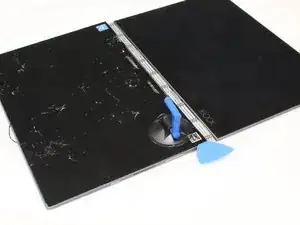
Sobald der Kleber erwärmt ist, nimm den iFixIt-Saugnapf und hebe eine Ecke an. An dieser Stelle sollte sich der Bildschirm vom Kleber lösen.
-
Während der Bildschirm angehoben ist, füge das Plektrum ein, um den Bildschirm vorsichtig abzuhebeln.
-
-
-
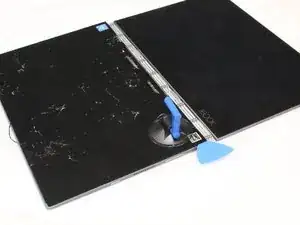
Während der Bildschirm angehoben ist, setze die Kunststoff-Plektren ein. Erwärme den Kleber und verwende anschließend das Bildschirm-Entfernungswerkzeug, um sicherzustellen, dass der Bildschirm nicht mit zu viel Kraft abgehebelt wird.
-
-
-
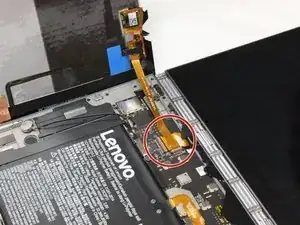
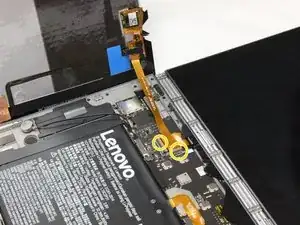
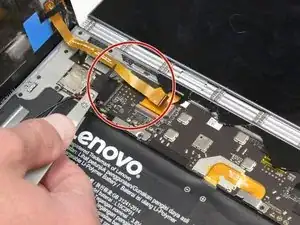
Nachdem der Bildschirm geöffnet wurde, ziehe das Kabel vorsichtig mit einer Pinzette heraus und.trenne das Flachbandkabe abl, das den unteren Bildschirm mit der Hauptplatine verbindet,
-
Wenn sich schwarze Abdeckungen auf den Laschen befinden, wie im zweiten Bild gezeigt, entferne diese vorsichtig mit einer Pinzette.
-
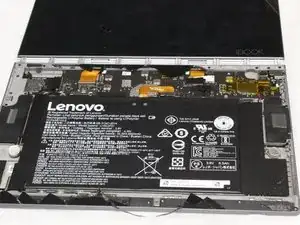
Um dein Gerät wieder zusammenzusetzen, folge diesen Anweisungen in umgekehrter Reihenfolge.

4 Kommentare
Was your keyboard cracked before you removed it? I see the first photo has an intact keyboard...
I've been given two of these, one with a dead keyboard and the other with a destroyed primary display. I want to transfer the functioning keyboard to the other intact machine. Is that possible, or will that destroy the keyboard?
Sam -
Hi Sam, it looks like no one has replied - my answer would be that the keyboard will be destroyed. I had to remove the keyboard to replace the battery, and the guide on IFixit for that implied that the risk of removing the keyboard meant destroying it. So I accepted that risk, and now I am trying to source the [right] replacement keyboard. I was sent a Spanish language keyboard, which really isn't right for me and have said that to the seller and asked for the English version, but sadly they were out of stock. If you have found one please let me know!
An addendum to my previous comment, this Youtube video suggests you might get away with it Sam! Probably requires the right heatgun (maybe not a hairdryer!) And patience...
I like this yoga book and I have the this broken bottom keypad and i dunno where do i have to get the spareparts