Einleitung

Diese Anleitung zeigt, wie die Jawbone Big Jambox geöffnet wird, um an die inneren Bauteile heranzukommen. Du musst dazu einige Schrauben entfernen und das Gehäuse Aufhebeln.

  1. FbdZmkEPUobQUF52
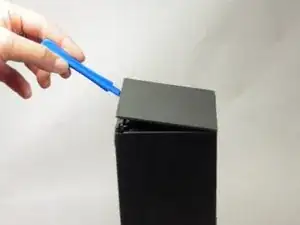
    • Setze ein Hebelwerkzeug in die Mitte der Nähte für die beiden Endkappen ein. Arbeite dich um die Endkappen herum und trenne sie ab.

    • Die Kappen werden von Clips festgehalten. Arbeite sehr vorsichtig.

    Can someone show the clips please in a photo?

    kenneth keen -

  2. gpR1qeYVfuiKrJPf
    gpR1qeYVfuiKrJPf
    4Xapn3AX3HIZYmBZ
    htYRDmTSEfZLbJMj
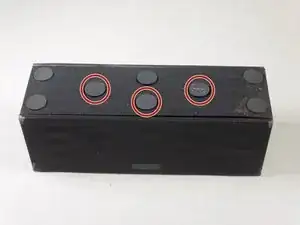
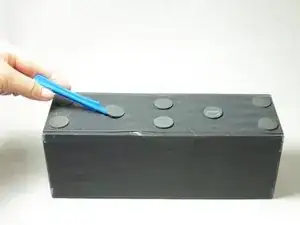
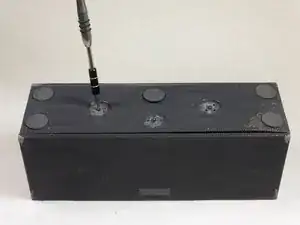
    • Drehe die Jambox mit der Unterseite nach oben. Löse die angezeigten Gummipropfen ab, eventuell benötigst du ein Öffnungswerkzeug dazu.

    • Es genügt, wenn du sie nur halb anziehst. Sie kleben dann später wieder besser fest.

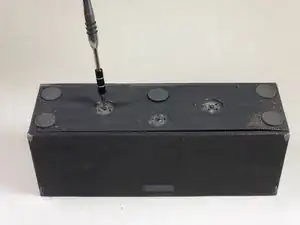
    • Entferne die drei 7,0 mm langen Torx T6 Schrauben unter den Gummipropfen.

    • Lege die Schrauben getrennt von den anderen beiseite.

    I used rubber cement to reattach the pads. That will hold them in place and be easily removable in future.

    David Robinson -

    Can someone show a picture of the screws…and where they screw not…even just for form’s sake?

    Thousand Sunny -

  3. GVMKQYqV4vHagsML
    GVMKQYqV4vHagsML
    mxDNbPDkIpXGSfS5
    ZcDVcDPp2jorIIPE
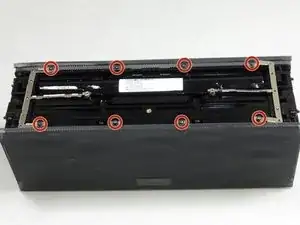
    • Drehe die Jambox so, dass das Logo zu dir zeigt. Stelle sie dann mit der linken Endkappe nach oben auf.

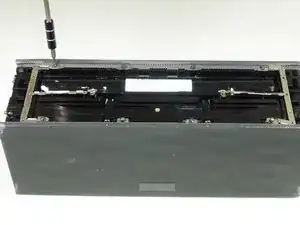
    • Entferne die vier 9,7 mm langen Torx T6 Schrauben.

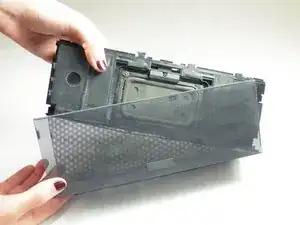
    • Löse vorsichtig die Laschen aus ihren Verankerungen, dann kannst du den Boden entfernen.

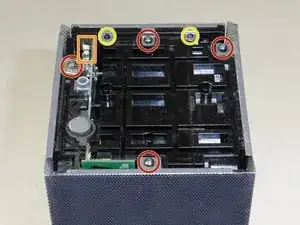
    • Drehe die Jambox um, so dass das rechte Ende oben liegt. Auf dieser Seite befindet sich das USB-Kabel (der Metallkontakt für die Erde ist orange markiert). Wiederhole die beiden vorherigen Schritte.

    Make sure you pay close attention when removing the screw marked with a red circle that is in the left most position, as there’s a small grounding plate that will be completely unrestrained and free to get nice and lost only to be found later leaving you not knowing what the hell it is or where it came from should you not secure it before removing the panel that that screw secures. That grounding plate is crucial for the safety of yourself and your speaker, because it bridges the USB-micro power input jack to the metal frame. That means that should you lose it and put the speaker back together without it, your speaker will not be able to ground out and should there occur any surge during your charge cycle, like during a freak lightning storm, or whatever, your speaker won’t able to discharge that surge, which will no doubt fry your speaker, and likely kill whomever poor bastard happens to grab the speaker, say to turn it off during said storm as a safety precaution. SAFETY FIRST!

    Thousand Sunny -

    Btw, the screw I mentioned is shown in the third picture, since that small detail might have some play over success or failure in finding it…lol. Whoops.

    Thousand Sunny -

  4. Sh3tMvExQQTIIqZy
    • Heble die Bodenplatte nach oben.

    • Ziehe die Bodenplatte ab. Das erfordert etwas Kraft, da sie festgeklebt ist.

    • Der Akku wird sichtbar.

    No glue on mine. Only two clips on each side (that you can see clearly in step 3 picture).

    Do not use force or you will break those clips.

    Jay -

    @jemdem (I assume this is the “Jay” involved) after looking at the pictures 3.1, 3.2, 3.3, I still don’t see what I would normally expect a “clip” to look like. Maybe the corners act as clips? If not, I can’t ‘clearly’ determine them, but it’s a fairly busy looking area with lots of recesses and all, so maybe they’re just blending in well?

    Thousand Sunny -

    There’s a plug on each foot in one of the corners that isn’t meant to be removed. The left one and the right one (when viewed so the writing appears correct way up), both have three pins and one plug, with the pins occupying three of the four corners (northeast, northwest etc.) and the plug occupying the remaining fourth corner. The left foot has pins in the upper right, upper left and lower left, and the plug which is part of the foot and plugs into the frame, is in the lower right corner, while the right foot is opposite, having pins in upper left, upper right and lower right, and the plug in the lower right. If that was too many ‘left’s and ‘right’s to follow along with, then just remember that the plug is on the lower-inside corner on each. The screw is in the center of each foot. If you pull too hard, or attempt to guide your pick/spudger all the way around when separating the foot, you could slice it right off, though adhesive will be needed for reapplying so severing isn’t the end of the world.

    Thousand Sunny -

    This is a reply to the third comment, and sorry for the reply not being immediately following, or better still, not a reply, and instead just correcting my comment, but I can’t edit it…anyway, I noticed a mistake in my description. The plug on the right foot is in the lower LEFT corner, not the Lower right. My apologies to anyone who followed my instructions about that foot and ended up damaging it.

    Thousand Sunny -

    …continuing, the last foot needing removed is the upper center, when viewed so the writing on the feet is correct way up. And the plug on that foot is in the upper position, so only separate the bottom and both sides to access the screw in the center.

    Thousand Sunny -

    After continuing with the side pieces, the ‘clips’ that were holding the end pieces on were indeed at the corners and are NOT visible, clearly or otherwise. In fact only the ‘well’ or socket that each of the clips insert into are clearly shown, however the clips themselves are on the end caps, not the main body. If the speaker you are working on appears to have been dropped before and the corners are at all crumpled inward, take extra care to try and straighten them back to original shape before attempting to unclog the caps because not doing so could result in the clips breaking off. This may sound difficult, but I managed to straighten out all eight corners of the one I’m working on with no issues using a pair of needle nose pliers that are toothless so as to not introduce any bite patterns to the grill.

    Thousand Sunny -

  5. 4eLBA2VEVUdE31sC
    4eLBA2VEVUdE31sC
    ZpLHTRAIClrqjMfQ
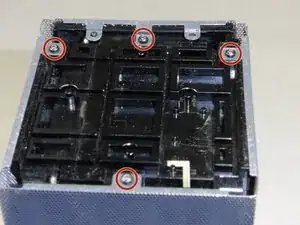
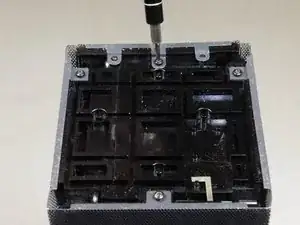
    • Fotografiere das Gerät von oben, bevor du weiterarbeitest. Beim Zusammenbau musst du wissen, wie die metallenen Stege angebracht sind.

    • Drehe die acht 9,8 mm langen Torx T6 Schrauben heraus. Entferne die metallenen Stege.

  6. mE1t61rJL3kgyFPA
    • Heble die Seiten der Jambox vom Gerät ab.

    It was at this precise moment (removing the shell) that I felt a small part hit my knee as it fell from the assembly and land in the carpet. It appears to be a small stainless grounding tab (clip) that I THINK came from the mounting pole beside the Micro B port and may act as a support and ground for the body of the port. Seems to fit but I dunno.

    Comotoes -

    It is a grounding clip and does belong on the power input jack and must be there if you want your speaker to safely ground out in case of a surge. Don’t lose it a please do put it back when reassembling your speaker. Also, it helps to read the comments attached to each step, if you had you would have read my comment regarding exactly this issue in previous steps. I’m glad you at least didn’t lose it when it fell, as it’s not something that is obvious when missing and most people wouldn’t even notice if it was lost.

    Thousand Sunny -

  7. SvF3JIkTNocSEpQL
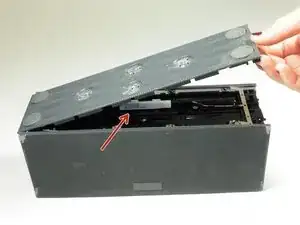
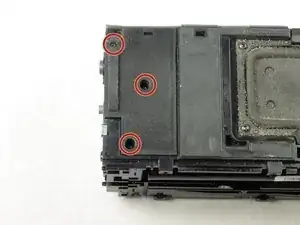
    • Lege das Gerät so, dass der Akku nach vorne zeigt. Entferne die drei 9,5 mm langen Torx T6 Schrauben.

    • Hebe die kleine Kunststoffplatte hoch, die Platine darunter wird sichtbar.

Abschluss

Um dein Gerät wieder zusammenzubauen, folge den Schritten in umgekehrter Reihenfolge.

Abby Cybula

Mitglied seit: 02/04/15

2010 Reputation

0 Kommentare