Einleitung
Use this guide to replace the lower case on a Lenovo ThinkPad X1 Yoga 3rd Gen.
Werkzeuge

-
-
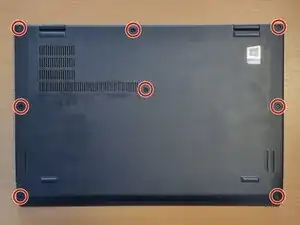
Use a Phillips screwdriver to loosen the eight captive screws securing the lower case.
-
Insert an opening tool into the seam between the lower case and chassis.
-
Pry around the perimeter until the lower case fully releases.
-
Remove the lower case.
-
Abschluss
To reassemble your device, follow these instructions in reverse order.