Einleitung

Warnung: Der Akkutausch kann gefährlich sein! Sei äußerst vorsichtig, wenn du diese Anleitung befolgst.

Entlade vor Reparaturbeginn den Akku zur Sicherheit auf unter 25%

  1. XgHl1hPenuW6ryBU
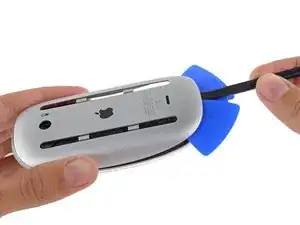
    • Setze Spudger und Plektren zwischen Metallboden und Acrylteil ein und heble auf.

    • Hinweis: die metallene Unterseite muss nicht entfernt werden.

    you do not need to perform this stage, go straight to stage 2...

    Apple Strudel -

    Please note, you absolutely do need to remove the metal bottom part in order to get to the 4 clips. I heated up the bottom with an iFixit type beaded heating thing to soften up the glue and used the iFixit picks (because they are super thin) to slide in between the plastic and metal parts to separate them.

    Bruce Hart -

  2. gwvgW21wpYSk1tH1
    gwvgW21wpYSk1tH1
    R3j2COfeqJNWpnIH
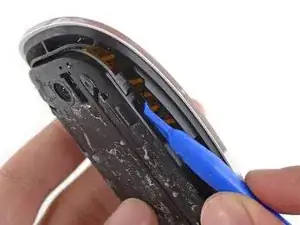
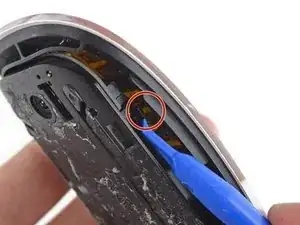
    • Verwende ein Hebelwerkzeug oder einen Spudger, um die vier Plastikclips am Rand des Innenfachs zu lösen.

  3. 2rwr5FDg1nGYkwlJ
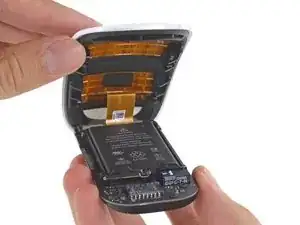
    • Öffne die Maus vorsichtig, so wie man ein Buch aufschlägt. Ein Flachbandkabel verbindet die beiden Hälften.

  4. lRvB2A3uqrUnWqBg
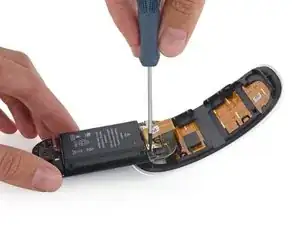
    • Entferne die beiden Torx T5 Schrauben, mit denen die Metallabdeckung über dem Kabelanschluss befestigt ist.

    • Trenne das Kabel von der Platine ab und lege die obere Hälfte der Maus beiseite.

    The two screws holding the metal cowling over the cable connector are T5, not Phillips.

    F Johnson -

    Welcher Depp hat nur die Ladebuchse so eingebaut dass man während des Ladens nicht arbeiten kann? Hätte man die Buchse nach der Seite gelegt könnte man weiterarbeiten.

    Schildbürger..

    Dieter Schmiedel -

    Die Deppen von Apple:( Wie überall, wo Dummheit siegt:(

    vjrott -

  5. uGUNWBG5hCYHILGL
    uGUNWBG5hCYHILGL
    NhBVrGPAuVaKYgVk
    • Wenn du flüssigen Klebstoffentferner von iFixit verwendest, solltest du jetzt entsprechende Vorbereitungen treffen.

    • Der Klebstoffentferner enthält Azeton, es kann die Haut und die Augen reizen.

    • Ziehe die Schutzbrille (im Kit enthalten) auf.

    • Wenn du Kontaktlinsen trägst, musst du die Schutzbrille benutzen.

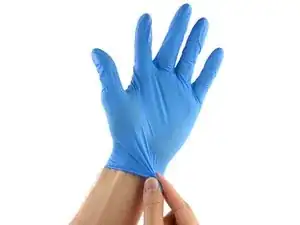
    • Das Kit enthält auch Schutzhandschuhe. Wenn deine Haut empfindlich ist, dann ziehe sie jetzt an.

  6. sPBThVrkGprDR5NX
    sPBThVrkGprDR5NX
    lQv1pkVHJgNIXIoO
    oHNXHRsfGCLrfpIj
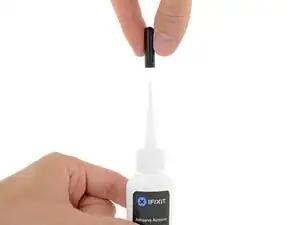
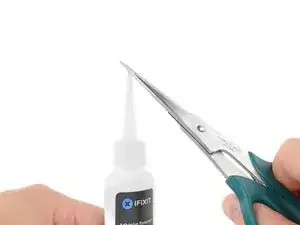
    • Ziehe den schwarzen Gummipropfen von der Flasche mit Klebstoffentferner ab.

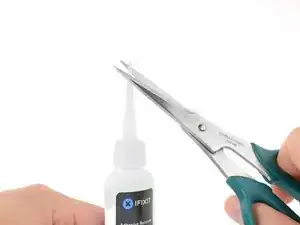
    • Drehe zum Ablösen die Kappe auf, bevor du die Spitze abschneidest.

    • Dadurch wird die Flasche geöffnet und der Druck ausgeglichen, bevor du die Spitze abschneidest. Wenn du das nicht tust, kann die Flüssigkeit beim Abschneiden der Spitze unerwartet herausspritzen.

    • Schneide die Spitze mit einer Schere ab.

    • Wenn du weit vorne abschneidest, wird die Öffnung kleiner und du kannst die Flüssigkeit später besser kontrollieren.

    • Drehe die Kappe wieder fest, bevor du fortfährst.

    • Verteile gleichmäßig zwei Tropfen der Flüssigkeit.

    • Du benötigst nicht viel von der Flüssigkeit. Die Flasche sollte für vier Akkus reichen.

    • Lasse die Flüssigkeit zwei bis drei Minuten lang unter dem Akku einwirken.

    Adhesive remover is not essential, 60-70°C dry heat (I would not advise putting the item in an oven btw!) for @ 3 minutes is sufficient with a drop or two of IPA along each long battery edge...

    Apple Strudel -

  7. h1QNJhiFcag2mGkH
    • Hier ist besondere Vorsicht geboten. Lithium-Ionen-Akkus können gefährlich sein, wenn sie durchstochen oder verbogen werden.

    • Genau wie der Rest der Maus wird der Akku vollständig durch Klebstoff gehalten. Um ihn zu lösen, kann eine umsichtige Anwendung von Isopropylalkohol, Klebstoffentferner oder mehr Hitze von unten erforderlich sein.

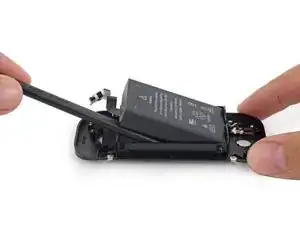
    • Setze einen Spudger unter den Akku und heble ihn vom Kleber ab.

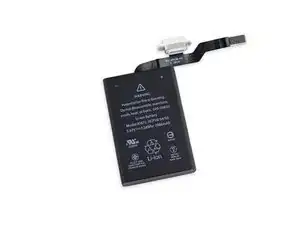
    • Ziehe den Ladeanschluss aus der Halterung.

    Ich habe die Unterseite auf einer kleinen Heizplatte auf 60 Grad erwärmt und an den langen Seiten des Akkus isopropanol eingebracht. Ging wunderbar nach 2-3 Minuten ohne den Akku zu stressen, z.B. durch biegen oder Torsion.

    Stefan D. -

    Ich bin froh, dass das für dich gut geklappt hat.

    Ben Capehart -

    I can verify Stefan D's comment. The battery is simply held in place by 2 longitudinal strips of heat sensitive glue placed at each long edge of the battery. I removed the 2 black 'slider bars' from the solver alloy base (prise from the inside of each bar at each end) then placed the dissembled base on a heat plate @ 60-70°C for some 3 minutes. I also with paintbrush drizzled isopropyl alcohol along each long edge of the battery. Using a thin flat blunt blade it was very easy to lift the battery through gentle 'teasing'.

    Replacement battery was from here:-

    https://www.replacebase.co.uk/for-apple-...

    Apple Strudel -

Abschluss

Um dein Gerät wieder zusammenzubauen, befolge diese Anweisungen in umgekehrter Reihenfolge.

Bringe deinen Elektroschrott zu einem zugelassenen Entsorger.

Ben Capehart

Mitglied seit: 10/06/21

10149 Reputation

17 Kommentare

I may be wrong because I don’t own this device, but from what I’ve read from other tutorials, it does not look like it’s necessary to do steps 1 and 2. The tutorials I’ve read just split the mouse in 2 without messing with the bottom of the mouse. Doing so means they don’t need to worry about damaging the bottom or working with the adhesive.

ComputerWhiz -

I have fixed it!
Thanks for the note!

Ben Capehart -

you are right 1st and 2nd are unnecessary steps, but hats off to the creator for showing, grat job! thanks

FixMyMacLK -

Die Anleitung ist leider sehr unvollständig.

Nachdem das Maus Kabel und das Batterie Kabel entfernt wurde, ALLE Schrauben entfernen (4er und 5er Torx), die Platine, den Schalter und die Metall Spange demontieren. Den Ladestecker abschrauben, Achtung! darunter befindet sich eine Metallhülse / Führung für den Ladestecker, gleich mit entfernen.

Jetzt darf nur noch die Batterie zu sehen sein.... Ab in den Backofen und auf 50 Grad Celsius erwärmen, das reicht aus, um die Batterie ohne Schaden am Gehäuse zu entfernen. Die Klebestreifen befinden sich links und rechts auf den langen Seiten. Diese im warmen Zustand sofort ablösen und auf die neue Batterie kleben.

Beim Zusammenbau darauf achten, die etwas längeren Schrauben gehören zum Schalter! Die Stecker vorsichtig ohne Gewalt einstecken, wenn alles richtig ist, gehen sie ganz leicht herein.

So, ich hoffe das ich nichts vergessen habe, Viel Glück

Michael Fischer -

Translation:

Unfortunately, the instructions are very incomplete.

After the mouse cable and the battery cable have been removed, remove ALL screws (4 and 5 Torx), dismantle the board, switch and metal clasps. Unscrew the charging plug, attention! Below it is a metal sleeve / guide for the charging plug, immediately remove it.

Now only the battery can be seen.... Put it in the oven and heat it up to 50 degrees Celsius, that's enough to remove the battery without damaging the housing. The adhesive strips are located on the left and right on the long sides. Remove them immediately when warm and stick them to the new battery.

When assembling, make sure that the slightly longer screws belong to the switch! Gently plug in the plugs without force, if everything is correct, they go in very easily.

So, I hope I haven't forgotten anything, good luck

Ben Capehart -

Thank you very much! This is absolutely correct.

F Johnson -

English translation by Google:

Unfortunately, the instructions are very incomplete.

After removing the mouse cable and the battery cable, remove ALL screws (4 and 5 Torx), disassemble the circuit board, the switch and the metal clasp. Unscrew the charging plug, caution! underneath is a metal sleeve / guide for the charging connector, remove it at the same time.

Now only the battery should be visible... Put it in the oven and heat it up to 50 degrees Celsius, that's enough to remove the battery without damaging the housing. The adhesive strips are on the left and right of the long sides. Remove this immediately when warm and stick it on the new battery.

When assembling, make sure that the slightly longer screws belong to the switch! Insert the plugs carefully without force, if everything is correct they will go in quite easily.

Well, I hope I haven't forgotten anything, good luck

Michael Fischer -

Lol we posted the same thing at the time

Ben Capehart -

I did first and passed out

Ben Capehart -

@beanman56

I wanted to go to the doctor because I saw twice... ;-))

Michael Fischer -

Can I use generic battery (can I solder it to the battery connector?)

Plamen Petkov -

It's not a wise idea.

Ben Capehart -

whr did i get this ?

sangeeth frenzo -

Diese Anleitung (nur die erete Hälfte) ist eine Unverschämheit. Und am Ende : Zusammenbauen nach dem Akku Wechsel in umgekährte Reiehenfolge. Warru wurede der Pozes nicht zu Ende gebracht. Warum veblüdelst hier die Menchen. Hör bitte in der Zukuft auf aus sich so peinlich als Ratgeber zu präsentieren.

Dr. Diusan Dubovy -

After step7 you need to remove the logic board so you can remove the battery cable and the battery itself.

SoFA -

The tutorial is completely wrong ... you don't need to remove the aluminum case ... check this YouTube short, the guy open it in 10 seconds without messing anything ... https://www.youtube.com/shorts/OJLxPHG-j...

Lorem ipsum (SonSurScène) -

What a horrible, anti-consumer design compared to the AA version, which can be used with standardized rechargeable AA batteries. And Apple does this, then says it’s good for the environment? Because less AA batteries are used? Rechargeable AA batteries exist and can be easily replaced while this will be e-waste after 5-10 years so the entire mouse will be thrown out as nobody does this repair. If wireless, then with standardized and easily accessible cells. Should be the case for gaming consoles, phones etc. too to be honest. Non-standard pouch cells are the curse of 21st century tech.

Anonymous -