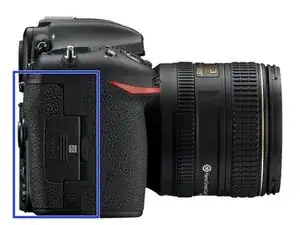
Einleitung
Bevor du diese Schritte durchführst, musst du den Akku und die Speicherkarte entfernen.


-
-
Entferne die Speicherkarte(n) von der Kamera.
-
Entferne den Akku von der Kamera und schließe den Akkufachdeckel.
-
-
-
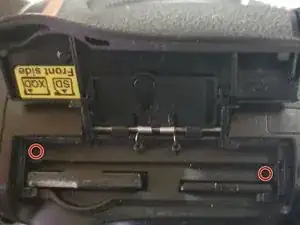
Entferne die beiden Schrauben neben den Einschüben für die Speicherkarten. Schließe dann den Deckel.
-
Hinweis: entferne vorher die Speicherkarten.
-
-
-
Ziehe die Gummibeschichtung über dem Griff ein wenig zurück und löse die beiden Schrauben darunter.
-
Achte darauf, dass der Kleber nicht beschädigt wird.
-
-
-
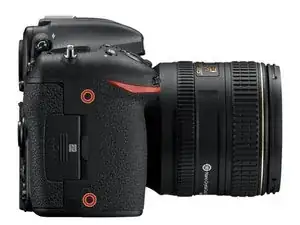
Entferne die beiden rot markierten Schrauben unter der Gummibeschichtung.
-
Achte darauf, dass der Kleber nicht beschädigt wird.
-
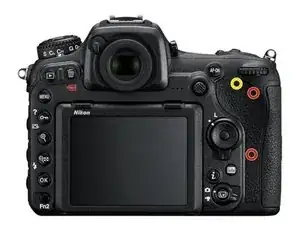
Hinweis: es gibt eine weitere Schraube (hier gelb markiert). Wenn du mehr als nur die Klappe über der Speicherkarte entfernen möchtest, musst du diese Schraube auch herausdrehen.
-
-
-
Das Panel sollte sich nun leicht herausheben lassen.
-
Eventuell musst du die Klappe öffnen, damit sie sich löst.
-
Um dein Gerät wieder zusammenzubauen, folge den Schritten in umgekehrter Reihenfolge.

4 Kommentare
Hi Wolphin . re D500 Thanks for your posting Is this the same procedure I would use for taking out the memory card unit as I want to see what's happened to the cover door that can't be pushed forward to secure it closed, after closing the memory cards door,
Curious never had this problem on other cameras have 5 with same door ,.Was closing this camera door yesterday and it although lid springs are in place can't push lid forward to its position for the final closure Thanks Gary Hi Wolphin . re D500 Thanks for your posting Is this the same procedure I would use for taking out the memory card unit as I want to see what's happened to the cover door that can't be pushed forward to secure it closed, after closing the memory cards door, Curious never had this problem on other cameras have 5 with same door ,.Was closing this camera door yesterday and it although lid springs are in place can't push lid forward to its position for the final closure Thanks Reading
Reading -
I'm assuming that the cards are correctly and fully seated in their slots (could try with no cards being in the camera to check).
If that's not the case, but still cannot slide the outer part to latch the door closed, it could be dirt or something which is preventing it from moving. It should be able to move a bit in and out, even when open (should need almost no effort to do so).
If it does move, but won't latch, there are 2 tabs on the outside of the door which slide into recesses. Check they are not bent and are lining up, and the recesses are clean too.
There is one screw on the door itself, which holds the 2 parts together. You can remove it to allow the door to move. I haven't tried that, as I haven't had issues with it. I have seen the door assembly available on some sites, so removing the 6 screws and replacing the door assembly is available too.
Wolphin -
.Thanks. for replying I inspected it with a pen torch and magnifying glass and I concluded it must be the 2 lugs on the lid not lining up with the 2 recessed holes on the CARDholder . "Have yet to find my watch makers screw drivers" to loosen the screw on the door to free it and realign the two items . I can't be anything else as its a simple movement and the small lugs inside the holes are part of the locking mechanism . Maybe the cause of this fault is I closed the door too quickly.
Reading -
If the 2 pins are bent... they are part of the plastic outer door, and the screw likely won't help. might be able to bend the plastic back (may want to warm it up, but plastic does break easily. If you tried to close it too quickly, it may have slid in while you were closing it and it wasn't closed. I have done that, but just doing the flip then slide forward as two separate motions is what I have trained myself to do.
Wolphin -