
Einleitung
-
-
NOTE: If you remove Microsoft's own Defender/AntiVirus Tool, you will be rewarded with more available memory/RAM and generally better system performance. It's up to you to add free Anti-Virus-Tools like https://clamwin.com at the end of this solution.
-
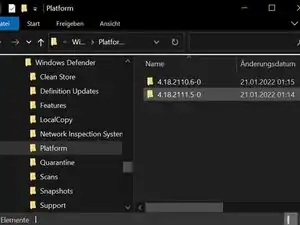
STEP 1: Open the "File Explorer" and go to Path/Folder: C:\ProgramData\Microsoft\Windows Defender\Platform
-
Copy the full Pathname of the two folders, you found there.
-
-
-
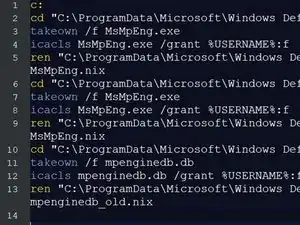
STEP 2: Create a pure Textfile (Batch File) with NOTEPAD or WORD, and add these Textlines: c: cd "C:\ProgramData\Microsoft\Windows Defender\Platform\[FOLDER_1]" takeown /f MsMpEng.exe icacls MsMpEng.exe /grant %USERNAME%:f ren "C:\ProgramData\Microsoft\Windows Defender\Platform\[FOLDER_1]\MsMpEng.exe" MsMpEng.nix Replace the placeholder [FOLDER_1] with Path from Step 1!
-
Add the same Text again, but with the Pathname of [Folder_2] from Step 1: cd "C:\ProgramData\Microsoft\Windows Defender\Platform\[FOLDER_2]" takeown /f MsMpEng.exe icacls MsMpEng.exe /grant %USERNAME%:f ren "C:\ProgramData\Microsoft\Windows Defender\Platform\[FOLDER_2]\MsMpEng.exe" MsMpEng.nix
-
Add these lines at the end: cd "C:\ProgramData\Microsoft\Windows Defender\Scans\" takeown /f mpenginedb.db icacls mpenginedb.db /grant %USERNAME%:f ren "C:\ProgramData\Microsoft\Windows Defender\Scans\mpenginedb.db" mpenginedb_old.nix
-
-
-
STEP 3: Store Textfile from Step 2 as killdefender.txt on your Desktop.
-
Open regedit as Administrator.
-
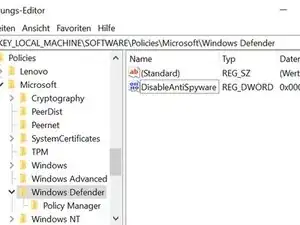
Go to HKEY_LOCAL_MACHINE\SOFTWARE\Policies\Microsoft\Windows Defender
-
Add a DWORD 32 BIT entry with the name "DisableAntiSpyware" and the value 1.
-
-
-
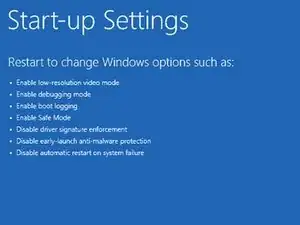
STEP 4: Before you press Restart in Windows Menu, hold down SHIFT key, press Restart and wait for Options: Choose System Startup (see Link below), After restart, choose option 4) Restart in Safemode without network
-
Safe Mode tutorial: https://www.itechguides.com/windows-10-s...
-
-
-
STEP 5: After restart into "Safe mode", rename your Textfile (from STEP 2) Extension from ".txt" to ".bat" and execute this (Batch) file as Administrator. Check again over STEP 3 if the registry entry still exist, otherwise do STEP 3 and restart again (a normal restart).
-
-
-
STEP 6: After normal restart check over Task Manager if the MsMpEng Service is running. if not, you should now have more memory availiable and the performance should be better.
-
Feel free to install Clamwin, but i do not recommend any commercial Virus Tool, running in the Background, as long as not required (for a business computer) and as long as you use, for example, Firefox, with an Adblocker Addon like "UBlock Origin". Always use official download sources for drivers and software! Have fun!
-
Finally: To increase speed of all applications, right click on their icons and change compatibility mode to "deactivate fullscreen mode" and under 'high DPI settings' change to 'override by' "Application"!
-
You will see a significant performance boost, as long as you keep your graphic card drivers up to date and disable Windows Search and SysMain Service. I recommand also to start cmd and enter "powercfg -h off" and use external HD (NOT SSD) as backup.
-
Turn also off all Background APPs and disable all the Monitoring stuff under Datasecurity Settings. Feel free to recreate this tutorial.
-
Arbeite die Schritte in umgekehrter Reihenfolge ab, um dein Gerät wieder zusammenzubauen.