Einleitung

Bist du über das Netzkabel gestolpert? Immerhin brauchst du nicht gleich das Logic Board auszuwechseln.

  1. twUoDXEVMw6TP6JK
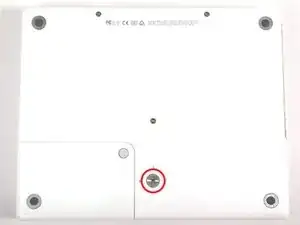
    • Nimm eine Münze und drehe die Verriegelungsschraube des Akkus um 90° im Uhrzeigersinn.

  2. JbLkX3rgRZXxaRHj
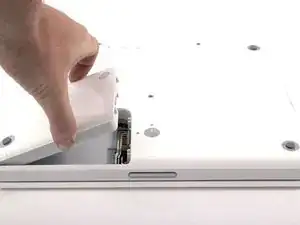
    • Hebe den Akku aus dem Computer.

  3. YRb1icXGroZFsR5Q
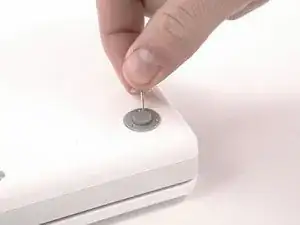
    • Nimm ein geeignetes Werkzeug und entferne die drei Gummifüße vom Gehäuseunterteil.

    Be careful that the feet don't shoot up and hit you in the eye when you pry them out!

    UniAce -

    Each rubber foot has three large tabs occupying 3, 7, and 11 o'clock positions, while a small tab at 9 o'clock position. When you place those rubber feet back to the ring housings, make sure their small tabs aligning with the opening gaps around the rings.

    Nienpo -

    Taking the feet off - I found a thin flathead screwdriver was much better than a pin to lever them off. Also doesn't mark the rubber. Not hard though

    tangawk -

    I agree with tangawk: with a flathead screwdriver it was a lot easier. One have just to go deeper enough under the tab to be effective. Just be careful: the tab could jump far.

    chmilblick -

  4. j4Nx3eLjBY5GiZKS
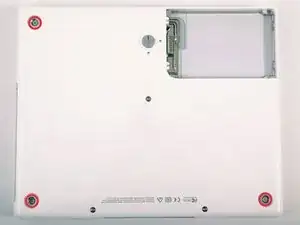
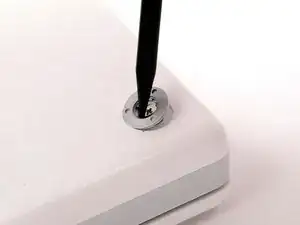
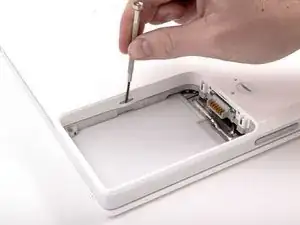
    • Entferne die jetzt sichtbaren drei Kreuzschlitzschrauben.

  5. GUGUQtPMWADopEA4
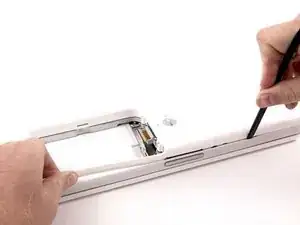
    • Heble die drei Metallringe, mit denen die Gummifüße befestigt waren, mit einem Spudger oder einem kleinen Flachschraubendreher nach oben.

    Align the ring so that it sits flush before trying to put the screws back in. A small tab in the case needs to align with the ring correctly.

    jaeckerb -

    Yes, the rings have to be put back and flushed with the lower case surface. Otherwise, the rubber feet will not stand evenly.

    Nienpo -

  6. LZ1IWs35gP1IjjJA
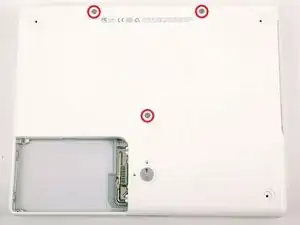
    • Entferne die drei Torx T8 Schrauben.

    • Die kürzere Schraube ist in der Mitte des Computers.

    I was able to use a hex wrench since I didn't have a #8 Torx screwdriver.

    jackshim -

    Zitat von jackshim:

    I was able to use a hex wrench since I didn't have a #8 Torx screwdriver.

    I, however, was not.

    rbrtrx -

    These 3 screws actually use 2mm Allen (hex) heads, so try to find one of those first (they come in many metric Allen sets) before resorting to the T8 Torx.

    Bryan -

    If you save your IKEA wrenches from their steel cable "curtain rods," you will have a 2mm hex wrench or two to spare; the 2mm wrenches are used to tighten the pair of set-screws holding each end of the cable into the wall-mounting.

    The three sets of metric allen wrenches I'd accumulated over the years did NOT contain that itty-bitty 2mm wrench, and I didn't want to try forcing a torx-fit.

    However, when I finally thought to check, I DID have a 2mm hex "screwdriver tip" in a large "universal set" of odd magnetic screwdriver tips--one with things like hollow-pointed torx, hollow-pointed hex, pin tips (imagine a flat-bladed tip with the middle 1/3 removed)--those so-called "tamper-resistant" screw heads (no triangle points, though, for all the kids' toys made in China).

    And why hadn't I thought to look in the screw driver set first thing? Because the hex 2mm was a WRENCH, not a screw with a hexagonal driver tip. Talk about limits imposed by "context" or "framing"--and age.

    Theron Ninth -

  7. vV1hcCItPc4PT4fc
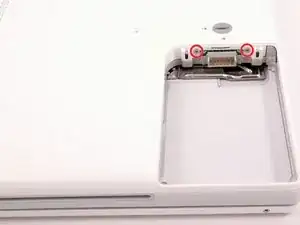
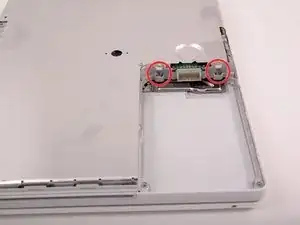
    • Entferne die beiden Kreuzschlitzschrauben an den beiden Seiten der Akkukontakte.

    If I am not mistaken, these two screws have slightly heavier heads than all the others, in case this is helpful info for when you reassemble.

    akatodd -

  8. bMYtvwBgcOmsXLKo
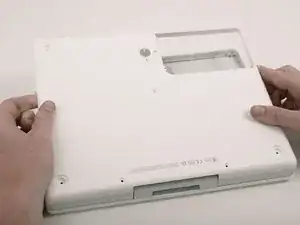
    • Atme tief durch, es kommen einige schwierige Dinge auf dich zu, wir versprechen aber, dass das Gehäuseunterteil abgelöst sein wird.

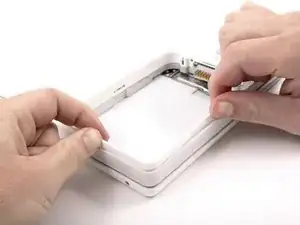
    • Drücke die dünnen Ränder des Gehäuseunterteils, die das Akkufach umgeben, nach innen, biege sie über die Laschen hinaus und hebe sie dann an, um diese Ecke des Gehäuseunterteils zu lösen.

    I need patience and I need it NOW!!!!

    chrisbulle -

    They aren't joking about these being trying times. Steps 15-20 are tough, especially if you don't have a spudger. A small flathead screwdriver works, but will scratch/nick your case.

    vorski -

    I killed my spudger on this step, trying to twist it in the seam to lift the cover up. I got better progress using it to pry out the gey band, surrounding the laptop. That action will release the catch grooves. Still a test of patience...good luck.

    karenskirka -

  9. DOOq4avnnBVURRIm
    • Am Steg im Akkufach ist ein Schlitz, mit dem das Gehäuseunterteil festgehalten wird. Heble die untere Rille am Schlitz mit einem kleinen Flachschraubendreher heraus und ziehe das Gehäuseunterteil hoch, um den Schlitz von den Laschen zu lösen.

  10. NN2ZltRSv6HkkPAm
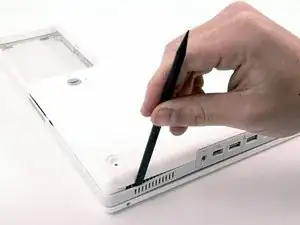
    • Führe einen Spudger entlang der Naht zwischen dem Gehäuseunterteil und dem Gehäuseoberteil, um die Laschen am Gehäuseunterteil zu lösen. Ziehe das Gehäuseunterteil nach oben und benutze wenn nötig weiter den Spudger, bis du es dreimal klicken hörst.

  11. BmsqSoCf36ihZP4E
    • Führe den Spudger weiter um die vordere rechte Ecke herum. Es gibt zwei Laschen an der Seite des Computers mit den Anschlüssen, eine nahe bei der vorderen Ecke und eine nahe beim Audioausgang.

    I used a flathead screwdriver and an old credit card instead of a spudger. If using the screwdriver, be advised it may damage the case.

    tildeksnyder -

    Wish I'd read the tip about the credit card! Made a few dents during this procedure as I didn't have a spudger. N.B. Plastic modeling tools are not suitable for this job!

    enginemonkey -

    "Continue to run the spudger around the front, right corner." This is nearly impossible for me. Instead, I use a small flathead screw driver to gently open up the tab at the corner.

    Nienpo -

  12. G5FoOIEmZhwrQP26
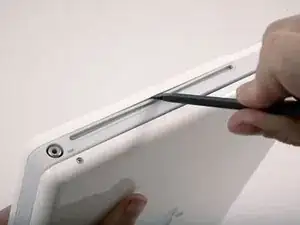
    • Bevor das Gehäuseunterteil ab geht, müssen drei Laschen über dem optischen Laufwerk gelöst werden. Schiebe einen Spudger über dem optischen Laufwerk in das Gehäuseunterteil und lasse ihn zur Rückseite des Gerätes hin laufen, bis du es dreimal deutlich klicken hörst.

    Press inwards between the case and the plastic around the drive. It'll flex the plastic around the drive in and away from the bottom case. The first is about an inch from the center of the slot, then centered on the slot and about one inch past the center.

    jaeckerb -

    Be careful here; I scratched up my case here pretty good with the flat head screwdriver I'd used.

    ejwest24 -

  13. QoHUamlI2EHRFpZ3
    • Wenn das Gehäuseunterteil vorne frei ist, drehe den Computer so, dass die Rückseite zu dir zeigt. Ziehe das Gehäuseunterteil nach oben von dir weg, bis die Rückseite frei kommt.

    • Es hilft, wenn du dabei das Gehäuse nach oben und unten wackelst.

    Step 20.5: Have coffee and give yourself a pat on the back...

    dennis peeters -

    Take care that the monitor cable is tucked in when putting the bottom case back on.

    jaeckerb -

  14. y6R2SPOLLv6GPWbk
    • Entferne die kleinen gefetteten Federn mit den Kunststoffkappen an jeder Seite der Akkukontakte.

  15. 4WIuQhQXvteSJ621
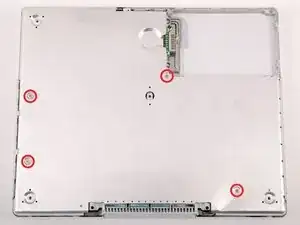
    • Entferne die vier Kreuzschlitzschrauben von der unteren Abschirmung.

    • Die beiden längeren Schrauben befinden sich am Rand des Computers nahe bei den Anschlüssen.

    I leave the bottom shield. It was not necessary for me to get it of to dismount the upper top.

    Everling -

    on mine, there are six small extra screws to remove.

    dianadipilla -

  16. 35fJKmvdXelMCXq2
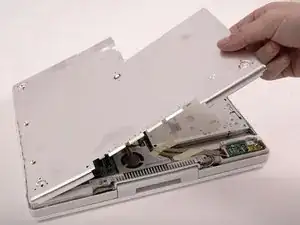
    • Hebe die untere Abschirmplatte ab.

  17. fQJ4eA5AQgv5ZJ5O
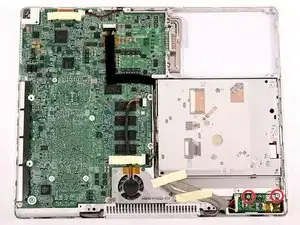
    • Entferne die beiden Kreuzschlitzschrauben, mit denen die Gleichspannungsplatine befestigt ist.

    I left the DC board alone screws, cable and all for my hard drive swap.

    jyee -

    No reason for this step or the next few when replacing the hard drive. Leave the DC board and its cable alone!

    jaeckerb -

    When re-assembling, make sure the right screw goes in the right-most hole.

    beeay -

  18. YLVJYo1s6HvJEcOo
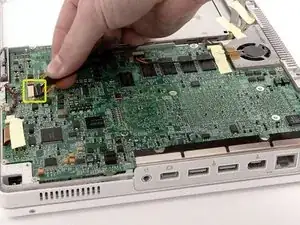
    • Trenne das Gleichspannungskabel vom Logic Board ab.

    I found that I could leave the cable attached if I was just careful with where I placed it when I turned the computer over.

    horntaxnow -

  19. FEngxZSB43GsmG2N
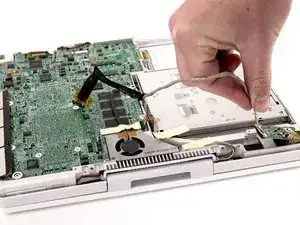
    • Löse das Kabel vom optischen Laufwerk ab, eventuell musst du Klebeband entfernen. Ziehe die Gleichspannungsplatine schräg aus ihrem Fach heraus.

Abschluss

Um dein Gerät wieder zusammenzubauen, folge den Schritten in umgekehrter Reihenfolge.

iRobot

Mitglied seit: 25/09/09

0 Reputation

0 Kommentare