Einleitung
Grundständige Anleitung: Ausbau der unteren Halterung im iMac 27" 2017
Werkzeuge


-
-
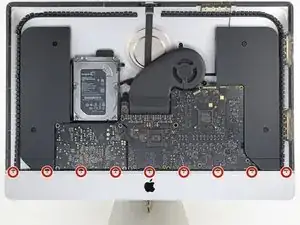
Entferne die neun 3,2 mm Kreuzschlitzschrauben, mit denen die untere Halterung befestigt ist.
-
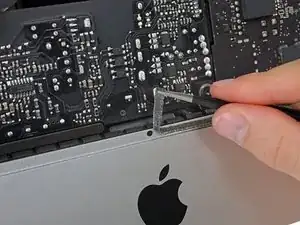
Möglicherweise musst du die Display-Schutzfolie an der Unterkante des Gehäuses abziehen, um an die Schrauben heranzukommen.
-
-
-
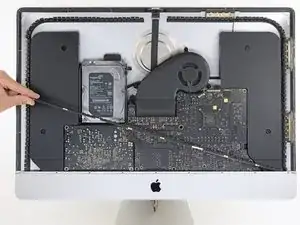
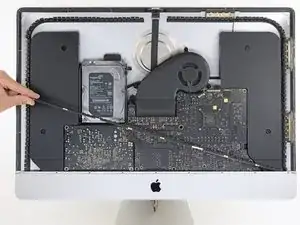
Entferne die untere Halterung (auch "Kinnriemen" genannt) aus dem iMac-Gehäuse.
-
So wird die untere Halterung wieder eingebaut:
-
Lege die Halterung diagonal ein.
-
Drehe die Schraube ganz rechts wieder teilweise hinein, so dass sie zwar die Halterung hält, diese sich aber noch drehbar bleibt.
-
Schwenke die linke Seite der Halterung nach unten, bis sie horizontal in ihrer ursprünglichen Position ist.
-
Beginne an der Schraube ganz links und ziehe die Schrauben fest.
-
Um dein Gerät wieder zusammenzusetzen, folge den Schritten in umgekehrter Reihenfolge.

These are new steps from when I did this on my late 2015 retina iMac so I believe step 25 and 26 are optional (you can cope without doing it).
Amuseme -
I did not find it necessary to remove these screws and this bar
James Orwin -
I lost these 8 during the reassemble. The manual tells I need eight 3.2mm screws.
Can anyone help to clarify what screws I need. I don't really understand this size. Is this M2x3mm?
Daniel -
If you are replacing the SSD, I highly recommend removing this support bracket as doing so will make removing internal components much easier, and helps to minimise damage to any parts.
Not removing the support bracket does not save you any time.
It is very easy to reinstall this support bracket.
If you are worried about losing the screws, put them in a ziploc plastic bag.
Ray -