Big Number Calculator is an indispensable calculator
for math equations using MB (Megabytes), GB (Gigabytes),
TB (Terabytes), etc.
EDIT: Originally posted in 2018. Updated in September 2023. Screenshot is out-of-date because bottom row of keys are now ordered as K, M, G, T, P and E.
There is a new Big Number Calculaor Video showing the revised key layout. The new video has additional instructions.
Sample Calculator Window
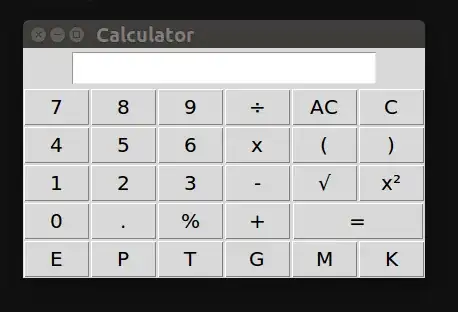
- Type
100K for 100,000 users
- Type
x to multiply
- Type
100 for $100 per month
- Type
=
- The result will be displayed as
10 M ($10 million dollars).
So 10 million dollars a month is what you can expect for 100,000 users paying $100 / month.
Python Script - calc.py
#!/usr/bin/env python
# -*- coding: utf-8 -*-
"""
Author: pippim.com
License: GNU GPLv3. (c) 2018 - 2023
Source: This repository
Description: mserve - Music Server - Calculator for big numbers
"""

from future import print_function  # Must be first import
from future import with_statement  # Error handling for file opens
from future import division  # eval() returns .3333 for (1/3)
import warnings  # 'warnings' advises which commands aren't supported
warnings.simplefilter('default')  # in future Python versions.
NAME: calc.py
DATE: December 8, 2018 - Ported to mserve September 7, 2023
DESC: Calculator in E-Exa, P-Peta, T-Tera, G-Giga, M-Mega and K-Kilo
NOTE: Requires Tkinter GUI libraries: sudo apt install python-tk
UPDT: Sep. 07 2023 - Conform to PEP rules. Support Python 2 and 3 simultaneously.
Divide by zero error message. Decimal point entered error message.
Support 2 floating point decimal division results converted to UoM.
Support square and square root UoM not in 2018 version.
Majority Credit to:
https://www.techinfected.net/2016/02/make-gui-calculator-in-python-windows-linux.html
try:  # Python 3
import tkinter as tk
import tkinter.font as font
PYTHON_VER = "3"
except ImportError:  # Python 2
import Tkinter as tk
import tkFont as font
PYTHON_VER = "2"
import math
class Calculator:
""" Big Number Calculator"""
def get_and_replace(self):
""" Replace 'x' with '' and '÷' with '/'
Expand K to 1000, M to 1000000, etc.
Whole numbers only, else 1.2k becomes 1.2000 s/b 1200
"""
self.expression = self.e.get()
self.new_text = self.expression.replace('÷'.decode('utf-8'), '/')
self.new_text = self.new_text.replace('x', '')
self.new_text = self.new_text.replace(' ', '')
self.new_text = self.new_text.upper()
self.new_text = self.new_text.replace('K', '000')
self.new_text = self.new_text.replace('M', '000000')
self.new_text = self.new_text.replace('G', '000000000')
self.new_text = self.new_text.replace('T', '000000000000')
self.new_text = self.new_text.replace('P', '000000000000000')
self.new_text = self.new_text.replace('E', '000000000000000000')
def equals(self):
    """ When the equal button is pressed, calculate result """
    self.get_and_replace()
    if "." in self.new_text:
        self.e.delete(0, tk.END)
        self.e.insert(0, 'Decimals invalid')
        return
    try:
        # evaluate the expression using the eval function
        self.value = eval(self.new_text)
    except SyntaxError or NameErrror:
        self.e.delete(0, tk.END)
        self.e.insert(0, 'Invalid Input!')
    except ZeroDivisionError:
        self.e.delete(0, tk.END)
        self.e.insert(0, 'Divide By Zero!')
    else:
        self.e.delete(0, tk.END)
        # Give result in K, M, G, T, P or E
        self.e.insert(0, self.convert())

def convert(self):
    """ convert to UoM with lowest whole number method """
    #2**10 = 1024  # Used to be MiB now MB, future switch to toggle between
    power = 1000.0
    size = float(self.value)
    n = 0
    Dic_powerN = {0: '', 1: 'K', 2: 'M', 3: 'G', 4: 'T', 5: 'P', 6: 'E'}
    while size > power:
        size /= power
        n += 1
    uom = " ?" if n > 6 else " " + Dic_powerN[n]
    return '{:2f}'.format(size).rstrip('0').rstrip('.') + uom

def square_root(self):
    """ square root method """
    self.get_and_replace()
    try:
        # evaluate the expression using the eval function
        self.value = eval(self.new_text)
    except SyntaxError or NameErrror:
        self.e.delete(0, tk.END)
        self.e.insert(0, 'Invalid Input!')
    else:
        #self.sqrt_val = math.sqrt(self.value)
        self.e.delete(0, tk.END)
        self.value = math.sqrt(self.value)
        self.e.insert(0, self.convert())

def square(self):
    """ square method """
    self.get_and_replace()
    try:
        # evaluate the expression using the eval function
        self.value = eval(self.new_text)
    except SyntaxError or NameErrror:
        self.e.delete(0, tk.END)
        self.e.insert(0, 'Invalid Input!')
    else:
        #self.sqr_val = math.pow(self.value, 2)
        self.e.delete(0, tk.END)
        #self.e.insert(0, self.sqr_val)
        self.value = math.pow(self.value, 2)
        self.e.insert(0, self.convert())

def clear_all(self):
    """ When clear button is pressed, clear the text input area """
    self.e.delete(0, tk.END)

def clear1(self):
    """  Clear display and memory """
    self.txt = self.e.get()[:-1]
    self.e.delete(0, tk.END)
    self.e.insert(0, self.txt)

def action(self, argi):
    """ Pressed button's value is inserted into the end of the text area """
    self.e.insert(tk.END, argi)

def __init__(self, master, disp_font, geom=None):
    """ Global variables """
    self.value = None
    self.txt = None
    self.expression = None
    self.new_text = None

    """ Constructor method """
    master.title('Big Number Calculator')
    # Geometry in format "+X+Y" or "WIDxHGT+X+Y" ('x' and '+' required)
    master.geometry(geom)  # Geom None when called from mainloop

    self.e = tk.Entry(master, font=disp_font)
    self.e.grid(row=0, column=0, columnspan=6, pady=3)
    self.e.focus_set()  # Sets focus on the input text area

    # Generating Buttons
    tk.Button(master, text="=", width=8, command=lambda: self.equals()).\
        grid(row=4, column=4, columnspan=2)
    tk.Button(master, text='AC', width=3, command=lambda: self.clear_all()).\
        grid(row=1, column=4)
    tk.Button(master, text='C', width=3, command=lambda: self.clear1()).\
        grid(row=1, column=5)
    tk.Button(master, text="+", width=3, command=lambda: self.action('+')).\
        grid(row=4, column=3)
    tk.Button(master, text="x", width=3, command=lambda: self.action('x')).\
        grid(row=2, column=3)
    tk.Button(master, text="-", width=3, command=lambda: self.action('-')).\
        grid(row=3, column=3)
    tk.Button(master, text="÷", width=3, command=lambda: self.action('÷')).\
        grid(row=1, column=3)
    tk.Button(master, text="%", width=3, command=lambda: self.action('%')).\
        grid(row=4, column=2)
    tk.Button(master, text="7", width=3, command=lambda: self.action('7')).\
        grid(row=1, column=0)
    tk.Button(master, text="8", width=3, command=lambda: self.action(8)).\
        grid(row=1, column=1)
    tk.Button(master, text="9", width=3, command=lambda: self.action(9)).\
        grid(row=1, column=2)
    tk.Button(master, text="4", width=3, command=lambda: self.action(4)).\
        grid(row=2, column=0)
    tk.Button(master, text="5", width=3, command=lambda: self.action(5)).\
        grid(row=2, column=1)
    tk.Button(master, text="6", width=3, command=lambda: self.action(6)).\
        grid(row=2, column=2)
    tk.Button(master, text="1", width=3, command=lambda: self.action(1)).\
        grid(row=3, column=0)
    tk.Button(master, text="2", width=3, command=lambda: self.action(2)).\
        grid(row=3, column=1)
    tk.Button(master, text="3", width=3, command=lambda: self.action(3)).\
        grid(row=3, column=2)
    tk.Button(master, text="0", width=3, command=lambda: self.action(0)).\
        grid(row=4, column=0)
    tk.Button(master, text=".", width=3, command=lambda: self.action('.')).\
        grid(row=4, column=1)
    tk.Button(master, text="(", width=3, command=lambda: self.action('(')).\
        grid(row=2, column=4)
    tk.Button(master, text=")", width=3, command=lambda: self.action(')')).\
        grid(row=2, column=5)
    tk.Button(master, text="√", width=3, command=lambda: self.square_root()).\
        grid(row=3, column=4)
    tk.Button(master, text="x²", width=3, command=lambda: self.square()).\
        grid(row=3, column=5)
    tk.Button(master, text="K", width=3, command=lambda: self.action('K')).\
        grid(row=5, column=0)
    tk.Button(master, text="M", width=3, command=lambda: self.action('M')).\
        grid(row=5, column=1)
    tk.Button(master, text="G", width=3, command=lambda: self.action('G')).\
        grid(row=5, column=2)
    tk.Button(master, text="T", width=3, command=lambda: self.action('T')).\
        grid(row=5, column=3)
    tk.Button(master, text="P", width=3, command=lambda: self.action('P')).\
        grid(row=5, column=4)
    tk.Button(master, text="E", width=3, command=lambda: self.action('E')).\
        grid(row=5, column=5)
def main():
""" Make root mainloop and objectify Calculator class """
root = tk.Tk()
# Larger font for HDPI screen
default_font = font.nametofont("TkDefaultFont")
default_font.configure(size=11)
display_font = "Calibri 13"
obj = Calculator(root, display_font)  # object instantiated
root.mainloop()
if name == "main":
main()
End of calc.py
You can get the calc.py python script source code from GitHub.
Install Tkinter
You need python-tk (Tkinter) installed to use Python GUI Calculator. It is already installed in most Linux distributions and all of Windows and MAC. If missing in your Linux distribution use:
sudo apt update
sudo apt install python-tk
