38

I'm using Ubuntu 18.04.

I renamed the /etc folder to apache2. That was my greatest mistake

Now I can't rename it back because I need to use sudo, but when I try I get the error

sudo: unknown uid 1000

How can I fix this problem? I don't have a live system to boot from, and in recovery mode the root terminal opens but then closes saying cannot open password database.

Zanna
  • 72,471
Bipa
  • 533
  • 5
  • 9

3 Answers3

61

An easy way to fix problems like this is often to boot from a live system, mount the root partition on /mnt and then rename the file.

If you don't have a live system or a means of making one, or you don't have physical access to the system but you can reboot and get the GRUB menu, you can use the GRUB editor to get a root shell and rename the file.

Reboot or power off, switch on and, if you don't normally see the GRUB menu on boot, press Shift or Esc to get to the GRUB menu.

Move the cursor down to Advanced Options for Ubuntu and press enter, then press e to edit the boot options (one time only - changes here will not be permanent, so we don't have to clean up afterwards).

You will see a screen that looks something like this1:
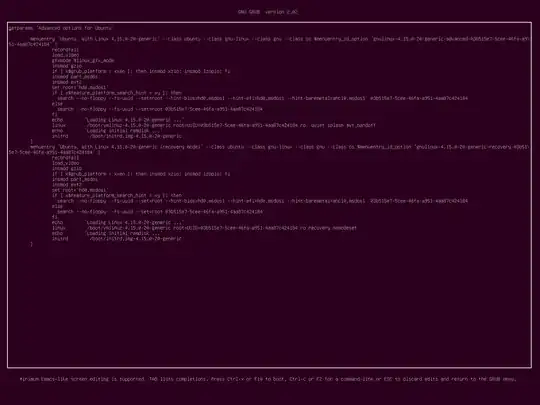
screenshot of GRUB menu editor

Move the cursor down to the line that starts with linux and then move the cursor to the end of that line, or anywhere among the kernel boot parameters there. Be sure you are on the correct line and type carefully here, as the system may fail to boot without /etc in place.

Add the text init=/bin/bash and press F10 to boot.

This will start the system with a Bash shell as init. You will get a root shell and the filesystem will be mounted read only.2 To make the filesystem writable, enter the command

mount -o remount,rw /

Now you can rename /etc (you may want to ls first)

mv /apache2 /etc

Now you can reboot, or complete the boot normally from here by having the root shell replace itself with the normal init system3:

exec systemd 

I tested this procedure on Ubuntu MATE 18.04.


1 Many thanks to Kulfy for obtaining a good quality screenshot of the GRUB editor from VirtualBox!
2 Although PATH cannot be set from the config files in /etc in this scenario, Bash will automatically set one.
3 If exec systemd doesn't work for you, exec /sbin/init should do the trick. If not, readlink -e /sbin/init should give the path to whatever init program should be running, which you can then exec with its full path. If you can't proceed this way, simply enter reboot.

Zanna
  • 72,471
  • 4
    Very thorough including screenshot +1 :) – WinEunuuchs2Unix Dec 18 '18 at 16:11
  • 3
    @Kulfy thank you so much! that's wonderful :D I can't use VB as I don't have enough RAM. Very kind of you to help improve my answer – Zanna Dec 18 '18 at 17:58
  • 3
    I think I took screenshot way too big :P ;-) and thanks for the screenshot credits :) – Kulfy Dec 18 '18 at 18:03
  • 1
    @Racoon You're very welcome, happy you got it fixed :) – Zanna Dec 19 '18 at 06:55
  • Trying to test it but not working in Ubuntu 18.04.Desktop. Followed the instructions verbatim. Not working. After F10 only a few lines appear and stops at blank screen. Can you suggest something? – Vijay Dec 19 '18 at 13:42
  • @Vijay blank screen or console? The shell will be text only and the prompt will have only the bash version. Perhaps removing the quiet and splash parameters from the line where you add init=/bin/bash will help at least make the process more informative. Can you tell me more about the environment, what you did, if that does not change anything? I am very grateful for the feedback – Zanna Dec 19 '18 at 13:56
  • If I click Enter at "Advanced Options for Ubuntu" the slection becomes the "Ubuntu, with Linux 4.15.0-42-generic" and Pressing e gives a different screen than your Pic. 2. If I press e at "Advanced Options for Ubuntu" it give a screen like your Pic. but in both cases after adding init=/bin/bash at the end of the Linux line/s it stops at blank screen. No response to any key. I will be removing the quiet and splash and post if something happens.
  • – Vijay Dec 19 '18 at 14:12
  • @Vijay I am out, but I will look at the editor in those scenarios when possible – Zanna Dec 19 '18 at 14:14
  • Removing the quiet and splash did not help. – Vijay Dec 19 '18 at 14:26
  • @ZannaFixed it by removing the "$vt_handoff " from the line. Rechecked it. Thanx for all the trouble taken by you. – Vijay Dec 21 '18 at 19:22
  • Thanks a lot for investigating further @Vijay :) I will research and think about whether I should add a note about it to my answer. – Zanna Dec 21 '18 at 19:54