After I changed some fonts in tweaks-tool, in some programs (Slack, Chrome) font formatting for blocks of code became broken.
I tried to restore defaults, but fonts in code blocks still ugly. How it can be fixed?
Ubuntu 18.04
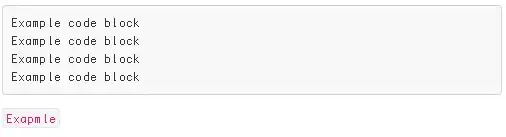
Example of ugly code formatting fonts in slack:
And normally should look like this: https://get.slack.help/hc/article_attachments/360003366488/inlinecode.png

Fontconfig warning: "/home/dietmar/.fonts.conf", line 11: invalid attribute 'name': Replace<match target="pattern" name="family">with<match target="pattern">. See also https://superuser.com/a/1891353/442356 – Dietmar Apr 10 '25 at 06:29