66

When I try to do a ntfsck to a NTFS partition I get this:

sudo ntfsck /dev/sdb1
Unsupported: replay_log()
Volume is dirty.
Unsupported: check_volume()
Checking 161792 MFT records.
Unsupported cases found.

How can I clean a "dirty" NTFS volume without having to actually use windows chkdsk tool in the NTFS volume.

I also did a ntfsfix and it said that everything was OK but it actually was not.

I also get the same "Dirty" error when trying to check the filesystem using the Disk Utility:
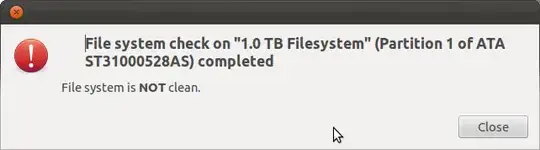
enter image description here

I am starting to think I need some powerful soap.

Luis Alvarado
  • 217,203
  • I don't know if this will help, but I came across this bootable utility disk that has DOS and a miniXP that looks interesting: hirem's boot CD – Marty Fried Mar 12 '12 at 00:07
  • Even though you specifically said "Without using Windows", you might have to resort to creating a Windows VM and running chkdsk if the below answer doesn't solve your problems. That's what I have to do anyway ;) – Sridhar Sarnobat Apr 06 '16 at 18:10

3 Answers3

105

Try using ntfsfix, which was part of the old ntfsprogs package and is now located in the ntfs-3g package (which you may already have installed).
This is a command line utility which attempts to fix common NTFS problems. It's been a while since I last used it, but it should do its job simply by typing:

sudo ntfsfix /dev/sdb1

It also offers a specific option to clear the "dirty" flag on the partition:

sudo ntfsfix -d /dev/sdb1

which might or might not be required in addition to the first command. Have a look at man ntfsfix for more information.

Byte Commander
  • 110,523
pablomme
  • 5,880
  • I am very sorry. I also did test with that command before doing the ntfsck. I will add it to the question sorry. Also after doing a fix it did not mention anything wrong it just said that everything was ok. – Luis Alvarado Mar 11 '12 at 22:25
  • Even the '-d' option? Well, in that case I don't have much else to contribute, sorry about that.. – pablomme Mar 11 '12 at 23:17
  • 6
    Actually ntfsck is the one with the -d parameter but anyway it does not solve the problem. It keeps on telling me that it is a dirty partition. Sounds sexy but is not. – Luis Alvarado Mar 23 '12 at 00:05
  • Yes, it works. Ubuntu must so it as default operation for such situations – S.M.Mousavi Apr 03 '12 at 00:24
  • 1
    This does not work. – Luis Alvarado Jul 15 '12 at 14:52
  • @Luis ntfsfix does have a -d option. ntfsck might have one as well (can't find any documentation for this prog) but so does ntfsfix. – Caltor Oct 23 '12 at 09:19
  • 2
    ntfsck is deprecated and no longer distributed. The -d option has been integrated into ntfsfix instead. – Mahmoud Al-Qudsi Oct 29 '12 at 00:50
  • +1 - This is useful for things like openwrt as well. Thanks! – George Nov 25 '14 at 22:37
  • For Ubuntu 14.04 use sudo apt-get install ntfs-3g see http://askubuntu.com/a/513115/112263 – CrandellWS Apr 24 '15 at 21:13
  • Wow, I had an issue with veracrypt not mounting a disk from an old computer as writeable. Then almost panicked when I in dmesg saw ntfs: (device dm-7): load_system_files(): Volume is dirty. Mounting read-only. Run chkdsk and mount in Windows.. But I tried a single call of sudo ntfsfix /dev/mapper/veracrypt1, remounted the drive and BAM! Writing access was back! – erb Jan 18 '16 at 00:22
  • 3
    Before you'll need to umount /dev/sdb1 or you'll get a Refusing to operate on read-write mounted device /dev/sdb1 error. – Pablo Bianchi Apr 08 '17 at 20:57
  • I used the ntfsfix tool to clean my NTFS partition, but in addition I had to restart my computer. Just saying if that might help to someone else. Thanks! – xarlymg89 May 17 '17 at 07:40
  • 2
    sudo ntfsfix -d /dev/sdb1 worked for me. When tailing the logs of dmesg with dmesg -W, I could see an error message after connecting my usb drive, saying ntfs3: sda1: volume is dirty and "force" flag is not set!". Removing the "dirty" flag with the ntfsfix command solved the issue for me. – ethaning Jul 18 '24 at 10:55
  • 2
    It's 2024 and I'm using Ubuntu 24.04 and this command with the -d option helps me a lot, Thanks. – Alireza Aug 22 '24 at 15:58
  • Even though it fixed the issue, I had to run it with the -d option in order to convince Ubuntu to "update". – Jan Rothkegel Apr 18 '25 at 13:30
  • ntfsfix -d /dev/sda2 worked for me on Ubuntu 25.04 while fixing a seagate 4TB drive – Ubuntuser May 05 '25 at 23:17
1

I think it may actually be that you need to stop checking it. :)

I believe I once had similar reports, and I even booted into the original Windows install that made it to run chkdsk, which didn't help. But what I learned was that Linux couldn't check an NTFS partition, and it should be mounted with the fsckorder set to zero.

I'm not certain if this has changed since then, but hopefully you can crosscheck this to see if it might solve your problem.

Edit: Forgot to add, I've had no problems with this partition since that time.

Marty Fried
  • 18,974
  • 1
    I had the same "Not Clean" dialog on an external NTFS drive when connected to my Ubuntu machine. I ran chkdsk on that drive on a windows machine, and it found no problems with it. I guess that the dialog on Linux is unreliable. – Amir Uval Mar 12 '14 at 13:33
  • 1
    The check flag does not always mean there are errors on the drive. it only means a check was scheduled for next boot. you can do that (scheduling) manually with ntfsfix or chkdsk. Linux only tells you if the flag is set. and that it does reliably. – JPT Oct 14 '18 at 09:01
1

As others have mentioned NEVER use ntfsfix, or any other command on drives without extensively reading what they do, basically read the source code before any such commands auto fix drive issues. your probably got the dirty bit set(from a sudden loss of power) and needs to be set clean and mounted in read only mode. or connect the drive to windows and do a chkdsk, this is what the dirty bit means and tells windows to do.Even chkdsk can delete orphaned files(not in MFT), so first mirror the drive and only then proceed.

Specifically ntfsfix overwrites MFT with MFTmirr, if it detects any inconsistency WITHOUT ASKING, which is terrible since MFTmirr is almost always slightly older and different from MFT,this results in data loss that needs to be recovered with signature recovery like photorec instead of the popular MFT record checking. Sometimes this can lead to PERMANENT loss.

theo1996
  • 11
  • 3