111

I am a new ubuntu user and want to use my machine to it's full extent, so I looked for Logitech Options software for my Logitech MX Master 2s on linux, but found nothing.

Will the software run through Wine? If not, is there any other way to install Logitech Options or get to customize the functions of macro buttons and the thumb wheel?

G. Shaf
  • 1,211

12 Answers12

126

I was having the same problem as you did/do. The solution that I found to address this issue was installing Solaar.

This application allows you to manage Logitech devices. I have a Logitech 400 plus (A keyboard with a mouse) and with that, I can achieve the things that I needed to change.

sudo apt install solaar
solaar

And you're going to see on the top right corner a battery icon indicating the battery remaining on your device. Hope this helps you!

22
sudo apt install solaar
solaar

This was the answer for me. I used it to enable a unifying USB receiver, and share it with an ERGO K860 keyboard and an MX ERGO trackball. Solaar will detect all devices paired with supported Unifying, Lightspeed, or Nano receivers, and at the very least display some basic information about them. A really excellent utility. Props to @vito genovese for the heads-up.

15

There is an unofficial driver logiops for Logitech mice and keyboards which works for me with Ubuntu 18.04 and Manjaro and the MX Master 2S and 3S.

Features include but not limited to:

  • thumb button with gestures,
  • smartshift scrolling with an individual threshold
  • individual dpi settings.

See this answer on how to install and configure the driver.

The Flow feature is not yet implemented but there seems to exist an alternative for Windows/Linux/Mac called barrier.

v.tralala
  • 526
  • 1
  • 7
  • 13
  • Been trying to use Flow with my k850/m720 kit even with Windows/Mac it was hit & miss. Barrier is awesome and now using it with Deepin and Win10. Thanks! – cdsaenz Oct 10 '20 at 17:40
  • Barrier worked like a charm – Paulo Pedroso Mar 01 '21 at 15:14
  • 1
    Barrier is awesome until you need national characters like ó ł ę etc. Because it is unable to properly send the altGr+? combination. There are hacks but it is not perfect. – Radix Salvilines Jun 07 '21 at 09:41
10

As it stands Logitech Options is not available for Linux and it does not appear to be running in WINE. You could always check the WINE website for more information, but it looks like there is nothing yet.

You should always checkout the Arch Linux Wiki for help. Here is the article covering the MX Master.

Piper might be what you are looking for.

From the Github page:

Piper is a GTK+ application to configure gaming mice. 
Piper is merely a graphical frontend to the ratbagd DBus daemon, see the libratbag
README for instructions on how to run ratbagd
6

After trying many other solutions listed here, logiops has worked great so far: custom button-mapping, gesture support, smart shift, etc. Nearly every LogiOptions feature seems to be supported by it. I'm running Ubuntu 20.04.4 LTS and using an MX Master 3.

Folks may be put off by it because there's no GUI, and build and installation aren't trivial (I had a problem where cmake couldn't find libevdev). That being said, Danish Shakeel's Configure Logitech MX Master 3 on Linux blog post helped quite a bit, especially for getting started with the configuration file. The documentation for the configuration file is quite good, but it can get a little tricky and there aren't many examples out there aside from the example in the repository.

For what it's worth, here's my configuration (located at /etc/logid.cfg by default):

devices: (
    {
        name: "Wireless Mouse MX Master 3";
        smartshift:
        {
            on: true;
            threshold: 30;
            default_threshold: 30;
        };
        hiresscroll:
        {
            hires: true;
            invert: true;
            target: false;
        };
        dpi: 1700;
        buttons: (
            {
                cid: 0x52; // scroll wheel button
                action =
                {
                    type: "Keypress";
                    keys: [ "KEY_RIGHTMETA" ]; // open activities overview
                }    
            },
            {
                cid: 0x53; // back button
                action =
                {
                    type: "Keypress";
                    keys: [ "KEY_RIGHTMETA", "KEY_PAGEDOWN" ]; // move to previous space
                }    
            },
            {
                cid: 0x56; // forward button
                action =
                {
                    type: "Keypress";
                    keys: [ "KEY_RIGHTMETA", "KEY_PAGEUP" ]; // move to next space
                }    
            },
            {
                cid: 0xc4; // mode shift button
                action =
                {
                    type: "Keypress";
                    keys: [ "KEY_RIGHTMETA", "KEY_A" ]; // show applications
                }    
            }
        );
    }
);

For mapping keyboard shortcuts, refer to /usr/include/linux/input.h.

4

I was looking for ways to configure my G700s on linux. piper works very well for configuring my mouse and apparently works for a number of other gaming mice.

edit: I got piper from the official arch repository, but is available in and the ubuntu repository.

3

In my case I needed to change my Logi K650 so that I didn't have to press fn key in order to use F-keys (as in F1...F2 keys).

The package solaar works great, I just had to unplug and plug back in the dongle after running the program for the first time, then wait about a minute for the UI to show available options, and finally turn off the Swap Fx function toggle button (had to press the lock icon twice to unlock the option):

image depicting Solaar window with Logi K650 keyboard options displayed and an arrow pointing to the Swap Fx function option which is turned off

2

logiops might be a good choice, this is an unofficial driver for Logitech mice and keyboard.

project page

rwxe
  • 21
2

I tried Solaar and piper they both didnt work at all , then I tried something called "easystroke gesture recognition" basically its Logitech options on steroids , you have much more options and you can custom everything and it can be used on any mice.

Guy Cohen
  • 21
  • 2
1

Installing Solaar as suggested by @vito-genovese solved the connectivty issue that support said that Logitech Options would help. Unfortunatly, it is not possible to reconfig keys or change speed profiles with the app, but helped with connecting my Logitech MX Vertical correctly with Ubuntu.

While trying to open the app I got the following error:

Solaar: missing required package 'python-pyudev'

I solved it installing python3-pyudev based on this issue report:

sudo apt install python3-pyudev
pcdro
  • 111
1

After trying some software for managing Logitech mice (especially the Master series), I have decided that the best one, both for configuration and modifications, is the Solaar software. I have decided to create a mini guide that you can find on my GitHub profile.

LogiOptions+ Alternative for Linux

LogiOptions+ Alternative

In this section we will explore an alternative to the official LogiOption+ application: Solaar.

Install Solaar on Debian and Debian-based systems

sudo apt install solaar

Basic Configuration

Once the program is launched, it will be able to find your Mouse either by using the Bolt receiver or by connecting it via Bluetooth.

Below is an overview of what the program can manage by default:
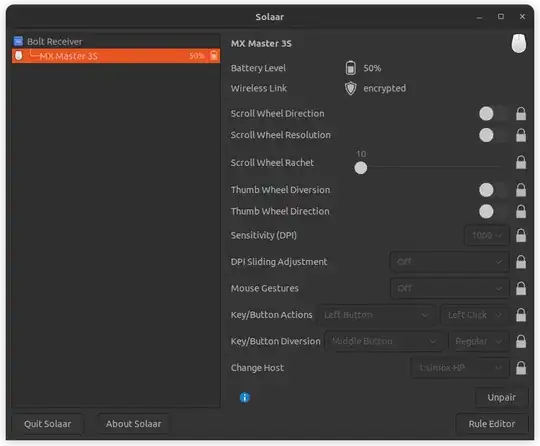
Basic Config

Advanced Configuration

To make the most of the mouse's capabilities, such as remapping the various side buttons available, Solaar provides the Rule Editor.

For example below, in addition to the default rules (under Built-in rules), two new custom rules have been created:

  • First rule: Opening the Terminal. Pressing the Smart Shift button (the central button above the wheel) a Terminal will appear.
  • Second rule: Show Working Windows. Pressing the Mouse Gesture Button (the button under your thumb) the Windows left button will trigger.
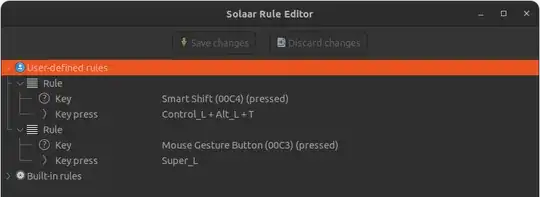
solaar_advanc_config.png

ATTENTION: An important take to do to make these custom rules working, is to set the Diversion property in the default window. Otherwise, the changes will not be taken into consideration.


solaar_smart_shift.png

solaar_gesture_button.png

karel
  • 122,695
  • 134
  • 305
  • 337
SimoX
  • 111
  • Your answer could be improved with additional supporting information. Please [edit] to add further details, such as citations or documentation, so that others can confirm that your answer is correct. You can find more information on how to write good answers in the help center. – Community May 05 '24 at 10:32
0

About unifying remotes, you might also wanna look at ltunify if you just need to pair. Easy use. But it's just for pairing.

k9momdk
  • 11
  • 1
    The unifying remote for Logitech needs no software what so ever. It is a hardware level device that works even during boot to select in GRUB. – David DE Feb 22 '22 at 18:00
  • ltunify is software though. Gonna link Gentoo wiki as I hope link won't die too fast, but sure it's in ubuntu repo as well https://wiki.gentoo.org/wiki/Ltunify. Seen for SuSE too (remember you can buy unpaired unifying dongle - you need to pair once) – k9momdk Feb 22 '22 at 18:27
  • 1
    Does not change my comment no software needed for the keyboard to connect to the receiver. – David DE Feb 22 '22 at 18:30
  • I originally downvoted this answer as it's mostly unrelated to the original question, and my keyboard always worked when plugging in the receiver. However, today I faced a scenario where it wouldn't and ltunify helped me out. Still mostly out of scope, but still useful in the topic of Logitech devices. Sadly, I can only unvote it if it gets edited lol – igorsantos07 Feb 09 '24 at 14:40