2

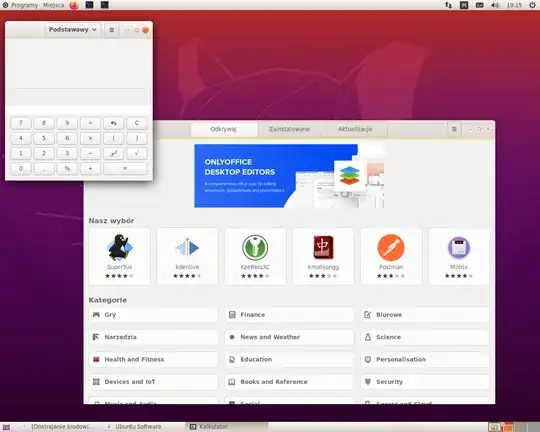
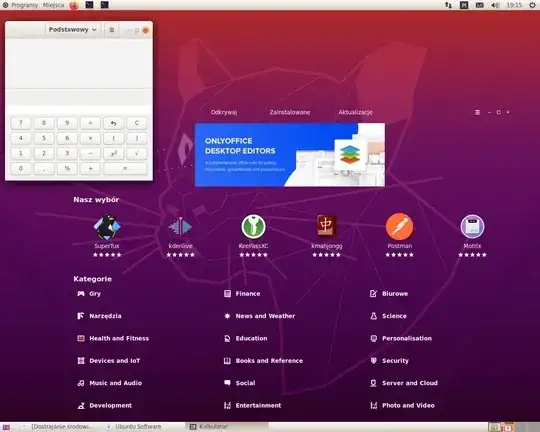
I found out that on Ubuntu 20.04 with GNOME Flashback, the Snap Shop utility from System Tools menu (the tool to install software on the system) window becomes completely transparent with white text when a non-standard theme is activated. Below are two screenshots: the first is from standard Radiance theme, the second is from a custom-made theme which is an exact copy of Radiance theme under another name. There is a Calculator window on the screen to demonstrate that the application looks identical in both themes. However, Snap Shop is different.

This is screenshot from Radiance theme: Screenshot from Radiance theme
This is screenshot from a copy of Radiance theme: enter image description here
Any hints how to fix this?

raj
  • 11,504
  • 1
    Does this answer your question? Ubuntu Software gets into a transparent background Also: https://askubuntu.com/questions/1229721/software-center-becoming-fully-transperent – pomsky Jun 01 '20 at 17:52
  • 1
    Is "Snap Shop" also snap application? Snap app might not have your custom theme / have no access to your custom theme... – muktupavels Jun 01 '20 at 17:56
  • 1
    Yes, it's also a snap application, and I found out that snap applications have their own themes package, which is also installed as a snap :). And it of course does not contain my custom theme. I don't know what to do with it yet, but at least I know why is this happening... – raj Jun 01 '20 at 18:00
  • 1
    Unless I find a way to modify a snap to include custom theme, there are two possible workarounds to this, as suggested in the links above:
    1. install and use gnome-software (which is a regular application and not a snap) instead of snap-store. However, this won't help for other snap applications
    2. move the custom theme I created from /usr/share/themes/ to /home//.themes/ (and also, because some apps run as root, make a link in /root/.themes) - then snap apps run with default Adwaita theme. Both are non-ideal, but better than nothing...
    – raj Jun 01 '20 at 18:54
  • 1
    Seems there is a way to modify a snap. You need to install a snap application called "overlay" that allows to remount a snap r/w (temporary, until reboot). I tried to remount r/w '/snap/gnome-3-34-1804/33' (that's the currrent version) and copy my theme to usr/share/themes directory inside this snap and it works! Now I only need to write some script to do this automatically at system boot. – raj Jun 01 '20 at 20:14
  • Well... looks like they probably "fixed" something - now snap applications use the default Adwaita theme when any non-standard theme is selected. My theme copied into snap (as specified above) does not work anymore. – raj Jun 19 '20 at 11:11
  • Well… fixed! :) It seems that now I should copy my theme not into /snap/gnome-3-34-… but /snap/gnome/3-28-… and it works again! – raj Jun 19 '20 at 12:28

0 Answers0