5

I am using a Mac with an Apple Wireless Keyboard - French.

I have installed Ubuntu as virtual machine by VMware Fusion. The keyboard setting of Ubuntu is as follows:
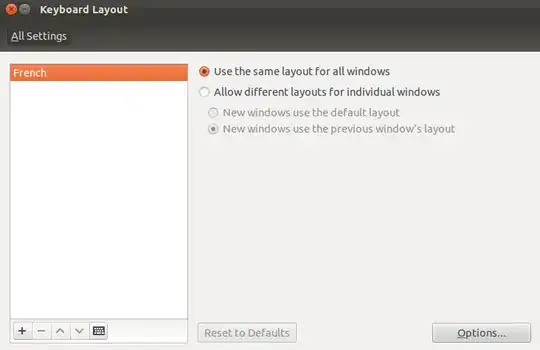
enter image description here

And the preview is not exactly as Apple Wireless Keyboard - French:
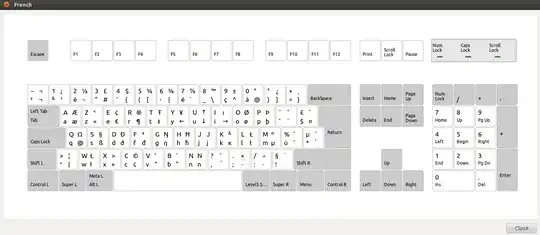
enter image description here

In Mac, we can type \ and [ by:

  • \ = Option ⌥ + Shift ⇧ + :
  • [ = Option ⌥ + Shift ⇧ + 5

However, it doesn't work under Ubuntu. Could anyone tell me how to type \ and [ under Ubuntu? Also, is there a keyboard other than French, that I currently set, which fits better my Mac keyboard?

Jorge Castro
  • 73,907
SoftTimur
  • 3,089

4 Answers4

5

I'm setting on a macBook pro - same keyboard pretty much!

I've switched my layout to My Language [Macintosh] - now i can make:

[ ]RightAlt8 & RightAlt9
{ }RightAlt7 & RightAlt0
\RightAlt+

So it's pretty much the best solution i found, as it makes it manageable by doing it as windows normally do, but it's sorta off from the normal mac way.

On a side note i have my Cmd button mapped with Ctrl and made some changes so it functions almost like Cmd button in OS X. - This way i lost the Super key but it's more to my liking ;)

user.dz
  • 49,295
Mstendorf
  • 301
  • This was not enough for me in Ubuntu 19.04. It might be because I am using a Norwegian keyboard, but I had to install gnome-tweaks, then go to the "Keyboard & Mouse" section, then turn on "Show Extended Input Sources", then restart gnome-tweaks and go back to the same section, then click on Additional Layout Options, then click on Key to choose 3rd level, then choose Right Alt. After that, the keyboard combinations in your answer worked for me. – tjespe May 22 '19 at 14:55
  • You also can get pipe | with maj+rightAlt+L – PhJ Jun 02 '24 at 07:44
1

For a single occasion I would resort to Unicode: Ctrl+Shift+u, 005bReturn for left bracket and Ctrl+Shift+u, 005cReturn for backslash.

For a long-term answer we'd want a single keypress, but I'm just not sure how to get your layers of software to align.

minopret
  • 453
0

Pressing Command + \ should work.

fosslinux
  • 3,881
0

Did you gave a try to Keyboard-configuration?

In my case (Ubuntu 12.04 server on MacBookPro 10.9 within VirtualBox 4.3.8 (ok, not Fusion, but similar conditions right?), here is what I did:

sudo apt-get install keyboard-configuration sudo dpkg-reconfigure keyboard-configuration

keyboard-configuration choices for MackBookPro French keyboard:

1. MacBook / MacBookPro (Intl)
2. French
3. French (yes, again)
4. Right Alt (AltGr)
5. No Compose Key

Seems keyboard settings works fine and are keep after reboot.

I may have to tests some other parameter value for 2. 3.and 5.

It took me 5 minutes to find out the right parameters for you: hope it will be that fast for you

Pascal
  • 273