When using Adobe Reader on a Windows desktop, one can open a PDF and use the fill & sign option. This option does not seem to appear on the Ubuntu version of Adobe Reader. How does one fill and sign PDF documents on Ubuntu?
Asked
Active
Viewed 1.1e+01k times
98
Franck Dernoncourt
- 3,558
Cheshie
- 1,095
10 Answers
110
Using Xournal or Xournal++
How does one fill and sign PDF documents on a Ubuntu?
Not with Adobe unless you get them to add support for it.
Alternatives:
Install and open Xournal (not actively developed anymore):
sudo apt install xournalOr install and open Xournal++ (actively developed), sometimes written
xournalpp:sudo apt install xournalpp
(See this for a comparison between the 2; xournal++ is a rewrite of xournal)
and then ...
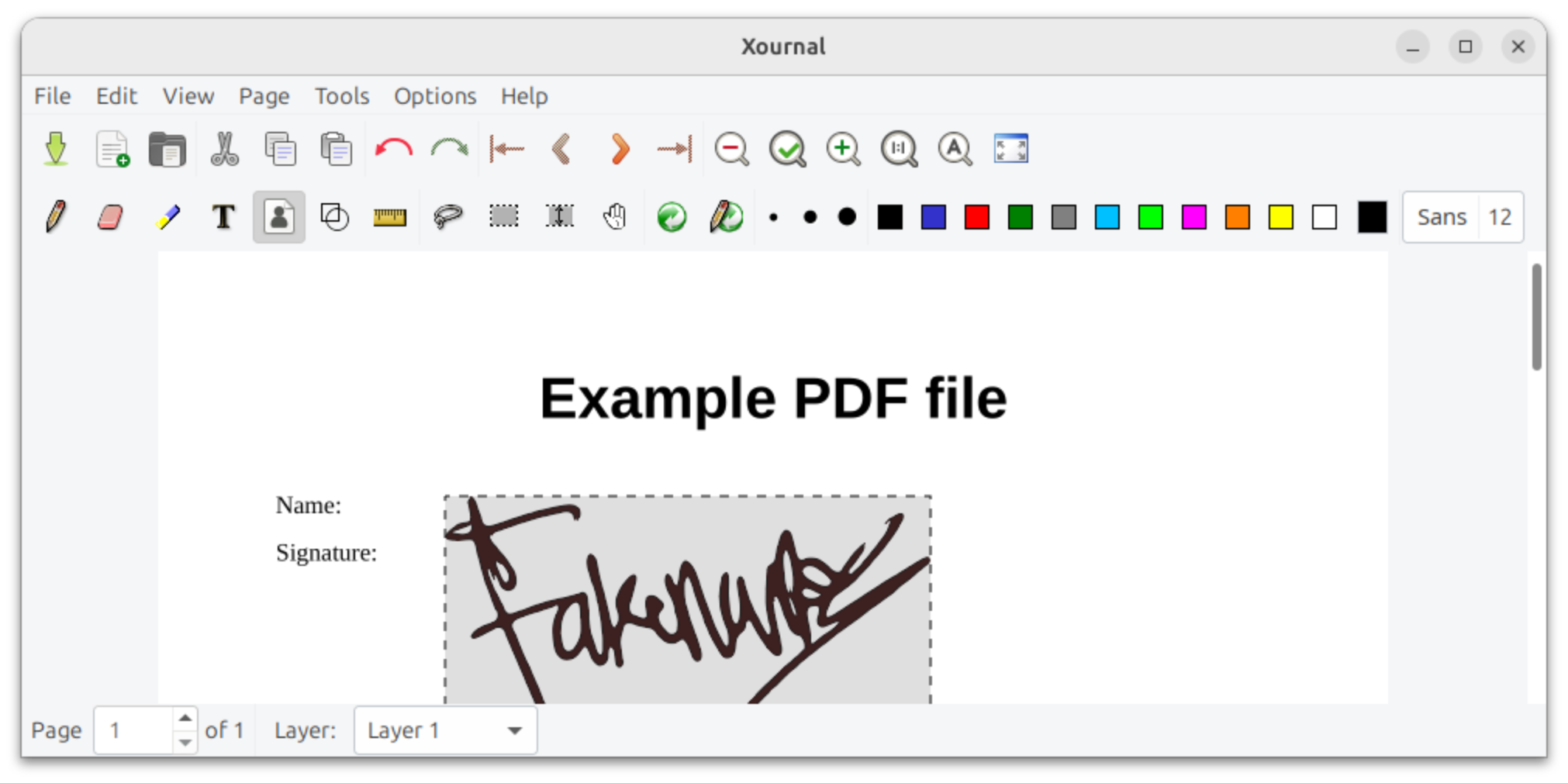
- Choose "Annotate PDF" from the File menu and select the PDF to sign.
- Click the "Image" button in the toolbar
- Click on document
- Select an image of your signature
- Optional: export to PDF so you have a new copy
Archisman Panigrahi
- 40,026
Rinzwind
- 310,127
-
Unfortunately and inexplicably this didn't work for me, after selecting the image nothing happened. I wasn't even able to add a simple text for what matters with this tool. – ecoologic May 01 '21 at 06:01
-
5
-
This works but does not create an identity-certified signature as Adobe Acrobat does. – Zatrapilla Aug 03 '22 at 16:27
-
1This works for me. Although I have been using xournal++ and as a last step "Export to PDF". – user5534993 Oct 24 '22 at 10:35
-
@user5534993 neat. https://github.com/xournalpp/xournalpp.github.io/pull/23/files has a list of differences. – Rinzwind Oct 24 '22 at 12:14
-
1
-
-
If Xournal++ is supported, and Xournal is unsupported, should Xournal++ be recommended first? – David Arcos Nov 24 '23 at 11:16
-
That is up to each of us to decide I would assume. But I would assume xournal should be replaced by ++. It's 7 years old but it does pass the build check for 23.10. So maybe it is just that good ;) – Rinzwind Nov 24 '23 at 15:23
-
For those saying that "selecting image didn't do anything" - You have to select the image icon and then click on where you want it in the page. Not very intuitive – scottdavidwalker Sep 18 '24 at 12:29
-
In 2025, xournalpp from ubuntu 24.04 worked perfectly smooth, nice gui and all. Thanks! – Agoston Horvath Feb 18 '25 at 08:54
20
I managed to achieve using pre-installed LibreOffice Draw.
Open the file using LibreOffice Draw
- Right click on the file
- Click: "Open with other application"
- Type:
drawand select "LibreOffice Draw"
Insert the picture of your signature
- From the top menu of Draw, click Insert
- Click image...
- Select an image of your signature
- Resize and drag where you need it
Export to PDF
This can be done either from the red PDF icon on the right side of the printer icon in the top left corner, or from:
File, Export As..., Export Directly as PDF
ecoologic
- 1,070
-
2I opened a basic PDF doc this way, and right away the page dimensions were off (paragraphs bleeding off the page edge). So... I'm gonna explore something else (online PDF tools). – Kalnode Jun 22 '22 at 20:05
-
@MarsAndBack - for some reason
xournalworked for me too some time later. I think it was a different installation, but I can't tell you anything particularly useful on how I got it working. Best of luck – ecoologic Jun 22 '22 at 22:02 -
-
1Works really well. This is also a way to edit the text or even adjust line spaces. I was asked to remove line space before for a PDF book. Using LibreOffice Draw seems to be a better way. – Harry Oct 20 '23 at 22:52
-
LibreOffice Draw 7.3.7.2 not only allows the insertion of images for signatures (Tools > Color Replacer to set transparent signature background) but surprisingly comprehensive editing of layout and text content. Ad*be software not required! – user1330734 Apr 16 '24 at 02:02
7
I made a tool for this: https://github.com/svenssonaxel/pdf-sign
Unlike Xournal++ and LibreOffice Draw, it will keep the quality of the signature (no rasterization), and IMO is faster too since it's specifically made for this use case.
-
-
This deserves to be much higher up in the list of answers. Thank you! – Silvio Levy Dec 24 '24 at 09:21
5
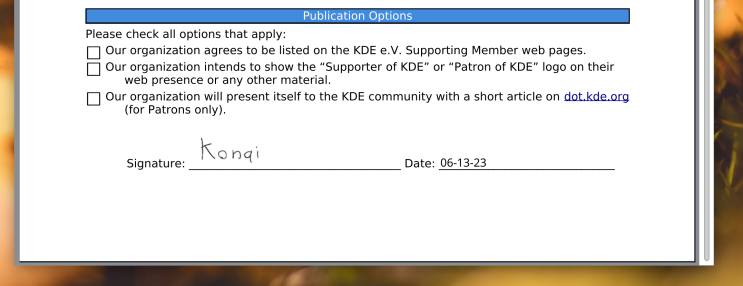
If you don’t want to take an image of your signature, you can use Okular: open the document, then choose Tools > Annotations and click on "Freehand Line" (the red scribble on the right of the pen).
Tip: to make it easier to sign on a laptop trackpad, temporarily disable the mouse pointer acceleration in your OS settings.
As pointed out by Archisman Panigrahi in the comments, Okular also has an "Insert signature" function to insert a scan of your signature. See this tutorial for more information on how to scan your signature.
End result:
Archisman Panigrahi
- 40,026
bfontaine
- 196
-
There are better ways to achieve this with okular. Can you update the answer with signature stamp? https://pointieststick.com/2023/06/13/tips-tricks-handwritten-signatures-in-okular/ – Archisman Panigrahi May 21 '24 at 14:14
-
1
5
Use your computer's internet browser pdf viewer (PDF.js)
Sometimes the simplest answers are the best. Without the need to install anything, you can use PDF.js, the default pdf reader of your web browser. Firefox, as well as Chrome, use PDF.js - I am not sure about other browsers.
You can fill in your pdf forms, write custom text, highlight, and even add your signature image. Then print your adjusted pdf into a file and you are done.

Paloha
- 1,187
- 1
- 12
- 17
-
1I feel silly I hadn't realised the browser supported all this before. Thanks for pointing it out! – Tasos Papastylianou Mar 07 '25 at 17:13
-
Only Firefox uses pdf.js by default. Chrome users can use it here: https://mozilla.github.io/pdf.js/web/viewer.html – ayykamp Mar 25 '25 at 16:16
3
I did like this:
Create my signature with signaturely and download image as png.
Install Sejda, a PDF editor for Linux, macOS and Windows, with a graphical user interface. Download deb file from https://www.sejda.com/desktop, then install sejda, like this:
sudo dpkg -i sejda-desktop_7.5.4_amd64.deb
- Start sejda and paste the signature image to a pdf.
Flimm
- 43,943
Ryo Matsuzaka
- 132
2
You can edit a PDF on Dropbox.com, if you use that service. Dropbox has official support for a desktop syncing client.
ahorn
- 121
-
This does not provide an answer to the question. To critique or request clarification from an author, leave a comment below their post. - From Review – zx485 Aug 03 '24 at 02:14
-
@zx485 the website is a web app. The solution does not need to be a desktop app. I use Ubuntu. – ahorn Aug 05 '24 at 05:16
-
Copying your data to the cloud is the last straw - a breach of Ubuntu's privacy approach that would be provided by a local application. – zx485 Aug 05 '24 at 19:42
-
Dropbox supports Linux: https://www.dropbox.com/install-linux . You're basically saying that Ubuntu users shouldn't use cloud storage. – ahorn Aug 09 '24 at 03:38
1
If you look for a solution that provides a real digital signature according to PAdES:
The only solution I found working is the KDE app Okular.
This even has out-of-the box support for using a private key on a smart card via PKCS#11.
Simply open the document to sign with this app, select Tools > Digitally Sign...,
enter the password or smart card PIN for the private key (may need to do twice depending on the card),
draw a rectangle that is large enough for printing your name and signature date,
possibly need to enter the password or PIN again, and
possibly need to select the certificate related to the private key used for signing.
More detail on using Okular for signing may be found here and here.
dvo
- 121
0
I was able to sign a pdf using https://dochub.com/. The service was free and worked great! When I opened the pdf from my google drive, I selected the option to sign using dochub. I uninstalled Adobe from my Linux machine as the signing part never worked right from Snap.
Jason
- 19
-
1uploading a document to a third-party website is not really privacy-friendly to say the least... – Ricky Robinson Apr 22 '24 at 17:25
0
I have used GIMP for adding signature to the PDF. Follow these steps:
- Click on File menu and Open the PDF file.
- Choose the Pencil Tool and draw your signature.
- Click on File menu and Export as PDF file.
Péter Szilvási
- 103
playonlinuxandWine. Please see this link >>> https://www.playonlinux.com/en/app-2653-Adobe_Acrobat_Reader_DC.html and come back here if you have any problems. – Apr 11 '21 at 16:12