0

I am using Ubuntu 20.04. Clamtk finding PUA or trojans daily, despite me deleting them and deleting cache and using bleachbit regularly. I have seen the previous post about false positives but how do you tell?
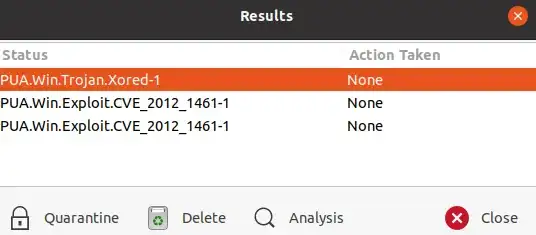
Clamtk Results

I am a newbie still and not sure what else I can be doing to protect from these or how much they are compromising the security of my system.

matigo
  • 24,860
  • 2
    clamtk is lying to you. See the WIN in the notification. It assumes you are using WINdows. Please remove it as it is totally useless unless you want to use it to scan windows files. "how much they are compromising the security of my system." =zero=. It is absolutely insane to scan a Linux system using WINDOWS rules. Never going to work. Oh and there are currently ZERO active virusses for Linux. Malware, rootkits sure but no virusses. – Rinzwind May 12 '21 at 12:35

1 Answers1

3

PUA means potentially unwanted application. By definition it is no false positive as it is not a positive. Often these lines can be ignored and you can set clamav to ignore PUA warnings.

The second and third detections relate to .tar.gz files with multiple compressed streams, which could be used to bypass malware detection (and yes this includes malware for linux). However, it does not necessarily mean that these files are infected. There are cases where you will have legitimate tar.gz files with multiple compressed streams.Though they should not be in your browser cache folders.

https://nvd.nist.gov/vuln/detail/CVE-2012-1461

Bruni
  • 11,219
  • how could I find out if they are infected? They reappear daily in the .cache – papercup May 12 '21 at 14:25
  • @papercup They probably reappear in cache, because you are getting them served from the same websites again. Theoretically you could uncompress them and scan the uncompressed files again. I probably would not do that. – Bruni May 12 '21 at 14:33
  • would using a different browser help? They are all from browsing on mozilla. – papercup May 12 '21 at 14:51
  • @papercup Maybe, but the probability that it is malware that actually compromises your linux system is rather limited. Also there is no real reason why a site would serve malware only to one kind of browser. – Bruni May 12 '21 at 14:58
  • this is continuing to be an issue: finding daily 'pua trojans' in mozilla cache folder but I think I have narrowed it down to ebay and amazon sites. Is there a way to check if my system is corrupted by them or if they are false positives for definite? – papercup Jun 21 '21 at 09:16
  • 1
    @papercup If you do not find any non PUA positives, I would ignore these findings. alternativelly you can upload them to an online virus scanner and see what other scanners have to report. generally a PUA finding (especially the 2nd and 3rd type) should be read as a warning of a potential gateway for malicious software and not as a positive. If you do not want to see them, here https://www.clamav.net/documents/potentially-unwanted-applications-pua are instructions on how to configure clamav to ignore them. – Bruni Jun 22 '21 at 13:51