I'm assisting in a project on Launchpad - however I do not have write access to that branch. How can I create a branch which I can push to and point people on the team for review?
Asked
Active
Viewed 2,631 times
11
-
1@ColeJohnson Considering Launchpad is an integral part of the Ubuntu Ecosystem, and this site is about Ubuntu Users and Ubuntu Developers I would like to think this is ontopic. If you think otherwise feel free to open a top on meta discussing why you feel Launchpad isn't ontopic to get feedback from the community. – Marco Ceppi May 28 '13 at 01:50
-
That makes sense. I just thought it would be better on Web Applications SE. But, would you say Launchpad is the canonical way to work on Ubuntu? :P – May 28 '13 at 05:56
4 Answers
11
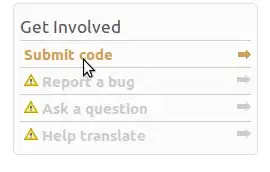
Go to the project page that you want to create a branch for and click 'Submit Code'.
Then set up the branch. Make sure it is hosted in Launchpad.
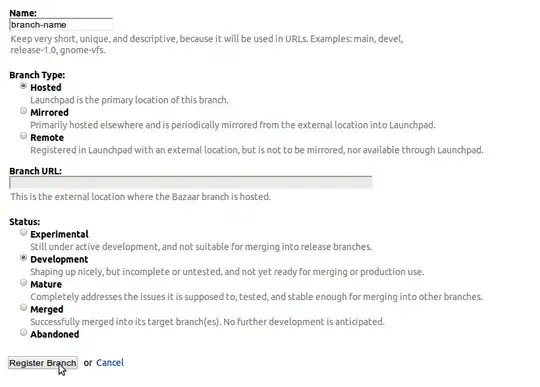
You can then push to the branch:
bzr push lp:branch
The first time you push, you will need to use:
bzr push lp:branch --use-existing-dir
Once you are ready to merge, click 'Propose for merging' on the 'Code' tab of the project.

It will then wait to be reviewed by someone with the necessary permissions.
Once the review has started, you will see something like this in the 'Code' tab:

You can follow this link to the review page.
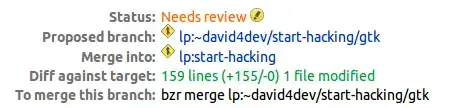
Once the reviewer is satisfied, they will merge the branches and your code will become part of the project's trunk.
dv3500ea
- 37,754
-
Does that only work if the "Submit code" button is available or is it theoretically possible to request merge to personal branches created in the launchpad.net user profile page (when I request those for merge it fails with
This branch is not mergeable into lp:~[username]/+junk/[branch name]after pushing a branch on commit ahead of master). Since the feedback doesn't give a reason and thus useless, I thought I ask. – Kalle Richter Jan 31 '16 at 04:39
3
You can push a branch under your own name, e.g. bzr push lp:~ajmitch/ubuntuwire-website/update-machine-list to push a branch to the ubuntuwire-website project which is named update-machine-list
ajmitch
- 19,029
1
Starting in the folder a level up from the branch:
bzr branch originalBranchName newBranchName
cd newBranchName
Make some changes to the files. If you add any new files/folders:
bzr add
Once you're done:
bzr commit -m "Description of changes"
And push to your own Launchpad branch:
bzr push lp:~lpusername/projectname/branchname
8128
- 28,878
1
For Subversion users, or those interested in lightweight checkouts, this might also help:
https://answers.launchpad.net/canonical-identity-provider/+question/209069
-
Although your answer is 100% correct, it might also become 100% useless if that link is moved, changed, merged into another one or the main site just disappears... :-( Therefore, please [edit] your answer, and copy the relevant steps from the link into your answer, thereby guaranteeing your answer for 100% of the lifetime of this site! ;-) You can always leave the link in at the bottom of your answer as a source for your material... – Fabby Oct 02 '15 at 01:28