The height of title bar in GNOME is really wide. Is there a way to make it narrow without installing any extension or theme? Title bar of File manager and Terminal is wide and looks ugly. I love how narrow the title bar of Unity on Ubuntu was. I'm on Ubuntu 20.04 GNOME: 3.36.8
Asked
Active
Viewed 2.9k times
11
1 Answers
16
Surprisingly, this common question apparently was never posted here before - I searched a duplicate in vain.
Gnome does not expose detailed tweaking of the appearance to the users. It does not even expose changing a theme - you need to install Gnome Tweaks for that.
The easiest option to change the height of a title bar is to change to a appropriate theme. This, however, is an all-or-nothing approach. You have to take the entire theme as is.
You probably better of with some manual coding. Create a file ~/.config/gtk-3.0/gtk.css and enter or adapt the following css code:
headerbar entry,
headerbar spinbutton,
headerbar button,
headerbar separator {
    margin-top: 0px; /* same as headerbar side padding for nicer proportions */
    margin-bottom: 0px;
}

headerbar {
min-height: 24px;
padding-left: 2px; /* same as childrens vertical margins for nicer proportions /
padding-right: 2px;
margin: 0px; / same as headerbar side padding for nicer proportions */
padding: 0px;
}
Log out and then back in for the changes to take effect (or reset Gnome Shell with Alt+F2, r when on Xorg).
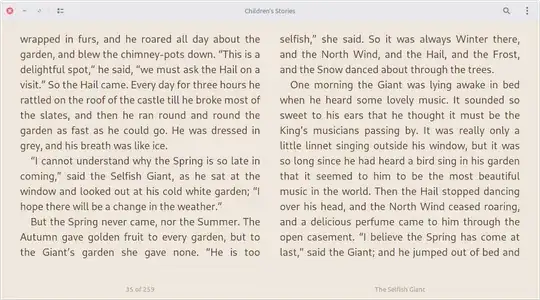
Foliate Ebook reader before changing gtk.css
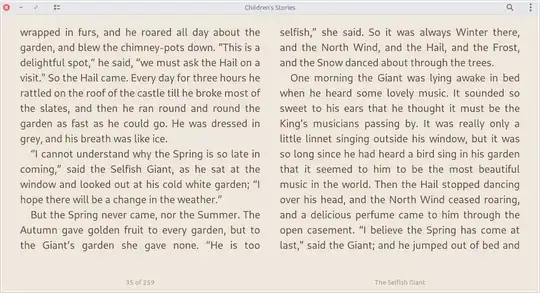
Foliate Ebook reader after changing gtk.css
Archisman Panigrahi
- 40,026
vanadium
- 98,427
-
-
This does not seem to change the height of headarbars of apps using libhandy. – Archisman Panigrahi Aug 18 '21 at 07:32
-
@vanadium it worked for some default apps like Nautius and terminal but funnily not working with Foliate Ebook reader. and Foliate changed its theme to light even though my primary theme on the system is dark. it did not work on Gedit too – yaa__ Aug 18 '21 at 12:28
-
Could be because these are installed as a snap or as a flatpak. It may also depends on the size of the controls that these apps put in their header bar. – vanadium Aug 18 '21 at 14:56
-
-
@ArchismanPanigrahi I installed Foliate via flatpak. I was just curious whether the titlebar can be reduced in size or not. and i dont like using too many PPAs. But thanks for all the responses. – yaa__ Aug 20 '21 at 17:53
-
@yaa__ It is really upto you, but "PPAs are harmful in general" is just a myth. The reduced titlebar should work with Foliate from PPA (works for me in XFCE). – Archisman Panigrahi Aug 20 '21 at 18:33
-
This also works for natively installed GTK4 apps (have not checked flatpaks). – Archisman Panigrahi Aug 31 '21 at 20:54
-
-
On Ubuntu 23.04, some windows (e.g. Snap, Firefox) still have thick headerbar. Any solution for this? (I copied the .css file to .config/gtk-4.0 folder hoping these windows may have smtg to do with GTK4 instead of GTK3, but did not work) – berkus Sep 09 '23 at 09:12
-
-
sorry for the late reply, but is there any hope for a GTK4 alternative? – João André May 18 '24 at 03:05
/home/.themesdirectory referenced is actually~/.themes. you might have to create this directory if it does not already exist. – mchid Aug 18 '21 at 00:11