This is odd. Using the link that you've provided, I'm able to see what appears to be Chinese text with the Snap version of Firefox 98.0.1:

I've looked at my language settings and, while I do have the fonts for English and Japanese, I do not have any for Chinese. The page does load properly, though.
Digging deeper, if you click on the "Advanced" button in the "Language and Appearance" section of the Firefox settings, you'll see the ability to specify specific fonts for different character sets:
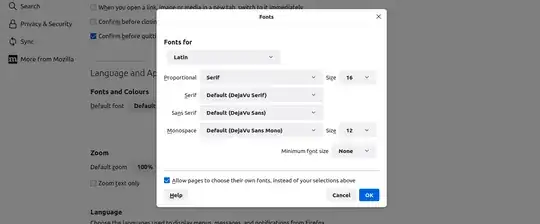
Changing the "Fonts for" option to "Simplified Chinese" or "Traditional Chinese (Hong Kong)" may show the same settings as is set for Latin. However, you may see other options that work better for you.
Alternatively, you could uninstall the Firefox snap from your system, then re-install. There is no --reinstall option like with apt, unfortunately.
Edit:
Another option comes from this answer where the fonts-wqy-zenhei font package was installed:
sudo apt install fonts-wqy-zenhei
This may resolve the issue


apt install firefoxit installed the snap version. When I runapt install firefoxit installed the native version (I also installed firefox-locale-zh-hans and firefox-locale-zh-hant). Things are working as expected now in both native Firefox and snap one. – Raniere Silva Mar 18 '22 at 01:51