47

In ubuntu20.04 qt5-default was the package name. So I tried the same and qt6-default in 22.04.

Then I tried apt-cache search qt which revealed (among many others): qt6-base-dev and qt5-base-dev.

I am unsure whether the new qt{version}-base-dev is the old qt5-default. If not: What is?

Natan
  • 1,059

5 Answers5

54

You need to install packages:

sudo apt install -y qtcreator qtbase5-dev qt5-qmake cmake

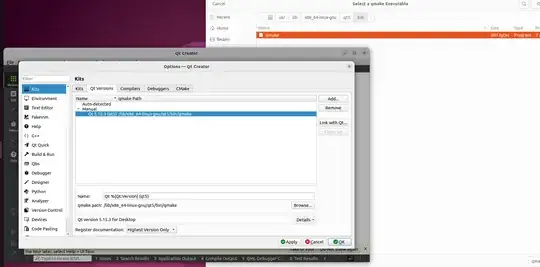
And you need to manually change the Qt version: screenshot how to manually change Qt version

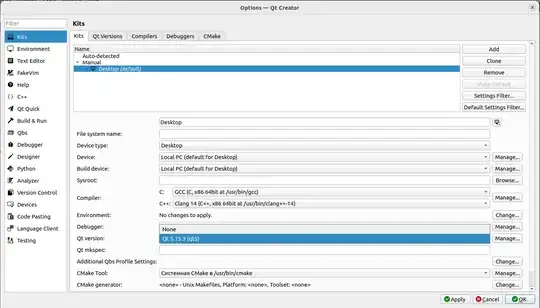
Then you need to manually change Qt version in the Kits tab: screenshot on the Kits tab

Bilal
  • 357
cycloclimber
  • 656
  • 5
  • 3
  • i sure hope this works on the standard raspberry pi os. i'm having problems gettin apt to install qtcreator on there. Well, not qtcreator - that's on fine. But the qt kit can't be found. Hoping that's in the qtbase5-dev. I'll give it a shot. thanks! – Stephen Hazel Jun 03 '22 at 21:43
  • 2
    That -does- work to install qtcreator (and especially the proper kit stuff) onto raspberry pi (regular 32 bit os). That helped me a looot - thanks! – Stephen Hazel Jun 05 '22 at 02:32
  • 1
    This worked for me on amd-64 Ubuntu 22.04 – Marcus Jun 08 '22 at 14:44
  • 1
    Is there any documentation page for this? – Jannis Ioannou Sep 07 '22 at 20:07
  • 2
    This sort of OVER-answers the question. What about for a "client" machine which only needs the Qt libraries to run programs? qt-default used to take care of that. What now? qtchooser doesn't install any libraries. qt5-base no longer exists either. – guitarpicva Apr 21 '23 at 16:26
  • 1
    Note that in Ubuntu 22.10 qtcreator's dependencies are all from Qt6 (see apt-cache depends qtcreator | grep qt6). qtbase5-dev is still there though (and automatically installs qt5-cmake), so just sudo apt-get install qtbase5-dev is sufficient for basic Qt5. – user643722 Oct 26 '23 at 09:29
8

Starting with Ubuntu 22.04, you can use qt6-base, qt6-base-dev or qt6-tools-dev

Kiruahxh
  • 213
  • 8
    Unable to locate package qt6-base – christian_js May 16 '23 at 19:27
  • 1
    on 24.04 qt6-base does not exist, but qt6-base-dev or qt6-tools-dev are there. And it seems they are enough to build a package in my case, which is DSView. (Although, DSView 1.3.2 fails to build because of its own errors..) – xealits Jan 05 '25 at 21:09
5

Why don't you install it with their online installer.

Once downloaded, chmod +x qt-unified-linux-<arch>-<version>-online.run then ./qt-unified-linux-<arch>-<version>-online.run

Logan
  • 51
  • 2
  • 1
    I try to use the package manager whenever I am able, but you are right given my question. – Natan Apr 25 '22 at 08:24
  • 1
    @Natan I tried the same thing. Maybe it'll get there in the future since 22.04 is relatively new. – Logan Apr 25 '22 at 19:02
  • Unfortunately, the online installer does not run on arm64 architecture. – Dragos Apr 30 '22 at 11:30
  • @Dragos You can also build from source if you are unable to use the installer. – Logan May 01 '22 at 18:03
  • 1
    this is a good answer and will get you the latest qt6.2+ BUT if you want to use the qt that came with your distro (especially if you use Kubuntu - which i guess you don't) then sudo apt install answer is the way to go if you want to distribute .deb files on kubuntu. which i guess you don't :) – Stephen Hazel Jun 03 '22 at 21:41
  • @StephenHazel Unless it's changed (doubtful), you can install Qt 5.x through this installer as well. – Logan Jun 05 '22 at 01:33
  • not 5.15.3 that is used by kubuntu 22.04. you can sudo apt install it on kubuntu, but the online installer goes from 5.15.2 to 6.0. I think cuz KDE started maintaining bug fixes on the last 5.x line as they couldn't move to 6 yet. – Stephen Hazel Jun 05 '22 at 02:30
0

For all who just want to install vulkan-sdk on Ubuntu 22.04 like I wanted, getting the error

The following packages have unmet dependencies:
 vulkancapsviewer : Depends: qt5-default but it is not installable

These instructions helped in my case: https://vulkan.lunarg.com/doc/sdk/1.3.236.0/linux/getting_started_ubuntu.html

wget -qO- https://packages.lunarg.com/lunarg-signing-key-pub.asc | sudo tee /etc/apt/trusted.gpg.d/lunarg.asc
sudo wget -qO /etc/apt/sources.list.d/lunarg-vulkan-jammy.list http://packages.lunarg.com/vulkan/lunarg-vulkan-jammy.list
sudo apt update
sudo apt install vulkan-sdk
0

I have had troubles with library on qt5 packages, so i have dicided to install qt6 packages and steps are here:

Install qt creator.

sudo apt install -y qtcreator

Also i have installed doc packages such:

sudo apt install -y qtcreator-data qtcreator-doc

For getting:

  • application data for Qt Creator IDE (qtcreator-data).
  • documentation for Qt Creator IDE (qtcreator-doc).

Install qt6-base-dev (it already has qmake6 and other packages for compiling).

sudo apt install -y qt6-base-dev

Also you can install examples for qtcreator of version 5:

https://stackoverflow.com/questions/45454072/make-qt-creator-to-see-examples-and-docs

It is probably old, but i don't find qtcreator for newier versions.

And finally personally i have had problems with my Qt creator - it have not seen automatically isntalled qmake so i did:

which qmake6

I get /usr/bin/qmake6 and then i manually add it to my configuraion (tools->kits->add) of project kit qtversion and everything works fine:

options screenshot