You can use the Tiling Assistant extension. I recommend installing it using the Extension Manager, which you can install by opening a terminal and running this command:
sudo apt install gnome-shell-extension-manager
After installing Extension Manager do the following:
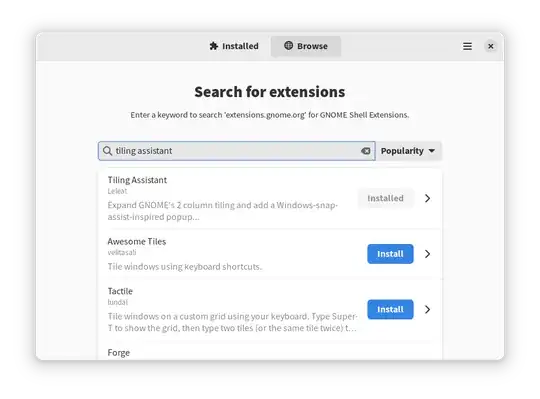
Open Extension Manager and click the Browse tab.
Search for "tiling assistant" and click Install to install the extension (I have already installed it in the screenshot):
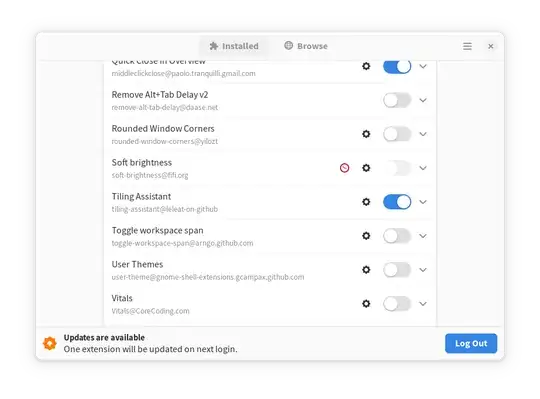
Go to the Installed tab and press the cog button next to Tiling Assistant to open the extension's settings:
In the window that opens, click the Keybindings tab and scroll to Edge tiling:
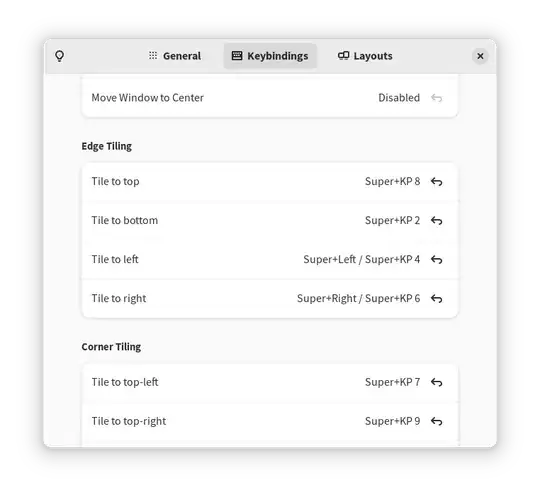
Change the shortcuts for Tile to top and Tile to bottom to the shortcuts of your choice.
You should now be able to use these shortcuts to have your windows tiled to the top and bottom halves of your screen. You can also do the same by dragging a window with your mouse to the top or bottom edge of your screen.


