How do I turn off the arrow for desktop icons?
Asked
Active
Viewed 1.0k times
7
-
2are you on gnome or kde? and btw what icons are you seeing an arrow on? Gnome doesn't normally put an arrow unless it's a symlink. – RolandiXor Nov 22 '10 at 21:19
-
1i'm on gnome and it's a symlink to a portable program in a folder from http://portablelinuxapps.org/ – Per Nov 22 '10 at 21:30
1 Answers
7
It is kind of hackish, but you could rename all the emblem-symbolic-link.png and
emblem-symbolic-link.svg icons to something else like emblem-symbolic-link.png.bak and emblem-symbolic-link.svg.bak respectively. Use locate emblem-symbolic-link to find where they are.
But is there any reason you need to use a symlink?
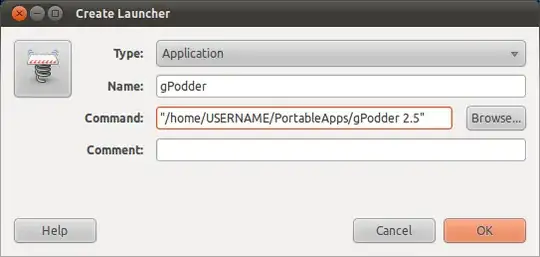
Otherwise you could use a Launcher. Right-click on your desktop and select
Create Launcher..., and click on the Browse... button and select your portable program.
Write a name for your Launcher and (optionally) select a different icon and your done.
Isaiah
- 60,830
-
Launchers are not navigable when in a modal window, like when you are saving a file (they just appear as the .desktop file they actually are). I found it very useful to include symlinks and NOT launchers in the Desktop to the folder you are currently working on, so you can open/save files through modal windows just clicking on "dektop", and then the desired folder. – Jan 21 '11 at 15:53