I just installed Notepadqq v2.0.0 on Ubuntu 22.04.2 LTS, and it gave the following message when attempting to load a file on my Google Drive:
This file has been deleted from the file system. with Save and Ignore options.
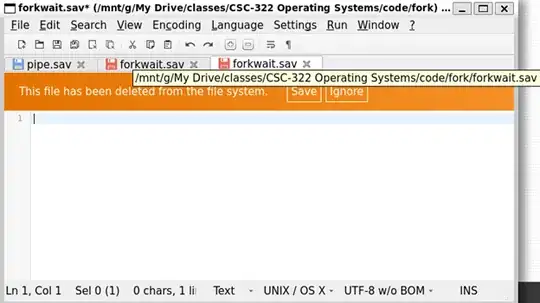
If I ignore, a zero length file is opened. If I choose SAVE, a zero length file is opened and my original file is truncated to zero bytes. If I cancel out of the operation, all is well on my file but I have nothing to edit.
Weird thing is that I have narrowed this behavior down to the following.
- Open a DOS window in a directory with my file on Google Drive
- Execute bash to open up a WSL bash terminal.
- Attempt to open the file with Notepadqq.
Bug occurs.
If I click open a WSL prompt into my root directory and edit a file from there, Notepadqq seems to work correctly.
If I try this on the /mnt/c mount, Notepadqq seems to work correctly.
I have searched Google, searched Ask Ubuntu, and did an image search of the displayed image on Google image search. No joy with any of these.
Any suggestions?
sudo notepadqqon the command line? What about as a non-root user:notepadqq? Could be a permissions issue. Have you tried to reinstall the application? – richbl Feb 22 '23 at 17:44apt. Opening a file on the Windows drive works fine, with no message regarding deletion. Some questions to help clarify - Does this happen with any file, or just this one particular one? Thepipe.savfile looks to be working normally from the tab color - Is that file on the root filesystem? – NotTheDr01ds Feb 23 '23 at 02:43C:drive (e.g./mnt/c/Users/<username>/forkwait.sav)? – NotTheDr01ds Feb 23 '23 at 02:44" Notepadqq will ask for root privileges whenever they are needed if either 'kdesu' or 'gksu' are installed. Running Notepadqq as root is not recommended. Use --allow-root if you really want to."
I did not allow it to contine. I get the original error with any file I open from a bash shell directly into a windows directory. It works fine when opened directly into my root directory but is very inconvenient, such that I don't use it.
I have not tried reinstalling it yet.
– ClayD Feb 23 '23 at 23:55