18

To open an emoji panel, in Windows, I can press the Win key and period.

On Mac, I can open an emoji panel via Control + Command + Spacebar.

What is a convenient way to open a similar emoji panel in Ubuntu? I don't want the Characters app, which is much less convenient than a single-click emoji picker.

karel
  • 122,695
  • 134
  • 305
  • 337
Ryan
  • 649

5 Answers5

11

If you prefer flatpak I've been using Smile for a few months years and it works great. Emote is also available, but I think Smile has more features.

smile

And to set up a shortcut (instructions from Ubuntu):

  1. Open "Settings"
  2. Navigate to the "Keyboard" settings in the sidebar
  3. Scroll down to "Keyboard Shortcuts", and press "View and Customize Shortcuts"
  4. Select "Custom Shortcuts" and then click the + to add a shortcut
  5. Set a name (e.g. "emote" or "emoji picker")
  6. Set "Command" to flatpak run it.mijorus.smile
  7. Set your shortcut as something like ctrl + .
10

I am using ubuntu 23.04 There is an inbuilt application called "Characters" you can use that to get emojis. No need to install a third party emoji picker.

You can simply press the super key (formerly Windows) and type an emoji name and select the emoji from list.

select emoji by name super key

But some emojis are hard to find by name, so create a shortcut to characters app and look and find suitable one from it.

Steps

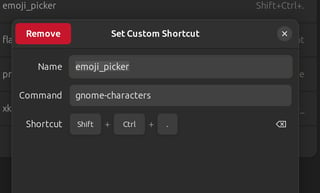
  1. Create a keyboard shortcut for the app - Ctrl + Shift + ..

emoji picker shortcut

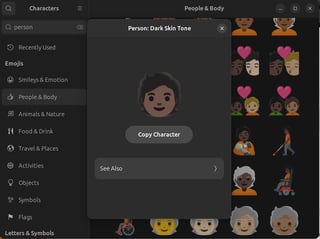
  1. Open app use Ctrl + F to find emoji. select and copy.

pick emoji

Use native GTK app shortcut Ctrl + . if available

  • 2
    my gripe is that the search is not as good as I'd like it to be. it's particular about what the emoji is called and I wish it recognized some similar terms. – starball Mar 05 '25 at 03:45
7

In apps developed using GTK, you can press Ctrl + . to trigger an emoji picker, no extra software required.

jobukkit
  • 5,266
  • 5
    With the notable exception of Chromium, for which I have yet to find a good solution. Sadly, that's also the application an emoji picker would be the most useful for. – marcelm Aug 14 '23 at 11:39
  • 2
    @marcelm See my other answer regarding emoji in browsers https://askubuntu.com/a/1317180/134848 – jobukkit Aug 14 '23 at 12:07
  • Not sure about Chromium but it works fine in chrome and firefox – Tejas Kale Aug 14 '23 at 16:38
  • @TejasKale Chrome and Chromium are the same software, the difference is that the former is distributed by Google and the latter is distributed by your Linux distro. – jobukkit Aug 14 '23 at 17:35
  • 1
    Doesn't seem to work in Google-Chrome or VScode (which is Chromium based)... at least for me on 23.10.. seems to work in a lot of in-built Ubuntu programs though... – Ben Winding Mar 07 '24 at 03:00
  • Doesn't work in Firefox for me... – Jonathan Gilbert May 25 '24 at 12:59
  • 2
    In ubuntu 24, the shortcut is now Meta + . – Madacol Oct 19 '24 at 09:53
  • In Ubuntu 24, Meta + ; also works; previously Ctrl + ; worked in addition to Ctrl + . – bmaupin Nov 22 '24 at 16:54
  • in Ubuntu 24, you can change it to control + . as it was before, by entering into ibus-setup - see https://askubuntu.com/a/1401116/827401 – dimisjim May 01 '25 at 21:44
1

Although not exactly a dedicated emoji picker but Albert launcher has a plugin for it. Works everywhere, localized, sorted by usage.

enter image description here

0

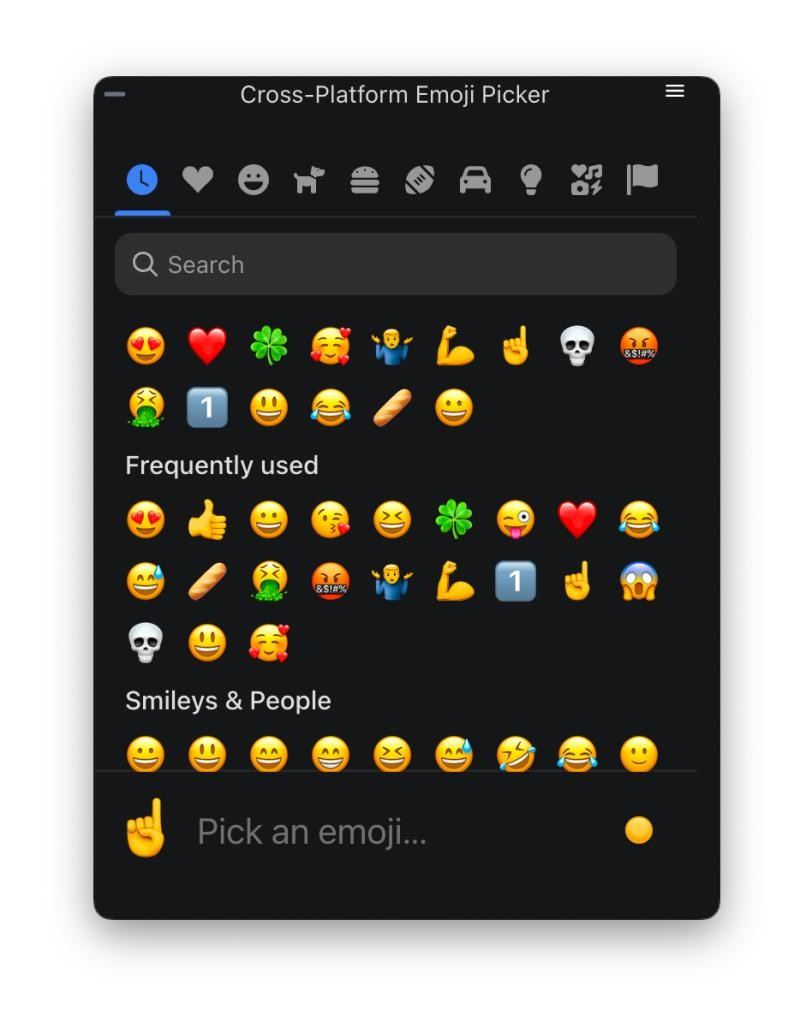
In 2024, this Cross-Platform Emoji Picker is available for free.

screenshot of Cross-Platform Emoji Picker

It works on Ubuntu and also on Windows and Mac, using the same keyboard shortcut.

P.S. Full disclosure: I created this app using Electron. This is not meant to be a spammy, self-promoting post. But I was the original question-asker 5 months ago, and I finally built this tool for myself because the others weren't good. Feel free to use it if you want.

Ryan
  • 649
  • Thanks a lot for working on this tool. Could you explain what are the advantages of this app in comparison to the many already existing emoji apps (e.g. like the Emoji Picker which comes out of the box since Ubuntu 18.04) mentioned in the this emoji picker answer for a Linux only user? Could you make the app open-source and publish it on a platform like Gitlab/-hub? This may help to trust the code as it would not be just an AppImage and people could help you with bug reports & code suggestions. – Filbuntu Jan 16 '24 at 19:51
  • @Filbuntu The main advantages: unlike the Ubuntu built-in emoji picker, this one feels much easier for me to use. And it works the same way regardless of which app you want to put the emoji into. And it works the same on Windows and Mac, so if you switch computers a lot, you're reducing the number of habits and hotkeys that you need to remember. In the future, it might even have further advantages, such as synching favs and history and creating custom groupings, etc. – Ryan Jan 16 '24 at 20:32
  • Looks really good! just curious if it's open-source? – Ben Winding Mar 07 '24 at 02:56
  • @BenWinding Thanks! Nope, private repo. – Ryan Mar 07 '24 at 14:13
  • 2
    UI looks beautiful, but enforcing to provide and confirm an email address is really something that a small Linux tool should not do. – Christoph Thiede Apr 09 '24 at 00:11
  • @ChristophThiede Thanks for your feedback. I build software for free. It's fun to create something useful. But when I've given away software in the past without having a way of tracking how many unique users actually use it, it has been less fulfilling for me. I don't even spam their email account. It's just to know how much a tool is being used (and how much effort I should continue putting into it). If people think signing in with an email address on their first time is too much of a bother, I don't mind if they use another tool instead. – Ryan Apr 09 '24 at 17:01
  • 2
    @Ryan Thanks for the reply! It's great that you build such tools and provide them freely to the community. Of course you can do what you want, I'm just mentioning this because I believe that you would find more users if you requested fewer setup steps or personal data from users. If your goal is really just to count unique users, couldn't you simply generate a device-specific ID (or random UUID) and send it to a server? You can also get download counts from repositories like flathub or GitHub, which are also associated with greater convenience and credibility by many. – Christoph Thiede Apr 10 '24 at 18:53
  • @ChristophThiede For me the appeal of the tool was that it works on Win/Mac/Ubuntu. Any ideas for how to count unique humans who have installed on at least one system? I didn't want my count to show "3" if really it was 1 person installing it multiple places. – Ryan Apr 11 '24 at 13:10
  • @Ryan Hm, couldn't you just ask them? "To continue, please answer the following question (this is used for anonymous analytics only): Have you ever installed this tool on any other device? [ ] Yes [ ] No" I don't see why anyone such lie at such a form. :-) – Christoph Thiede Apr 14 '24 at 13:42
  • 3
    Promoting your own closed source emoji keyboard app that requires an account is disingenuous considering we're talking about Ubuntu. – wizulus Mar 03 '25 at 20:20
  • @ChristophThiede of course he could. It feels very likely that he's harvesting email addresses -- despite the reasoning given here. – BenB May 08 '25 at 18:53
  • "harvesting email addresses"? For what? Contrary to everyone's fears, I haven't used those email addresses for anything. – Ryan May 08 '25 at 22:42
  • Update: In the newest version, email address is no longer required. – Ryan Aug 22 '25 at 14:12
  • @Ryan is the source available? – Archisman Panigrahi Aug 26 '25 at 22:15