Similar error running kubuntu 24.04.3 LTS (Noble Numbat).
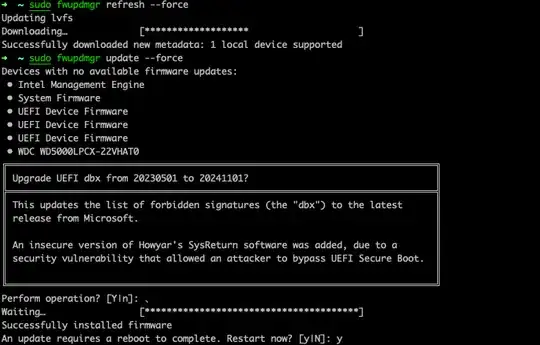
Running fwupdmgr update --force did not fix the issue.
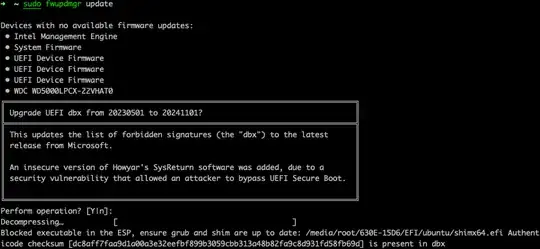
Exact error message: "Blocked executable in the ESP, ensure grub and shim are up to date: failed to load /media/root/ESP/EFI/Microsoft/Boot/bootmgfw.efi: Error opening file /media/root/ESP/EFI/Microsoft/Boot/bootmgfw.efi: Permission denied"
Issue 1: the path "/media/root" does not exist.
Running efibootmgr -v showed that the only occurrence of bootmgfw.efi was on "Windows Boot Manager HD(1,GPT ...". Running "lsblk", I guestimated this was /sda/sda1, which is not mounted. So, switch to root, create a mounting point and mount it: sudo su -, mkdir /mnt/sda1; mount /dev/sda1 /mnt/sda1
Re-run fwupdmgr update, new error: "Blocked executable in the ESP, ensure grub and shim are up to date: failed to load **/mnt/sda1/**EFI/Microsoft/Boot/bootmgfw.efi: Error opening file /mnt/sda1/EFI/Microsoft/Boot/bootmgfw.efi: Permission denied".
As the path is now correct, investigate the permissions... Tried running as root, tried to change the file permissions (no error but no permission change), tried changing the mount options... all with no success.
Finally, moved the files and tried again:
Switch to root sudo su -
Make a temp dir, keep boot stuff together mkdir /boot/tmp
Move the Win EFI directory: mv /mnt/sda1/EFI /boot/tmp/
Run the update: fwupdmgr update --force ==> success!!!!
Move the Win EFI back: mv /boot/tmp/EFI /mnt/sda1/
Cleanup: rm -rf /boot/tmp
It looks like the issue is caused by the dual-boot configuration.
Update: the Windows boot worked fine.
/media/root/3841-B9E0/EFI/, it should normally be/boot/efi/EFI/. Anyway, in my case not just that file but all those in my folder were old, so I removed the whole directory/boot/efi/EFI/custom. But I followed this procedure, which is meant for purging EFI of old unused OS entries (each bullet is a separate line): •sudo su•cd /boot/efi/EFI•ls, and then selecting my folder : •rm -rf custom. After that, the update of that UEFI dbx package worked in Discover. – cipricus Apr 22 '24 at 13:07