I am trying to isolate CPUs on an AMD EPYC 8534PN (64C/128T). Unfortunately, I see the RCU stalls and the server crashes over and over. And I am not really sure what I am doing wrong.
The crashes only happen when the server is under load. Usually, I am running build jobs and some tasks with RT priorities there (integration tests). But from my understanding, by using rcu_nocbs=8-63,72-127 irqaffinity=0-7,64-71 rcu_nocb_poll in grub, setting IRQBALANCE_BANNED_CPULIST=8-63,72-127, and moving the remaining rco's over to the housekeeping group with tuna -t rcu* -c 0-7,64-71 -m should avoid this, shouldn't it? I expect no rcu to be executed on the isolated cores anymore.
The errors I am seeing looking like the following:
RCU stalls:
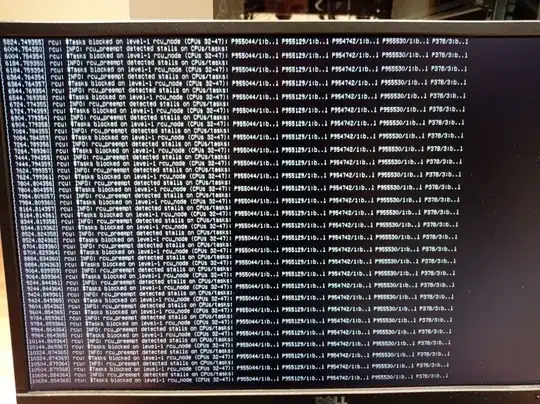
This is a part of the dmesg output:
Apr 22 00:08:37 hp-epyc kernel: rcu: INFO: rcu_preempt detected stalls on CPUs/tasks:
Apr 22 00:08:37 hp-epyc kernel: rcu:         Tasks blocked on level-1 rcu_node (CPUs 48-63): P497/2:b..l
Apr 22 00:08:37 hp-epyc kernel:         (detected by 53, t=2940082 jiffies, g=1051549, q=30752212)
Apr 22 00:08:37 hp-epyc kernel: task:ksoftirqd/53    state:R  running task     stack:    0 pid:  497 ppid:     2 flags:0x00004000
Apr 22 00:08:37 hp-epyc kernel: Call Trace:
Apr 22 00:08:37 hp-epyc kernel:  <TASK>
Apr 22 00:08:37 hp-epyc kernel:  __schedule+0x238/0x5e0
Apr 22 00:08:37 hp-epyc kernel:  ? asm_sysvec_reschedule_ipi+0x1b/0x20
Apr 22 00:08:37 hp-epyc kernel:  preempt_schedule+0x60/0x80
Apr 22 00:08:37 hp-epyc kernel:  preempt_schedule_thunk+0x16/0x18
Apr 22 00:08:37 hp-epyc kernel:  rt_mutex_slowunlock+0x280/0x2f0
Apr 22 00:08:37 hp-epyc kernel:  ? try_to_wake_up+0x307/0x670
Apr 22 00:08:37 hp-epyc kernel:  rt_spin_unlock+0x3e/0x50
Apr 22 00:08:37 hp-epyc kernel:  __hrtimer_run_queues+0x3a0/0x3c0
Apr 22 00:08:37 hp-epyc kernel:  hrtimer_run_softirq+0xa6/0x110
Apr 22 00:08:37 hp-epyc kernel:  __do_softirq+0xc9/0x2cc
Apr 22 00:08:37 hp-epyc kernel:  run_ksoftirqd+0x30/0x80
Apr 22 00:08:37 hp-epyc kernel:  smpboot_thread_fn+0x1d3/0x2d0
Apr 22 00:08:37 hp-epyc kernel:  kthread+0x191/0x1b0
Apr 22 00:08:37 hp-epyc kernel:  ? smpboot_register_percpu_thread+0xe0/0xe0
Apr 22 00:08:37 hp-epyc kernel:  ? set_kthread_struct+0x50/0x50
Apr 22 00:08:37 hp-epyc kernel:  ret_from_fork+0x22/0x30
Apr 22 00:08:37 hp-epyc kernel:  </TASK>
Based on the lscpu -p output I came up with the following isolation scheme:
housekeeping & IRQs: 0-7,64-71
isolation: 8-63,72-127
Systemd is configured as following:
sudo systemctl set-property user.slice AllowedCPUs=0-7,64-71
sudo systemctl set-property system.slice AllowedCPUs=0-7,64-71
sudo systemctl set-property init.scope AllowedCPUs=0-7,64-71
The IRQs are banned from the isolated cores in /etc/default/irqbalance:
IRQBALANCE_BANNED_CPULIST=8-63,72-127
IRQBALANCE_ONESHOT=0
And I have moved the rcuo's via tuna -t rcu* -c 0-7,64-71 -m to the housekeeping group.
Grub is configured as follows:
BOOT_IMAGE=/vmlinuz-5.15.0-1032-realtime root=/dev/mapper/ubuntu--vg-ubuntu--lv ro quiet splash selinux=0 enforcing=0 nmi_watchdog=0 crashkernel=auto softlockup_panic=0 nosoftlockup audit=0 mce=off tsc=nowatchdog skew_tick=1 default_hugepagesz=1GB hugepagesz=1G hugepages=12 iommu=pt amd_iommu=on nohz_full=8-63,72-127 rcu_nocbs=8-63,72-127 irqaffinity=0-7,64-71 nohz=on rcu_nocb_poll numa_balancing=disable transparent_hugepage=never nosoftlockup rcu_nocb_poll processor.max_cstate=0 kthread_cpus=0-7,64-71
OS: Ubuntu Server 22.04.4 LTS \
Kernel: 5.15.0-1032-realtime \
CPU: AMD EPYC 8534PN 64-Core Processor
Edit:
I was able to stabilize the server. I had some help by this article (unfortunately, subscription only). These are the steps I have taken:
The first step was to disable irqbalanced. I found there is a bug that silently fails to enforce the IRQBALANCE_BANNED_CPULIST parameter. I tried to use IRQBALANCE_BANNED_CPU, but this parameter was already deprecated in the version we are using. So I disabled irqbalanced completely.
In the article it says "In the past, the ksoftirqd/N threads handled the timer softirq tasks, along with the work for the other softirqs.". I couldn't find any ksoftirqd processes, instead I only found the softirqs which have also appeared in the kernel logs.
This is why I have moved the ksoftirqd threads to the highest priority to avoid them starving on the CPU.
x=8
y=63
for i in $(seq $x $y) ; do tuna -t "ksoftirqd/$i" -p fifo:99; done
a=72
b=127
for i in $(seq $a $b) ; do echo "$i"; tuna -t "ksoftirqd/$i" -p fifo:99; done
I have also applied the rcutree.kthread_prio=99 kernel parameter to the kernel command line to set the priority of the RCU rcuc/N and rcub/N threads to 99.
To give a complete picture, I am running RT workloads with priorities up to 50 on the server through Kubernetes. I also run unit and build tests in parallel to the RT workloads.
Can someone confirm the above assumption that ksoftirqd still handels timers and work ob Ubuntu is still correct? I couldnt find much about it researching.
Another question I have regarding this topic is, why are not all rcu workloads moved properly to the housekeeping group? I don't want to use isolcpus, which I guess would help with this. Is there another way to move the interrupts completely so the isolated cores are free for RT workloads? Thanks in advance!