2

I've looked for a recent answer I can understand (absolute novice) but nothing seemed to address my specific problem.
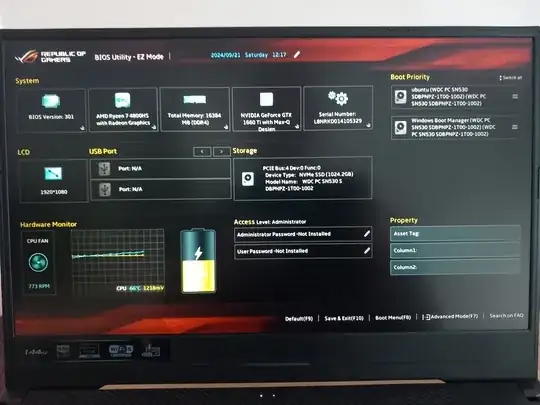
system summary

My system is set to boot Ubuntu first (see setup screen image). The second boot is Windows 11 home, fully updated as of 2024/09/21.

Each time I switch on I get the following:

Failed to open \EFI\UBUNTU\grubx64.efi - Not Found

Failed to load image __: Not Found

start_image() returned Not Found, falling back to default loader

Failed to open \EFI\UBUNTU\grubx64.efi - Not Found

Failed to load image __: Not Found

start_image() returned Not Found
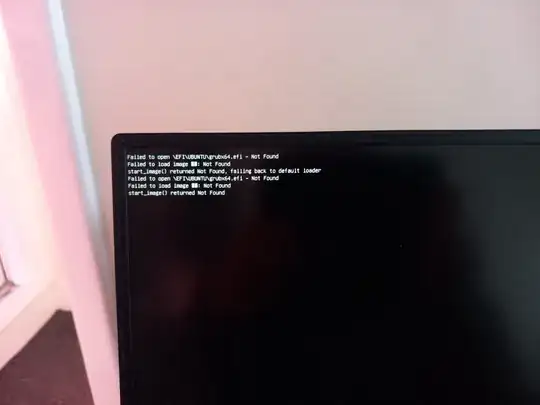
photo of boot fail message

It then boots into Windows.

Please explain like I'm a kid, how I can make my laptop boot into Ubuntu again?

I should add that I bought it a while back as-is, and I have no install disk for either Windows or Ubuntu.

  • How did you install Ubuntu if you did not have a installation disc/USB? – Archisman Panigrahi Sep 21 '24 at 12:51
  • It was already installed when I bought it, and it was not sold with any disks – Chris M Language Sep 21 '24 at 12:53
  • Hmm ok. The easiest way to fix would be to reinstall Ubuntu and setup the dual boot again. You can download Ubuntu, and load it to a USB drive, and use it for installation https://ubuntu.com/tutorials/install-ubuntu-desktop#1-overview. Please note that Windows updates often cause issues like this, so there is no way getting around that unless you delete either Windows or Ubuntu – Archisman Panigrahi Sep 21 '24 at 12:55
  • This question is similar to: How can I repair grub? (How to get Ubuntu back after installing Windows?). If you believe it’s different, please edit the question, make it clear how it’s different and/or how the answers on that question are not helpful for your problem. – karel Sep 21 '24 at 23:22
  • I tried to read the How to Repair Grub, but I just didn't understand it, sorry.

    I am not good with computer terminology, jargon, and know nothing about coding, commands or how computers work. Seriously. My eyes blur when I try to read it and my brain seems to freeze up. I should add that I did mention, have no install disc, so I fail at step 1 anyway

    – Chris M Language Sep 23 '24 at 16:49

1 Answers1

1

A recent windows update invalidated the grub secure boot signature. This would both prevent grub from booting windows and (after a bios update or bios key invalidation) may prevent grub itself from booting. This should not be an issue if your grub is up to date. Turning off secure boot would allow grub to boot long enough to update linux and then re-enable secure boot.

Having said that, I would expect different error messages from this problem. The former windows error would be something like "Verifying shim SBAT data failed: Security Policy Violation Something has gone seriously wrong: SBAT self-check failed: Security Policy Violation". If grub itself fails secure boot, the symptoms would vary by bios but may include mention of secure boot failure or just skipping grub entirely without any error. You can try disabling secure boot and see if that fixes it.

However, the "not found" errors make me suspect your EFI boot partition has been corrupted. The easiest way to fix this is to use something like refind to bypass the damaged grub and then run grub-install or the Ubuntu live disk to try to do a boot repair.

Ubuntu has a boot repair utility at https://help.ubuntu.com/community/Boot-Repair

Glancing at other answers linked here in comments, I think a lot of them are too old and possibly not relevant anymore.

user10489
  • 5,583
  • given that the OP is a new user you may need to expand your answer to encompass references to your suggested fixes in order for the answer to be useful. You don't even know which version of the OS is in use. – graham Sep 21 '24 at 14:08
  • I might first run dosfsck on the ESP and any other FAT32 partitions. Partition must be unmounted, Details: https://askubuntu.com/questions/862724/grub2-failed-to-install/86587z682#865872 Or chkdsk from Windows on ESP which Windows does not normally show. Technical details on SBAT: https://mjg59.dreamwidth.org/70348.html – oldfred Sep 21 '24 at 15:22
  • Good idea, I hadn't thought of that. But I would assume boot repair would do that. – user10489 Sep 22 '24 at 13:00
  • @graham I don't see how OS version is relevant to repair method. Secure boot is not affected by OS version. Grub repair is only affected in that you should use the same version live disk. The only thing relevant here is grub itself, which OP already mentioned. The secure boot invalidation affects all versions more than a few months old. – user10489 Sep 22 '24 at 13:11
  • Hi, and thanks for taking the time to reply.

    I actually disabled Secure Boot a few weeks ago after a previous update had the same effect. It worked. However, now with Secure Boot already disabled - this is why I don't know what to do next.

    So anyway, what I've learned from reading around is that I can download a boot command (this is how I'm describing it in my novice understanding1

    – Chris M Language Sep 23 '24 at 16:36
  • So I download this boot command onto a key drive (a new freshly formatted one I suppose is best?) then put it in a USB socket and switch on the computer. I understand it should then boot into Ubuntu, then I can do some Grub repair with a command window and short piece of script. (I think there is a fairly clear instruction for that elsewhere, and I know Ctrl+c and Ctrl+v so OK)

    What do I need on a thumb/stick/usb drive, so Ubuntu will boot? And, where can I get it?

    – Chris M Language Sep 23 '24 at 16:46
  • 1
    Try https://help.ubuntu.com/community/Boot-Repair – user10489 Sep 25 '24 at 06:14