Made a clean install of 24.04. When I click on the [question mark] Help icon on the dock, the "Ubuntu Desktop Guide" loads, but nothing is visible. The files are there, I can print them, but I can't see them. When I move the cursor around it changes to the Black Hand and when I click, the title bar changes. Everything seems to be working, except...the files do not show.
Asked
Active
Viewed 284 times
5
-
What happens when you change the theme? – Rinzwind Feb 07 '25 at 10:18
-
The behavior is very weird. The text is there but it displays text and background as all white. I confirmed you can see the document if you print to PDF. – grantbow Feb 07 '25 at 18:09
-
Rinzwind, I don't know how to do that. I changed the "View" to 'Dark" and got a black screen, evidently with black type and a black background, I'm surprised there isn't more talk about this. Maybe Ubuntu users don't need help! – bblakely Feb 09 '25 at 02:58
-
1This looks like a flaw in the provided themes. Certainly this is something worth noting. Try to download another theme from here and report back – kanehekili Feb 09 '25 at 23:12
2 Answers
1
Using my theme the help page looks like this:
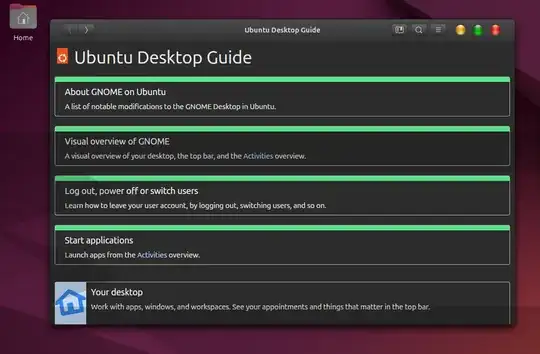
That might not be your favorite theme but it clearly shows that the provided themes have a flaw. You can install my "light theme" as well from here
kanehekili
- 7,496
- 1
- 21
- 38
-
Great test result, thanks for the screenshot. This is a good clue about why this problem may be happening. – grantbow Feb 15 '25 at 03:30
-
I'm learning a lot about [tag:themes] from other questions and answers on the site. – grantbow Feb 15 '25 at 03:46
-
I didn't want to try this first because I'm unclear what changes might be made that might not easily be undone. The reinstall of the existing
ubuntu-docspackage must have fixed a bug in a theme somewhere or some kind of file dependency on a default installation. I have a second machine with a clean install that I can start trying to do a diff to find the actual cause in one of theubuntu-docspackage files or configurations before and after a reinstall of theubuntu-docspackage. – grantbow Feb 15 '25 at 15:32
1
Reinstall the package ubuntu-docs
PingMaster
- 111
- 4
-
Good idea, I will try this soon. To reinstall the package from the terminal the command is
sudo apt-get --reinstall install ubuntu-docs. I hope this and/or related packages or commands will help fix and help identify the cause of this strange display behavior of the help system. – grantbow Feb 15 '25 at 03:27 -
-
looking inside the package there are no scripts it runs, just writes the files in various languages into
/usr/share/help. If one of those files gets changed somehow a reinstall would fix it. The one dependencyubuntu-docshasgnome-user-docsalso has no scripts. So where is the problem that gets fixed in the theme related bug we see after a default install? – grantbow Feb 15 '25 at 16:23 -
1grantbow, thanks for the command line for a reinstall, however it did not work for me. Others are having similar problems - https://askubuntu.com/questions/1454571/some-application-guis-do-not-render-correctly-since-updating-to-22-04?rq=1 – bblakely Feb 16 '25 at 00:12
-
Somehow the ubuntu-docs package may be corrupted or misconfigured. Reinstalling the package restored all necessary files – PingMaster Feb 17 '25 at 05:09
-
-
-
a recent upgrade solved the problem. But now the screen doesn't display properly, my video card -Nvidia 470- is stuck on 1024x768 with no way to change it, but that's a different problem, not to be solved here. – bblakely Aug 15 '25 at 22:28