11

Guys I am trying to send a file from my Galaxy s2 to ubuntu but its keep dropping the connection but im able to send a file from Ubuntu to Mobile .

I have seen this link Botskool.com and its mentioned there is a Receive Files option in BT Preferences. But in my BT settings its no where to be seen.
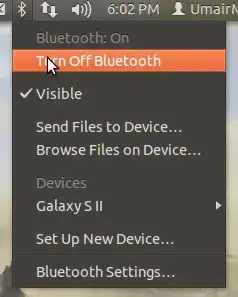
enter image description here

Help

OmiPenguin
  • 2,342

1 Answers1

18

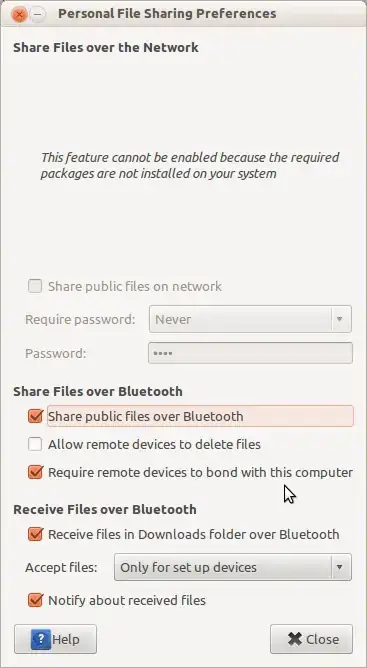
There isn't really any receive option. Go to Personal File Sharing Preferences and select Always under Accept File: option if you want to receive files from your device without pairing it, though I'd recommend pairing as if you select this option any device can send malicious/bogus files to your computer without pairing while visible.

Here is a screen-shot of Personal File Sharing preferences

Samik
  • 2,660
  • 1
    this menu needs to pop up when you first start with Bluetooth – Tim McNamara Nov 04 '12 at 04:30
  • Additionally, there should be a button in the bluetooth settings dialog which can be clicked to make the personal file sharing preferences dialog box appear. Are there bug-reports along these lines? – Mark Apr 19 '13 at 13:58
  • 2
    In case you still can't receive files even after enabling "Receive files...", check that /usr/lib/gnome-user-share/gnome-user-share is running.

    It is started automatically upon login by /etc/xdg/autostart/gnome-user-share.desktop if file sharing is enabled, however there appears to be a bug (at least in 13.10) that prevents gnome-user-share from starting when enabled in preferences.

    – Roman Jan 19 '14 at 15:54
  • @Roman I confirm that this bug is present in my Ubuntu 13.10 – PHP Learner Feb 23 '14 at 11:17
  • I just can't understand why it is not a default option in Ubuntu to accept files from devices that I manually set up...it really took me some time to find this answer and I installed and reinstalled dozens of times blueman and others... – Joschi Jun 11 '14 at 08:43
  • finally works! but unfortunately dest folder seems hardcoded.. – Aquarius Power Apr 05 '15 at 19:37