3

I want to install Paint(Microsoft) equivalent image viewing or editing software in Ubuntu 24.10.

I got the command sudo apt install gpaint but getting the following error

Package 'gpaint' has no installation candidate.

How to resolve it? Is there other better software than GNU?

1 Answers1

6

gpaint has not been in Ubuntu since 2023, and is dead upstream at its project pages (which seem to still exist but are not updated and haven't been for years). It was removed in Debian, and that removal trickled down to Ubuntu as seen in the package's publishing logs in the below screenshot:
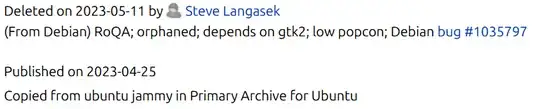
package publish history in Ubuntu

The Debian removal bug #1035797 indicates the following reason for removal in Debian:

The package is orphaned and its upstream is no longer developed. It depends on gtk2, has a low popcon and no reverse dependencies.

-- Bastian Germann

As of 2023, gpaint was no longer maintained, no longer developed, depended on GTK2 (which was removed from Debian and other releases of Ubuntu and other distros), was NOT a popular package.

Because of this, it was removed from Debian on May 9th, 2023. That deletion was done by Steve Langasek on May 11th, 2023.

I would look for an alternative tool other than gpaint.

Thomas Ward
  • 80,112
  • in support of Thomas' answer, you may find this ItsFOSS article of some use. I have a personal preference for Pinta (Snap version) as the .deb version appears buggy. It can be downloaded from Ubuntu Software – graham Feb 10 '25 at 15:27
  • Here's the "official" page for the software you're looking for: GPaint. Looking at the download links confirms this answer as there is no GNOME3 version. – eyoung100 Feb 10 '25 at 17:49
  • Another alternative is KolourPaint from KDE. It integrates nicely with Unity (so I assume with GNOME too), as if it were a GTK app. It's in the mould of the older versions of MS Paint, rather than Windows 7 or later. Personally I found the deb version worked better as the menubar disappeared with the snap. – dom1310df Feb 11 '25 at 10:29
  • What are the alternative package and what are the commands to install them? – Learner Feb 11 '25 at 16:06
  • @Learner there are numerous alternatives, and thus numerous packages. Since there is no one direct alternative, that's a little broad for an answer here. – Thomas Ward Feb 11 '25 at 16:26
  • @graham, Package 'pinta' has no installation candidate' says my terminal. I used sudo apt-get install pinta command – Mr. M Sarkar Feb 12 '25 at 03:38
  • 1
    @Mr.MSarkar as graham stated, he suggests using the snap version - you'd install that with sudo snap install pinta, which uses Snaps, not apt – Thomas Ward Feb 12 '25 at 04:06
  • @ThomasWard, ok, i installed pinta, the question is resolved now – Mr. M Sarkar Feb 12 '25 at 04:20