So if you go here to the documentation and read you'll notice it says for best performance you should use an SSD.
Also to help improve Whonix performance.
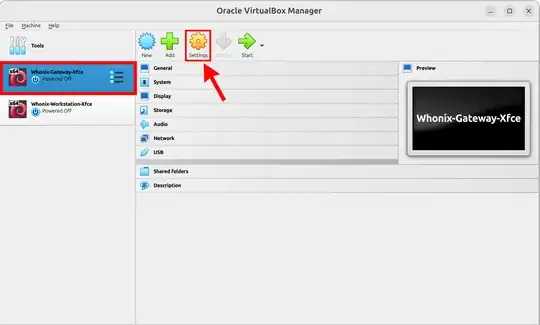
Select gateway and then click on Settings
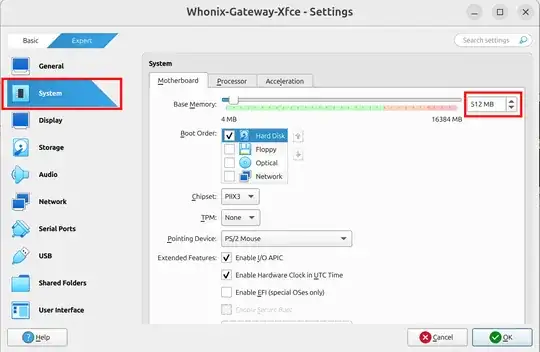
You should see this screen, now select System and then here is where you can choose how much ram gateway uses. Set gateway to use 512 MB of ram (also make sure to bump workstation's ram up to 4 GB) now when you set gateway to 512 MB of ram it'll automatically open up in command line interface CLI mode, so not graphical user interface GUI mode. Why? Cause CLI uses less resources. Now listen you'll definitely want to use workstation in a GUI but a GUI is not absolutely necessary for gateway, and if you ever want to use gateway in a GUI again just increase the ram back to normal.
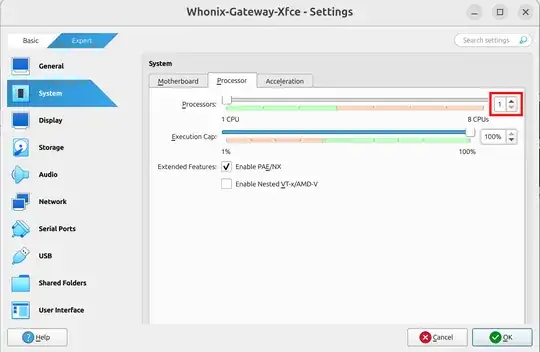
Select just 1 core for gateway and then 2 cores for workstation which leaves just 1 core for Ubuntu the host OS (cause you know you have a 4 core CPU).
This is how you change ram and cores for workstation as well. It's the same thing, select workstation and then click on Settings.
As a side note, if you've got a modern PC with an 8 core CPU and 32 gigs of ram then go and give gateway 2 gigs of ram and give workstation 4 gigs of ram. And I think by default gateway uses 3 cores and then 3 cores for workstation, which is fine.
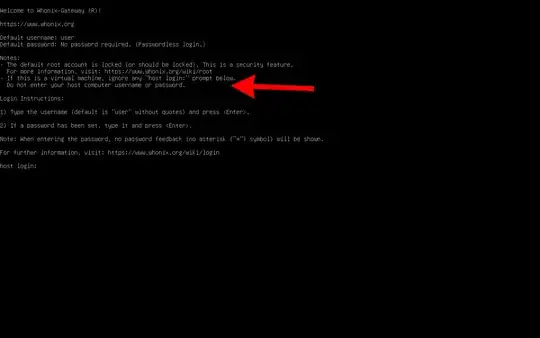
Oh yeah, if you do give gateway 512MB of ram and run it in CLI. You see what the red arrow is pointing to. There's no need to enter in username and password just move on and fire up workstation from this point. I wanted to point this out cause I was stupidly entering in username and password here, I did that for a while til I caught myself lol.
This should immensely improve your performance.


