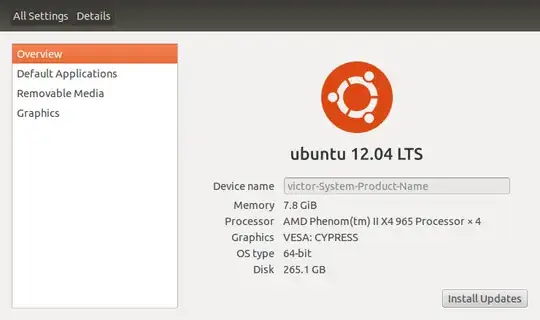
I would like to change my "Device name" as shown in the settings panel. How do I do this?
Asked
Active
Viewed 7.0k times
21
-
1st answer worked fine for me on 14.04, many thanks – May 02 '14 at 21:06
5 Answers
28
Execute the following command using a terminal:
sudo sed -i 's/present-host-name/new-host-name/' /etc/hosts
sudo sed -i 's/present-host-name/new-host-name/' /etc/hostname
You can check your present-host-name by cat /etc/hostname or hostname.
Then reboot the computer, to see the changes.
vine_user
- 2,891
-
3Only renaming the hostname change the device name in details. but There will be an error relating to hostname in each sudo command to terminal – Anwar Jul 06 '12 at 03:26
-
10
Open a terminal and issue the command
gksu gedit /etc/hostsThen change the line
127.0.1.1 victor-System-Product-Namewith
127.0.1.1 your-desired-nameThen also open the file
/etc/hostnamewith commandgksu gedit /etc/hostnameand change the hostname there to reflect the new name.Then reboot the computer, to see the changes
Anwar
- 77,924
-
-
@Samik, unfortunately
sudo hostname preferrednamewon't work. I checked that. thanks – Anwar Jul 04 '12 at 15:07 -
1Sorry, these steps don't work, but I guess it's good to change the etc/hosts file to reflect what is in etc/hostname anyway. Thanks. – Victor S Jul 04 '12 at 15:52
-
@VictorS, yes, only changing the hostname causes errors to be shown in terminal – Anwar Jul 06 '12 at 03:32
4
You can use the built in service hostnamectl
sudo hostnamectl set-hostname [NEW-HOSTNAME]
replacing [NEW-HOSTNAME] with the hostname you would like
this should work immediately on most things but I would reboot for good measure.
2
Since there are plenty of ways to get something done here is one more:
While in your root directory:
cd /etc
sudo vi hostname
Type in your admin password, press Enter.
Press i to 'insert' and change existing device name to the desired device name.
Press Esc and type :wq!, press Enter.
Restart the system for the change to take affect.
Seth
- 59,442
- 44
- 149
- 201
0
Run this command , it will open up Text editor
sudo gedit /etc/hostname
Replace the present name to your Desired name. Save and close. Reboot for it to take effect.
atenz
- 12,868
-
Only changing the hostname, causes error to be shown on each sudo command to the terminal – Anwar Jul 06 '12 at 03:30
-
Thanks for noticing me about that , can you post the exact errors you see . According to Hostname man page
Edit /etc/hostname for permanent change, even i tried this method and haven't encountered any such errors. – atenz Jul 06 '12 at 05:19 -
I edited
/etc/hostnameto a new nameanwarfrom previous oneanwar-precise. The error after rebooting the system and executing a sudo command issudo: unable to resolve host anwar. It may be only warning. I executedsudo geditcommand – Anwar Jul 06 '12 at 05:32 -
I searched for these and concluded you need to change both
hostsandhostnameto reflect complete changes , depending on maybe loopback , DNS , domain-name, resolv.conf. But its better to do changes in both of them. Yet i haven't encountered any sucherror,must be different interface. – atenz Jul 06 '12 at 06:00