I ssh into the machines on my network using hostname.local. I've forgotten the hostname for one of the machines. Is there a command I can issue from one machine that will broadcast a request for and display all the hostnames for the machines on my lan?
Asked
Active
Viewed 4.0k times
2 Answers
37
Avahi tools
There also are tools from the Avahi package to list services.
avahi-browse (from avahi-utils)
Command line tool that browses the network for any services used by Avahi.avahi-browse -atavahi-discover
Is a GUI to display all Avahi services available:
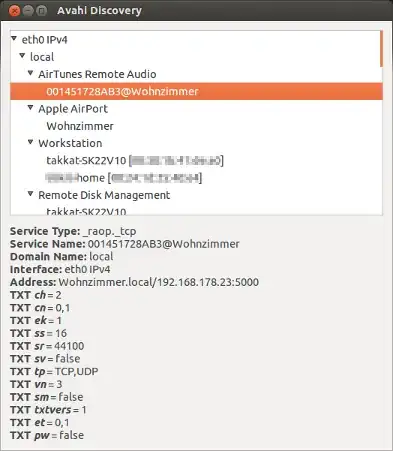
8
nbtscan
A good tool to scan all hostnames on a network is nbtscan.
$ nbtscan 192.168.1.0/24
Doing NBT name scan for addresses from 192.168.1.0/24

IP address       NetBIOS Name     Server    User             MAC address
------------------------------------------------------------------------------
192.168.1.0     Sendto failed: Permission denied
192.168.1.162    CLEMENTINA          <server>  CLEMENTINA          00:00:00:00:00:00
192.168.1.205    CLEMENTINA          <server>  CLEMENTINA          00:00:00:00:00:00
192.168.1.255   Sendto failed: Permission denied
- Note: This is for NetBIOS, not for mDNS.
- Official site
You can install it in the Software Center by searching for 'nbtscan', through their website, or via Terminal:
sudo apt-get install nbtscan
Pablo Bianchi
- 17,552
xlukasx
- 1,385
-
The question was tagged avahi so answers should cover mDNS. The answer is also 12 years old, so no other issue with answering for NetBIOS vs avahi – smcnally Aug 23 '24 at 20:23
avahi-browse -alr. – Pablo Bianchi Sep 19 '18 at 05:21avahi-browse --all --ignore-local --resolve– jaques-sam Jun 12 '24 at 10:45