I recently installed Ubuntu 12.04 on my Samsung laptop alongside Windows 7. Whenever I use Ubuntu (even when its idle) kworker uses almost 90% of one of 8-cores. Even though it doesn't really affect my usage, it bugs me and I am afraid of that it might harm my processor. I even tried installing another Linux distro (Linux Mint), and kworker caused the same problem. So I don't know what to do. I would really appreciate your help.
Asked
Active
Viewed 1.1e+01k times
46
3 Answers
70
Instead I think this CPU usage is not normal and is related to the well-known kworker bug: https://bugs.launchpad.net/ubuntu/+source/linux/+bug/887793
The solution for me and for many others was, first of all, find out the "gpe" that is causing the bad stuff with something like:
grep . -r /sys/firmware/acpi/interrupts/
and check for an high value (mine was gpe13 - with a value like 200K - so, you have to change it accordingly, if differs). After that:
~ cp /sys/firmware/acpi/interrupts/gpe13 /pathtobackup
~ crontab -e
Add this line, so it will be executed every startup/reboot:
@reboot echo "disable" > /sys/firmware/acpi/interrupts/gpe13
Save/exit. Then, to make it work also after wakeup from suspend:
~ touch /etc/pm/sleep.d/30_disable_gpe13
~ chmod +x /etc/pm/sleep.d/30_disable_gpe13
~ vim /etc/pm/sleep.d/30_disable_gpe13
Add this stuff:
#!/bin/bash
case "$1" in
    thaw|resume)
        echo disable > /sys/firmware/acpi/interrupts/gpe13 2>/dev/null
        ;;
    *)
        ;;
esac
exit $?
Save/exit, done.
Tested and working on :
Ubuntu 12.10 on Samsung Chronos 7 series - Model no. NP700Z7C --
Ubuntu 16.04.2 on Clevo - Model no. P650RS --
Ubuntu 24.04 on Samsung Chronos 7 series - Model no. NP700Z7C --
Mauro Mascia
- 801
-
Welcome to Ask Ubuntu! Whilst this may theoretically answer the question, it would be preferable to include the essential parts of the answer here, and provide the link for reference. – hhlp Dec 29 '12 at 11:01
-
1thank you!!! this is the most annoying bug I had preventing really enjoying ubuntu in my samsung. – GClaramunt Mar 20 '13 at 14:09
-
For the benefit of future searchers, babixeddu's solution also fixed the problem on my Fedora box. My only non-zero interrupt file was grp10, and the values ranged from 7k to 15k. Although nowhere near babixeddu's 200k, the "echo disable" solution worked for my system. – Tom Dec 13 '13 at 16:22
-
2
-
3instead of setting the file /etc/pm/sleep.d/30_disable_gpe13 i've edited the file /etc/rc.local and added "echo disable > /sys/firmware/acpi/interrupts/gpe13 2>/dev/null" (before the exit 0) and now it's working, thanks – Joaolvcm May 22 '14 at 14:41
-
I've had this issue come up again and again for a year on my MacBook Pro. This is the first solution I have found that I could get to work. Thank you! – ballPointPenguin Jul 25 '14 at 18:47
-
1This also worked for me on 14.04.1 (my interrupt counts were a bit lower -- around 40k -- and the affected ones were gpe16 and gpe17). – Dan Oct 01 '14 at 16:32
-
214.10 still has this problem (MacbookPro Retina, late 2013). Found
gpe06:94815545andgpe17:10621, and after disabling thegpe06, kworker no longer appears at the top of the CPU ussage list, and then I could event see the power indicator increasing the remaining time left on battery power. – Armando Pérez Marqués Mar 07 '15 at 23:28 -
1I purchased fujitsu lifebook AH544 and I've had this issue with ubuntu 15.10 and ubuntu 14.04.
My non-zero interrupt file was /sys/firmware/acpi/interrupts/gpe13 .
This solution worked for my system. Thank you!
– Yoh Dec 30 '15 at 16:42 -
Note: I'm on Samsung Chronos 7 series - Model no. NP700Z7C running 15.10 and this is still an issue. – oliverseal Jan 05 '16 at 06:38
-
2Thank you so much for this! I was having this issue.. Every time I opened a torrent app the CPU usage went from 0 to 100% all the time.. My first thought was that was a NTFS problem.. but no. KTORRENT was at 90% and used your guide... all works fine now :-) – Mariano L Apr 09 '16 at 23:42
-
1The issue is still present under Ubuntu 16.04 and my solution still works well ;) – Mauro Mascia Feb 03 '17 at 14:14
-
The issue affects also Debian Stretch. 3 days ago I did clean install of Debian 8.8 and immediate upgrade to Debian Stretch. Since then was looking the Net for solution. It was hard to google, because I used "one core high usage" or "process high temperature" what did not return proper solutions. I was like, owww I have to reinstall? After all that time I sacrificed for configuration and customization? I also had problems with DisplayLink adapter and the anger grow in me to the threshold I wanted to go back to old Windowz 7 – Marecky May 15 '17 at 22:22
-
1One more thing, my mistake at the beginning of working out of this problem was using
htop(freshly installed). If I usedtopI would see thatkworkereats my CPU. Problem withhtopis that it doesn't showkworkerin currently running tasks! – Marecky May 15 '17 at 22:26 -
NOTE to others (maybe trivial, but I'm a n00b) If
echo "disable" > /sys/firmware/acpi/interrupts/gpe13, run separately, doesn't make the kworker stop (check in another terminal with commandtopif the kworker stops) , then you probably need to run it with sudo privileges. If that works with the individual command then usesudo crontab -efor the rest of the instructions, or else it doesn't work. (It didn't for me at least). – jonahe Aug 24 '17 at 12:53 -
2
-
3This answer is a lifesaver. It's a shame to see that a serious 9 year old bug is still around, and apparently even affects the latest versions of Ubuntu. – Gabriel Oct 13 '18 at 21:10
-
I had this issue after a fresh install of 18.10... I noticed issues with the brightness on my computer, booted with
nomodesetand used the command line to download the proprietary nvidia driver. After reboot, issue resolved. – Samleo Apr 23 '19 at 15:20 -
2
-
1
-
2
-
I didn't have permission so had to use
sudo crontab -eto allow it to run with root permissions. (Also when testing in terminal usedecho disable | sudo tee /sys/firmware/acpi/interrupts/gpe10per https://reddit.com/r/linux/comments/3lfxhf/comment/cv623is) – OzzieOrca Nov 13 '24 at 19:26 -
In my case the command
grep . -r /sys/firmware/acpi/interrupts/revealed nothing suspicious. Counts from 0 to 1 only. Stillkworker/*:*-eventsprocesses are consuming between 3% to 8% of my CPU. And it appearead suddenly after 3 months of no such problem. – Krzysztof Tomaszewski Apr 08 '25 at 08:47
2
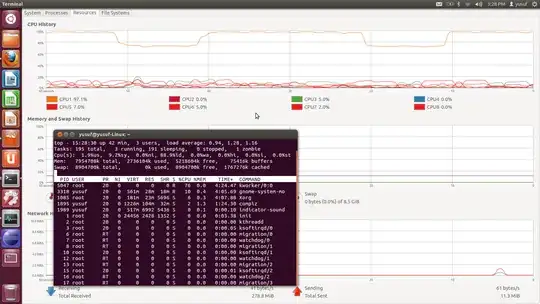
The CPU usage seems to be normal, there's only 1 CPU (CPU1) that has high usage. In all there are total 3 process that are in the running state two of them being kworker and gnome-system-mo (the first 2 processes in the top command screen short you added).
"kworker" is a placeholder process for kernel worker threads, which perform most of the actual processing for the kernel, especially in cases where there are interrupts, timers, I/O, etc. These typically correspond to the vast majority of any allocated "system" time to running processes. It is not something that can be safely removed from the system in any way, and is completely unrelated to nepomuk or KDE (except in that these programs may make system calls, which may require the kernel to do something)
For more information about kworker please have look at the following link:- What's KWorker and it's importance
-
Thank you for your quick answer! I have another question then. Is there way to make the processor use other CPUs instead of using only one core for its most of processes. – Yusuf Aug 16 '12 at 13:32
-
-
1Not at all normal that a core is continuing to run at 80% when the system is idle. – vanadium Feb 21 '20 at 10:25
1
I installed Linux Mint 17 yesterday and noticed this evening that kworker was consuming 100% of one of 4 cpus. I ran the above check, but did not find anything other than 0 for the interrupts.
While examining the services that I normally have running, I noticed that shutting down the nfs server dropped the kworker thread back to zilch. A restart of the nfs server did not fix the issue.
I found this bug report (https://bugs.launchpad.net/ubuntu/+source/linux/+bug/1322407), which indicates that a similar nfs server problem was fixed in kernel 3.13.0-32.57. The latest update on Mint 17 appears to be running kernel 3.13.0-24-generic, so I don't have the fix in the kernel that I am running. I don't know if this will help anyone else but I systematically went to each nfs client machine and did a 'umount -a -t nfs' and waited to see if it had any effect. I found the client that seemed to have been causing the issue as the kworker dropped to nothing after I unmounted. I remounted the nfs shares on the client 'mount -a -t nfs' and the problem did not return.
Jack
- 11
kworker/*:*-eventsprocesses started constanly consuming between 3% to 8% of CPU. Annoying... Going to switch to Alpine Linux if this is not going to stop, as it just wastes electric energy. – Krzysztof Tomaszewski Apr 08 '25 at 08:45