44

I have a .accdb file created with Microsoft Office 2010 and I want to know if it is possible to open it with some native Ubuntu application like LibreOffice or OpenOffice, I know LibreOffice has LibreOffice Base but I can't figure out how to open or if it's even possible to open a .accdb file.

Is there any way I can open a .accdb file without Wine or VirtualBox?

Jeggy
  • 3,132

2 Answers2

67

Yes, we can use the UCanAccess JDBC driver to connect to Access databases (.mdb and .accdb) in LibreOffice Base.

One-Time Setup

First, I installed LibreOffice Base

sudo apt install libreoffice-base

Then I went to UCanAccess on Maven Central, Browsed the latest version, and downloaded the uber.jar file.

I launched LibreOffice (not Base, just LibreOffice itself)
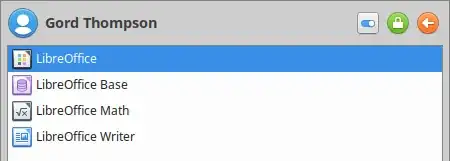
base

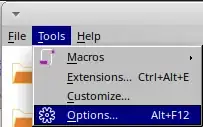
and chose Tools > Options

options

On the Advanced tab I clicked the "Class Path..." button
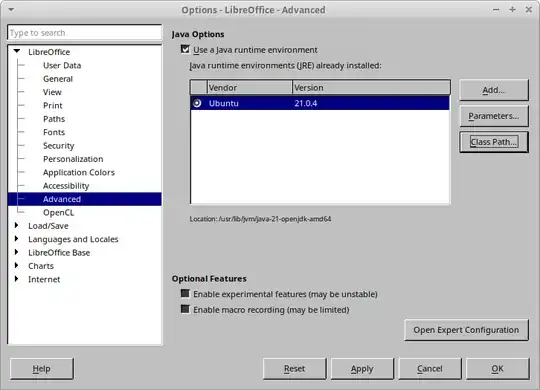
classpath

and then added the following JAR file using the "Add Archive..." button:

/home/gord/Downloads/ucanaccess-5.1.2-uber.jar
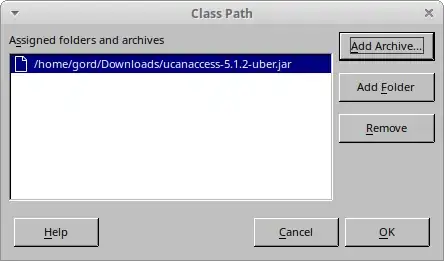
addjar

Important: You must close and re-open all LibreOffice (or OpenOffice.org) components for the new "Class Path...” value to take effect. That includes any "quick start” features or other related processes. (If you want to play it safe, simply restart your machine.)

Per-Database Setup

I launched LibreOffice Base, and in Step 1 of the wizard I chose "Connect to an existing database (JDBC)"
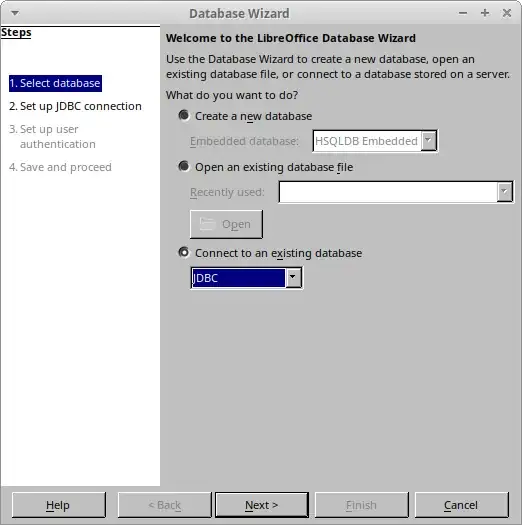
existing

The Access file I wanted to manipulate was named "mdbTest.mdb" in my Documents folder, so in Step 2 the "Datasource URL" was …

jdbc:ucanaccess:///home/gord/Documents/mdbTest.mdb

(note that Base supplies the jdbc: prefix for us, so all we need to enter is the remainder of the URL starting with ucanaccess: …)

… and the "JDBC driver class" was

net.ucanaccess.jdbc.UcanaccessDriver
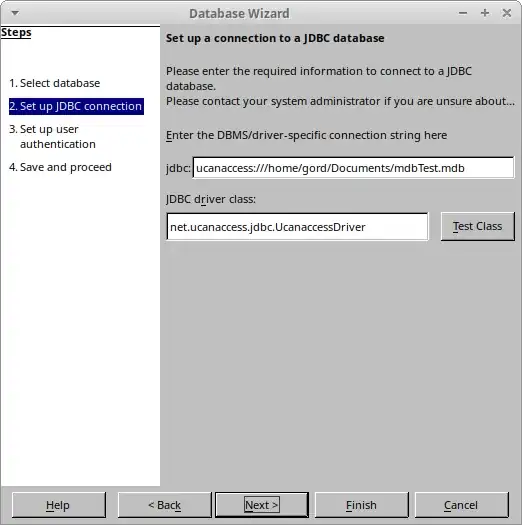
enter image description here

In Step 3, I left the "User name" field empty and just clicked "Next >>".

In Step 4, I saved the LibreOffice Base database as "mdbTest.odb" in my Documents folder.

When the wizard completed it opened my LibreOffice database and I could see the tables in the .accdb file
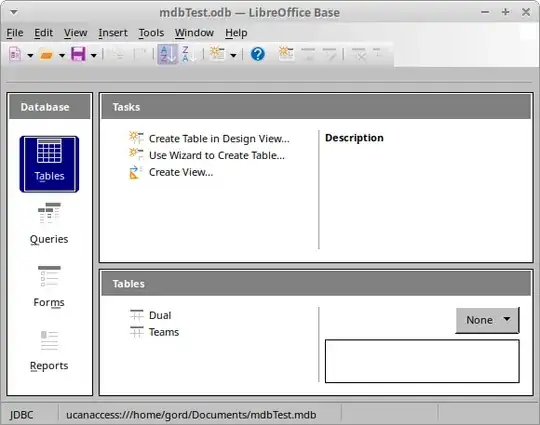
base_main

Troubleshooting

If you are using a distribution that installs LibreOffice Base by default (e.g., Linux Mint) then you may receive the error

The connection to the data source "MyDatabase" could not be established.

'org.hsqldb.persist.HsqlProperties org.hsqldb.DatabaseURL.parseURL(java.lang.String, boolean, boolean)'

That is because LibreOffice has installed its own (rather old) copy of HSQLDB that conflicts with UCanAccess. To fix that, remove LibreOffice's copy of HSQLDB. For example, on Linux Mint that would be

sudo apt remove libhsqldb1.8.0-java

Also, if LibreOffice Base won't work for whatever reason you can use DBeaver instead. Installing the (free) Community Edition is as easy as

sudo snap install dbeaver-ce
  • Great work Gord. Any idea if this is using existing drivers? I'm having trouble getting this into my statistical software for importing Access Tables :) – AdamO Jun 22 '15 at 21:39
  • Brilliant! But I needed to add jackcess-2.1.4.jar and hsqldb.jar to my java class path. (I did this by putting them in jdk/jre/lib/ext) Before that I kept getting an error message saying the driver was corrupt. – Lance Holland Oct 03 '16 at 12:54
  • 2
    This is still working for LibreOffice 6.2! Thank you! – StR May 21 '19 at 23:54
  • It does NOT work for me (Ubuntu Studio 20.10). I hangs on step 2, giving the error "The JDBC driver could not be loaded" (I'm trying to open an Access 2003 mdb file - created in Office 2010 for compatibility reasons). And no, Base won't open it even without this stupid "UCanAccess" thing. – Phantômaxx Mar 12 '21 at 18:39
  • @Phantômaxx - feel free to use something better than "this stupid 'UCanAccess' thing" if you can find one. – Gord Thompson Mar 12 '21 at 19:03
  • It seems there's no way to use the f***ing Libreoffice Base... – Phantômaxx Mar 12 '21 at 20:40
  • @Phantômaxx - I can't vouch for Ubuntu Studio 20.10 but I just tried the above instructions under Ubuntu Studio 20.04 and they worked fine for me. – Gord Thompson Mar 13 '21 at 14:19
  • There must be something wrong in Ubuntu Studio 20.10, then. – Phantômaxx Mar 13 '21 at 15:22
  • @Phantômaxx re: "There must be something wrong in Ubuntu Studio 20.10, then." — Nope. – Gord Thompson Mar 13 '21 at 21:15
  • @GordThompson Of course there is, since it does not work at all. – Phantômaxx Mar 14 '21 at 08:58
12

As mentioned here it says it supports Access files but if we look deeper they have only tested in LibreOffice up to Office 2007.

Since you have an Office 2010 I would suggest trying out this link since other users by the look of this have already tried.

Additionally the compatibility shown here says how good LibreOffice Base is when relating to Microsoft Access 2010. At least up to version 3.6.

There is also a question on the Ask Libreoffice site about this that mentions this link where it is said that the 2007 format is different from the 2010 so it will not work correctly in LibreOffice 3.6 or below.

My only recommendation that does not include Wine or VirtualBox would be to use MS Office 2010 to save the Access file as a 2007 version (If possible) or a MDB format. At least while LibreOffice works on improving compatibility with 2010 in general.

Nemo
  • 130
  • 1
  • 11
Luis Alvarado
  • 217,203
  • 2
    I noticed this line here: 'limited olders driver "Microsoft.Jet.OLEDB.4.0" works fine for read/write, while "Microsoft.ACE.OLEDB.12.0" driver only reads; (fdo#43187). Driver only works on Windows.' - great... – Wilf Jun 26 '14 at 18:19