3

I started using the firefox nightlies a while ago. I would get updates for both versions 4 (Minefield) and 3.7 (Namoroka). Now I want to keep version 4 nightly, but replace the 3.7 nightly with 3.6 stable. I've already removed the 3.7 nightly, but can't figure how to install 3.6 stable (systemwide). Trying to install it using apt-get starts downloading the nightly again. Where do I need to make the necessary changes?

Edit for further clarification:

Installing version 3.6 stable is not a problem. Adding the mozilla ppa is not a problem either. Getting version 4 nightlies is, likewise, not a problem. Installing and running both verstions simultaneously does not cause a profile overlap -- they each have their individual profiles. I have no problems with profiles whatsoever.

What is the problem then? This -> After you add the mozilla ppa, you also start getting the 3.7 nightlies. So? The process overwrites the stable version of 3.6 with a nightly of 3.7 -- this is what I do not want.

Temporary solution that I have -> Before installing updates everyday, I deselect the 3.7 updates, which keeps the 3.6 intact. I just don't want to have to do this. I want to stop getting updates for 3.7 nightly.

It isn't a big thing at all. I'll probably just have to uncheck some box somewhere, or make a little change to some config file.

But thanks to everyone trying to help. It is much appreciated.
Mussnoon
  • 5,236

4 Answers4

2

Indeed, if you add the PPA, it will update Firefox 4 nightlies (which is what you want), and Firefox 3.6 to some nightlies (which you don't want, or it will loose its branding and become Namoroka).

What you want to do is to pin firefox so it won't update from the PPA (but firefox-4.0 will).

Create the file /etc/apt/preferences.d/ubuntu-mozilla-daily-pin-400 and add this:

Package: *
Pin: release o=LP-PPA-ubuntu-mozilla-daily
Pin-Priority: 400

Now, the PPA will have lower priority than the official repositories, so firefox will always check from the official repositories, but firefox-4.0, which is only on the PPA, will be updated from it.

(source for the configuration: Pinning the ubuntu-mozilla-daily PPA)


Another way, without using the command line, is to open Synaptic Package Manager, find the firefox package, and on the "Package" menu, check "Lock Version". But then, Firefox 3.6 won't get updates from the official Ubuntu repositories either. :-/

1

First, remove all firefox versions and all firefox related ppas you maybe have added.

After that type

sudo apt-get update
sudo apt-get install firefox

to install the current stable version of firefox.

To install the current version 4 nightly build type this:

sudo add-apt-repository ppa:ubuntu-mozilla-daily/ppa
sudo apt-get update
sudo apt-get install firefox-4.0

Firefox 4 should now appear here: Applications->Internet->Minefield 4.0 Web Browser.

Dayjay
  • 526
  • Thanks, but adding the mozilla ppa causes it to start getting the 3.7 nightlies too. Of course, I can deselect it everytime before hitting "install updates" on update manager, but there must be a better way. – Mussnoon Jan 14 '11 at 09:13
0

Follow these steps:

  1. Remove all versions of firefox and all profiles
  2. Remove the "ppa:ubuntu-mozilla-daily/ppa" repository if you have and run sudo apt-get update
  3. Install the firefox 3.6 (stable) sudo apt-get install firefox and make a profile for this version
  4. Install the Firefox-4.0 nightly:
sudo add-apt-repository ppa:ubuntu-mozilla-daily/ppa
sudo apt-get update
sudo apt-get install firefox-4.0
  1. Run the command firefox-4.0 -ProfileManager -no-remote and create a new profile "ff-4.0" and start the firefox
  2. Make an activator and set the command as: firefox-4.0 -P "ff-4.0" -no-remote
  3. Done! ;)

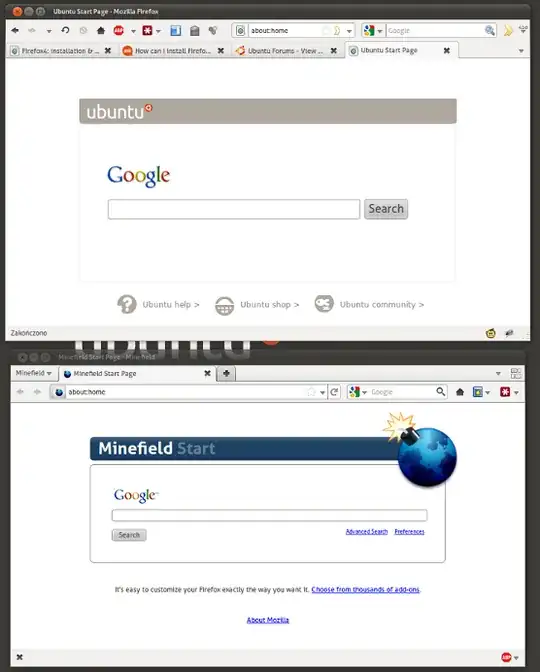
Remember! If you want to run the firefox stable and nightly version at the same time, always first run the stable version.

Result:

alt text

lukasz
  • 2,436
0

To install Firefox 4 without updating the stable default Firefox version, use SilverWave ppa.

You can also use my FoxTester extension, which allows to easily install any number of Firefox versions and launch them simultaneously. However, you won't get automatic updates.

Take a look at my tutorial if you need more info about those methods.

lovinglinux
  • 6,427
  • The firefox-4.0 package from the "ppa:ubuntu-mozilla-daily/ppa " does not update the stable default Firefox version! Only you have to run firefox or firefox-4 with a profile created for the appropriate version of firefox – lukasz Jan 14 '11 at 11:56
  • @lukasz is not the firefox-4.0 package that update the stable default, is the ppa tha does that. The ppa allows to install firefox-4.0 package, but also updates firefox package with the latest unstable updates. – lovinglinux Jan 14 '11 at 18:23