4

When I try playing .m4v files in VLC the sound track doesn't play correctly, and I get a kind of buzzing staticy distorted version of the actual sound, I'd really appreciate some help as I don't really like totem and XBMC doesn't seem to be working either.

Thanks in advance!
Mike
  • 71

5 Answers5

8

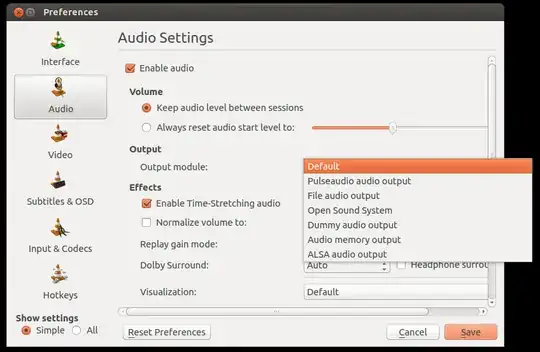
Go in to the Preferences and switch the Output Module to ALSA audio output. Quit VLC & relaunch. It worked ok to me

  • Do you have a screenshoot of that menu? If you add an image (of the Preferences menu), will be more easy to the users to set the configuration as you said. – Lucio Dec 05 '12 at 03:21
3

I've had the same problems with VLC sound playback in various formats. Go in to the Preferences and switch the Output Module to Pulseaudio audio output.
Quit VLC & relaunch.

Hope it helps!

mrcktz
  • 1,774
AB-Grizzly
  • 31
  • 1
3

For me 3 things (Easier than other options I could try) worked. You could either:

  • Change the Sound Preferences in VLC by going to Tools --> Preferences --> Sound and changing the Default from one option to another. For example Alsa to Pulseaudio or Pulseaudio to Alsa are the most common ones. enter image description here

  • Try pausing the movie for 2 to 5 seconds, then unpause it. The sound should come immediately of after 1 or 2 seconds without the horrible static.

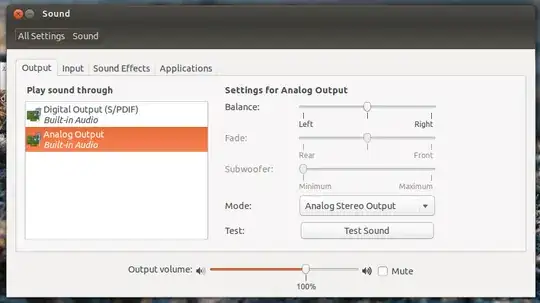
  • If you are using HDMI or outputting it to a TV/Monitor with Speakers and already checked all the Sound settings in your TV or Monitor, try changing the Sound Preferences in Ubuntu:

    enter image description here

Luis Alvarado
  • 217,203
2

Solution #23 worked for me for 2 computers for skype and vlc that made problems with sound: pulseAudioBugWebSite

The solution is to change the lines in /etc/pulse/default.pa. I've changed this line:

load-module module-udev-detect

to this:

load-module module-udev-detect tsched=0

reboot. It worked for me!

Yamaneko
  • 880
Philippe Gachoud
  • 6,160
  • 3
  • 46
  • 51
0

None of the Module changes made anything better. Some made it worse. What finally fixed it for me was just unselecting "Enable Time Stretching Audio":

Tools > Preferences > Audio > Enable Time Stretching Audio (uncheck)

This was checked by default (I know because I uninstalled and reinstalled and also reset preferences), so I don't know when it became a problem, but everything checks out now. Output Module is set to Automatic if that makes any difference to anyone.