While editing text documents I need to put time stamps frequently. I thought of automating it in 2 different ways. None of these seem to be working.
- Using nautilus-actions
I set up a new right-context action which runs the command date|xclip
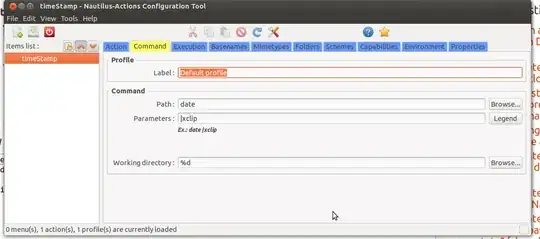
This right-context doesn't show up when I right click in other applications (such as terminal, or browser). Moreover when it appears, and I click on it, it doesn't do anything.
- Using keyboard shortcut
I setup a new keyboard shortcut which is supposed to execute date command but doesn't.
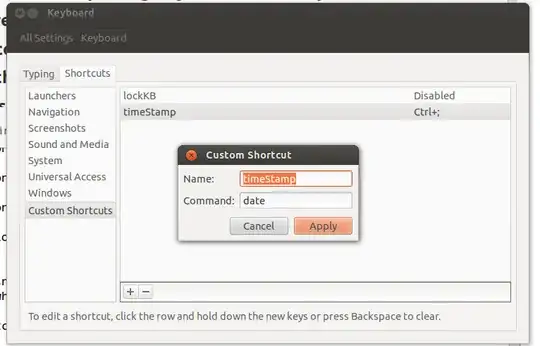
Any pointers?
Thanks.
xclipcopies the text not to the clipboard, but to the X selection. To paste it, use middle-click rather than Ctrl-V. – Mechanical snail Jan 07 '13 at 07:11bash -cdid the trick but there is some kind of delay in typing. When I click the shortcut, complete timestamp is not typed using xdotool. Some initial numbers are eaten up e.g.1-07 15:14:35+08:00or013-01-07 15:14:35+08:00– user13107 Jan 07 '13 at 07:16bash -c 'date | xclip -selection clipboard && xdotool key 'ctrl+v''that works perfectly. – Immanuel Weihnachten May 22 '13 at 02:26xdotool --clearmodifiers- some keys are typed with the Ctrl (e.g. - space, it gets swallowed). Some characters won't be typed (e.g.:- which is shifted), but I'm using a following command:xdotool type --clearmodifiers $(date "+%Y-%m-%d,%H-%I")which works for me. – Tomasz Gandor Aug 09 '15 at 20:26