4

In order to be able to answer this question, I was looking for a way to manage PolicyKit in KDE. Using Google I quickly ran into the KDE's official Authorization manager (mentioned here and here in the official upstream KDE docs):
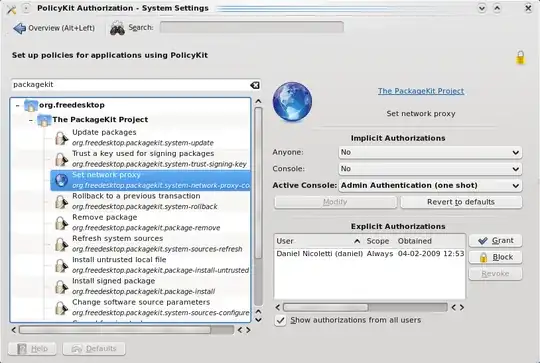
enter image description here

However, I cannot locate this on my fully fledged Kubuntu 12.04.1 installation. It's not in the System Settings while I have installed the packages policykit-desktop-privileges and polkit-kde-1.

It seems it is supposed to be included in the very base of KDE since 4.3 according to these docs:

PolicyKit is closely integrated with KDE starting from version 4.3. In kdebase-workspace we have an authorization manager and an authentication agent.

In Ubuntu, the package kdebase-workspace is a transitional package to kde-workspace, which is in turn a metapackage for some basic KDE workspace applications - not mentioning anything about PolicyKit or authorization, only the System Settings application.

Now, where is this part of the "System Settings" in Ubuntu nowadays?

gertvdijk
  • 69,607
  • 2
    It seems to be missing in kubuntu, https://bugs.launchpad.net/ubuntu/+source/polkit-kde-1/+bug/575428 . And it seems te be forgotten as well :( – McNisse Feb 01 '13 at 11:16
  • @McNisse Thanks for the link to the bug report! I must have been missing this one in Googling. – gertvdijk Feb 01 '13 at 11:22
  • 2
    Just for the completeness - it seems to be moved out of KDE workspace upstream, into a new project here and missing in Kubuntu since 10.04. I've updated the bug report and it looks like it's going to take some time in order to get this new package in Debian/Ubuntu. – gertvdijk Feb 01 '13 at 12:14
  • I would like to reopen this question and hope for a answer. Thanks. – DrBeco Nov 03 '15 at 18:47
  • @DrBeco It's not valid question here I'm afraid. Note that I close the question myself for the reason it's a bug and such questions are therefore not valid here as per the [faq]. – gertvdijk Nov 04 '15 at 12:01
  • Get it to run under kde5 and looking for integrate it to kde5... i am on a redhat based distro tho... first install "kdebase4-runtime" and "polkit-kde-kcmodules-1" rpm/deb to check what's runnable run "kcmshell4 --list" and to run the app do "kcmshell4 kcm_polkitactions" and "kcmshell4 kcm_polkitconfig" this is a very useful app i don't know what happened on kde5 – intika Apr 07 '18 at 03:01
  • Also a good lecture https://drfav.wordpress.com/2009/12/22/polkit-and-kde-lets-make-the-point-of-the-situation/ – intika Apr 07 '18 at 15:21

0 Answers0