I'm using the Caledonia theme in KDE, but the icons in the Task Manager are way too big. Is there a way to change the size of all the icons? This is how it looks right now. I would prefer it if the size was the same as Quicklaunch (16x16)
Asked
Active
Viewed 1,804 times

1 Answers
1
There are many
There are many task managers for the KDE.

The Icon only task manager has a scale for the icons.
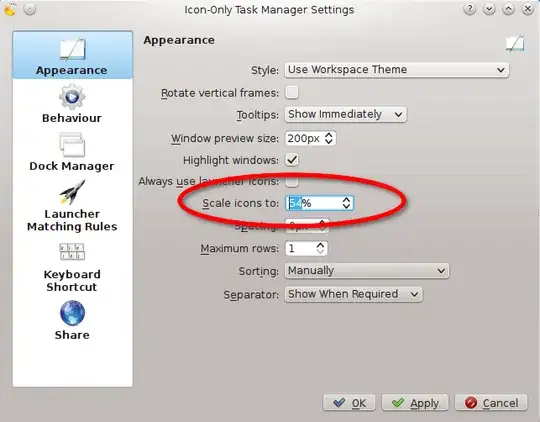
:~$ apt-cache show plasma-widgets-addons

Description: additional widgets for Plasma
 This package contains additional Plasma widgets shipped in the Plasma
 addons module. Install it if you want a variety of widgets on your Plasma
 desktop.
 .
 This package provides the following widgets:
  * Binary Clock
  * Black Board
  * Bookmarks
...
  * Icon Tasks
...
Also the smooth tasks task manager has a scale for the icons.
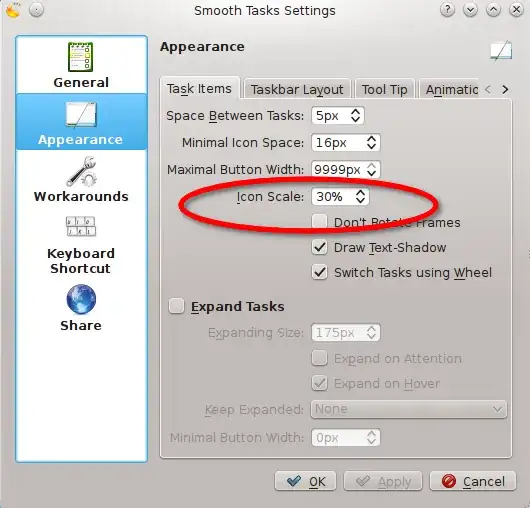
Package plasma-widget-smooth-tasks: http://packages.ubuntu.com/search?keywords=plasma-widget-smooth-tasks&searchon=names&suite=all§ion=all
user26687
- 15,214
-
Icon-only task manager is awesome! I installed smooth tasks, but it didn't turn up when I tried to Add Widget. It doesn't show up on krunner either ... but the ICTM is really amazing, thank you so much! – notablytipsy Feb 15 '13 at 20:28