5

Thanks to Ask Ubuntu, recently I discovered PulseAudio Volume Control (pavucontrol) and started using it with joy.

My question is this: is there a way to use it in place of the default audio control shipped with Ubuntu 12.04? I would like to get pavucontrol to appear by clicking on the speaker icon in the Unity top bar.
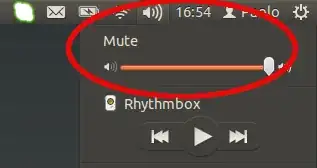
enter image description here

Paolo
  • 1,808

2 Answers2

4

Unfortunately, this is not possible without editing the source code for the sound indicator.

Anwar
  • 77,924
RolandiXor
  • 51,957
  • Thanks! Any reference on that or at least a short explanation? – Paolo Feb 15 '13 at 18:00
  • 1
    @Guandalino I'm not sure I can find a quick reference for you but essentially the sound indicator is hard coded to launch specific applications, and its options (in dconf) do not include the option to choose a volume control application of your own. – RolandiXor Feb 15 '13 at 18:29
0

It is hard coded in the source code, but the change is quite simple.

There is, however, a ready-made package that can be found here:

$ sudo add-apt-repository ppa:mc3man/sound1
$ sudo aptitude update
$ sudo aptitude safe-upgrade

The indicator-sound will be upgraded.

EDIT: According to Launchpad bug #961745, xfce4-mixer was replaced by pavucontrol on Xubuntu since indicator-sound version 0.8.4.1-0ubuntu4

raphaelh
  • 292