Why are some updates called Important security updates?
How are they different from other updates?
Is my system insecure, If I don't install them?
How can there be very frequent security updates?
Does it mean my Ubuntu is very unstable or insecure?
Asked
Active
Viewed 3,704 times
2 Answers
10
What is a security update? How are they different from other updates?
Usually they are security-related bugs rather than new features or bug fixes. For example, it might fix a buffer overflow a developer found.
If I don't install them, is my system insecure?
Not necessarily, but there are exploits. If someone could manage to exploit them (which might not even be possible unless they have another exploit), it isn't totally compromised. However, you should assume that it is insecure, because if theres a slight chance that it is, for all purposes it is.
How can there be very frequent security updates? Does it mean my ubuntu is very unstable or insecure?
This comes into the differences between Linux and closed-source operating systems.
In Linux, security flaws are found much easier when they exist due to the code being open. Then the patch is immediately put upstream and onto your computer through the package update.
Whereas in a closed source system, often such flaws aren't found until exploitation. Its just a matter of when the security flaw is found, not the existence itself.
mathepic
- 225
-
Mind explaining the downvote when the the guy who said pretty much the same thing that I did (after I wrote my answer, mind you) was upvoted? – mathepic Feb 21 '11 at 18:10
-
Same thing? You were explaining how Linux is more secure than Windows, while Pedram answered the question and explained what the security updates were. – Oxwivi Feb 21 '11 at 18:25
-
1@Toki - Read the question - "Does it mean my ubuntu is very unstable or insecure?" I tried to answer that as well as include information on the other stuff in the question (which is the only thing he said). Secondly I didn't even explain why its better, I just explained the difference! In fact, I only used Windows as an example - the differences were between open and closed source. – mathepic Feb 21 '11 at 18:30
-
Oops, my bad. However, the what the questioner asks is what is security updates, and if the constant security updates mean that his system is insecure. The downvoter probably disregarded the rest of the question and noted the absence of the answer to the primary issue that questioner addresses. I think you should edit it and write something in the lies of 'Ubuntu is more secure because...' and not directly compare it with Windows or something because it will sound like trolling. I'll upvote you for now. – Oxwivi Feb 21 '11 at 18:40
-
@Toki Tahmid - Okay, hopefully my answer is more clear now. – mathepic Feb 21 '11 at 18:45
-
You've done an excellent job there! I'm picky about grammar and all, so I can pick at a couple of points, but all is great. Unfortunately, as I said in the last comment I am not the downvoter, I upvoted it so it's at 0 now. Anyway, keep up the great job! – Oxwivi Feb 21 '11 at 18:50
-
@Toki Tahmid Okay, thanks. For what its worth the downvoter just removed it. – mathepic Feb 21 '11 at 18:51
-
I would say, what human create can't be perfect. If we're lucky problems are fixed and provided as updates. Security updates are the ones which fixes problems which (in practice or in theory) can be used to breach security. It's not that Ubuntu is not perfect: no OS is that, every OS can and should have security fixes from time to time. I would say, it's not to see security updates more times than just once (like MS provides more at the same time as far as I know) since it means you have fixes quicker for a given problem. However as we can see: this is not Windows or Ubuntu, but in general – LGB Feb 21 '11 at 20:04
-
@LGB That is true, both in terms of the "Service Packs" and how their components are tightly integrated whereas in Unix systems we have a ton of smaller things that need updates. – mathepic Feb 21 '11 at 20:06
-
@mathepic: yes, and I am happy with the situation to have smaller (but more) fixes alone, that's the quickest way to fix a problem while MS may (I am not sure though) waits for collecting "some fixes" together and give them in one "piece", so you may (again: I am not a windows expert) have security problems for longer in Windows before the fix. It does not give too much info about Windows or eg Ubuntu is more secure in general (which one needs more fixes, since "one" win "pack" may fix tons of problems, so it's hard to compare). – LGB Feb 21 '11 at 20:20
-
Nitpick: you don't need source code to find the flaws, only to fix them. The source code to Windows isn't generally available, yet people find security flaws all the time. – Jörg W Mittag Feb 21 '11 at 20:21
-
@Jord W Mittag You don't but it certainly makes it a lot easier. Security flaws in Linux that are found by a developer go a lot less unnoticed because they aren't actually exploited. – mathepic Feb 21 '11 at 20:34
7
As the name says, security updates are important updates which will improve your security.
Some updates are only new versions of your applications with new features and some of them are bug fixes. Critical security bug fixes are included in "Important securty updates" in the update manager.
If you want your system to be secure you must install security updates as soon as possible. Without these updates, attackers may use vulnerabilities in your software to attack your system.
Also, it's a good idea to make Ubuntu check for updates daily and install security updates without confirmation:
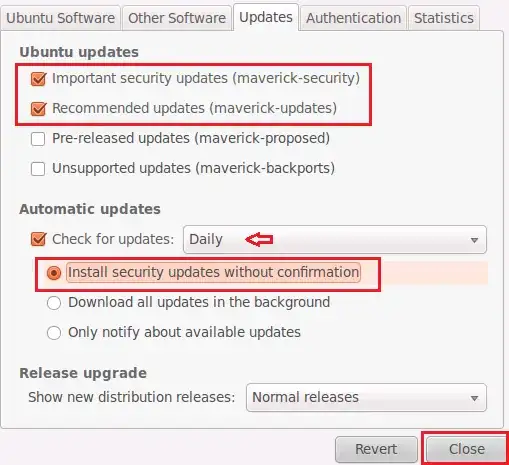
Image source: Setup Ubuntu 10.10 Maverick Meerkat to Install Security Updates Automatically