9

I have Chromium installed on Ubuntu 13.04, but aside from flash things, it seems I can't get a sound out of it.

For instance, I installed an extension, SpeakIt, which is supposed to read paragraphs aloud, but I get no sound out of it. The test includes listening to an audio file, I don't get anything out of that either.

I do hear sounds when played by YouTube, which makes me believe that the computer's sound itself isn't a problem, only Chromium's (because Flash makes sounds).

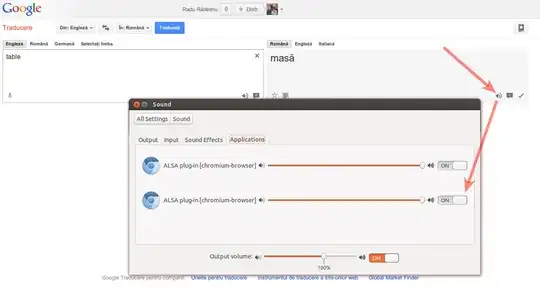
I don't hear sounds the browser plays (like Google Translate's speak).

What can I do to troubleshoot? What could be the problem?

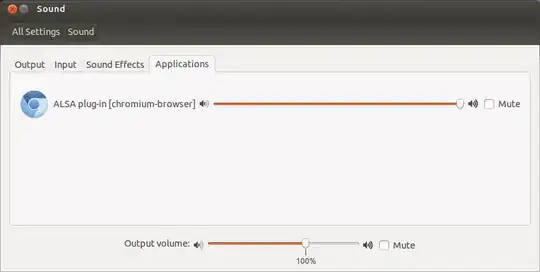
When looking in the Sound > Applications submenu, it doesn't even show up there. When I play a YouTube video, it does show.
Image

Example of what happens when YouTube video is playing
Zanna
  • 72,471
Madara's Ghost
  • 607
  • 4
  • 9
  • 23

4 Answers4

7

here's a simpler way to fix it: sudo apt-get install chromium-codecs-ffmpeg-extra. Source: Bug #991758

Dung Thai
  • 131
3

I had this problem too. This is an old bug about Chromium: Issue 22152: <audio> tag doesn't work for extension resources. Anyway, I didn't understand how they fixed there (actually I have not bothered myself) - if they fixed (is written that it is fixed). Because of that I won't explain what is happening there.

I fixed it by following the following steps:

  • Download and install Google Chrome.
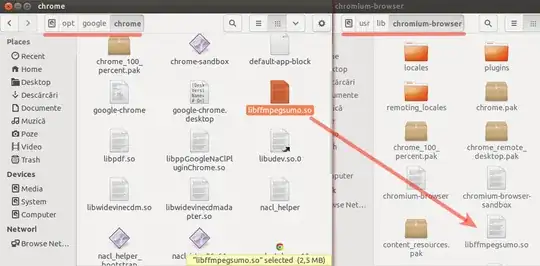
  • Replace /usr/lib/chromium-browser/libffmpegsumo.so file with /opt/google/chrome/libffmpegsumo.so (preventive, you can make a copy of the original file).

Replace libffmpegsumo.so

  • Optional, uninstall Google Chrome if you don't need anymore or if you don't intend to use it in the future.
  • Open Chromium browser and check if you can hear sounds now, in Google Translations for example.

Check if sound is working


I think, not sure, that this happens because many of the audio and video codecs included in Chrome aren't included in Chromium due to licensing, patents and stuff like this.

Radu Rădeanu
  • 174,437
1

No need for install, just download the package and extract, like:

sudo dpkg -x google-chrome-stable_current_amd64.deb ./google
sudo cp /usr/lib/chromium-browser/libffmpegsumo.so /usr/lib/chromium-browser/libffmpegsumo.so.backup
sudo cp /home/YOURUSERNAME/Downloads/google/opt/google/chrome/libffmpegsumo.so /usr/lib/chromium-browser/libffmpegsumo.so

Ok, restart chromium.

Eric Carvalho
  • 55,573
Anonymous
  • 111
0

Follow this if you have downloaded chromium from Ubuntu Software.

The same problem will occur in this case also.

To fix this follow these steps.

  1. Go to Ubuntu Software > Installed > look for Chromium browser

    Chromium page for details

    Click on Permission tab

  2. Look at opened window

    Enable play audio in window

    Enable Play audio

muru
  • 207,970