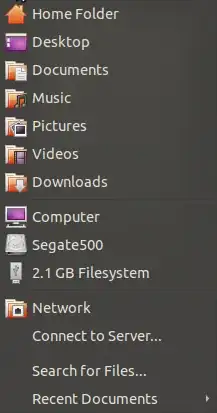
I want to add a Public folder at here. -The Public folder exists in ~/Public as default.
How can I do?
Asked
Active
Viewed 7,919 times
7
Benjamin
- 10,229
2 Answers
10
- Open up the file manager.
- Navigate to the folder you want to add.
- Use Bookmarks->Add from the menu or press Ctrl+D. Alternatively, you can navigate to the folder above the folder you want to add to the Places menu and drag and drop to the left hand pane in the file manager.
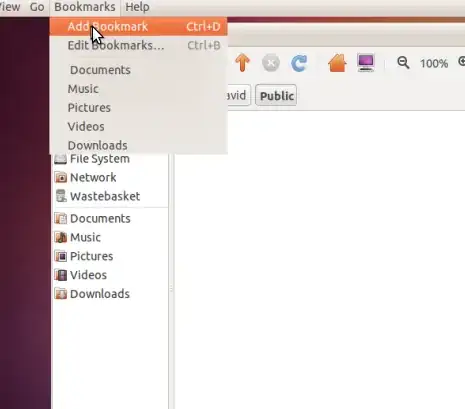
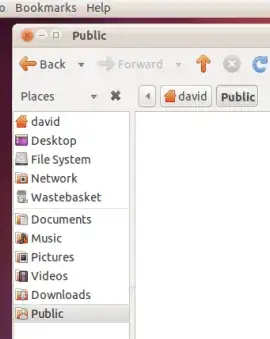
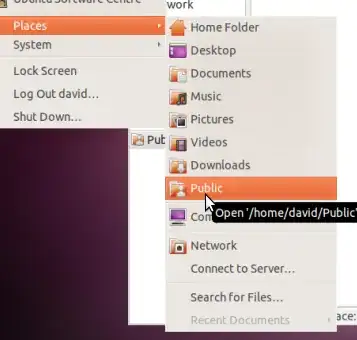
dv3500ea
- 37,754
-
Oh, easy! Thanks. I can't find this feature by myself. The interface is so hided. – Benjamin Mar 05 '11 at 11:44
4
In Nautilus you can simply drag and drop any "places" to the bottom half of the side pane (View -> Side Pane F9):
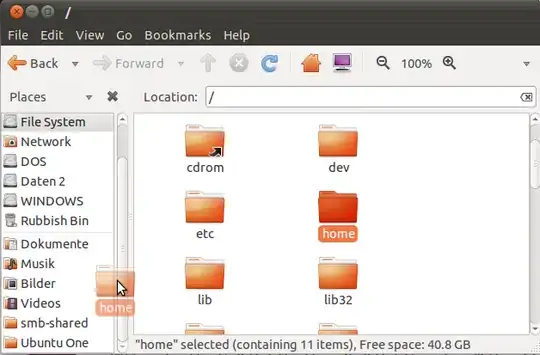
To remove entries simply select an entry and press Del or choose Remove from the right click context menu.
Takkat
- 144,810