7

After running sudo update-mime-database /usr/share/mime my gnome doesn't recognize any file types anymore. In Nautilus all files are now text/plain type and all now open with gedit by default. Gnome-commander does the same.

I guess that it's not that file associations are broken but rather file type recognition problem.

Tried to (not in that order):

  • rerun update-mime-database several times
  • reinstal package gnome-mime-data
  • delete ~/.local/share/applications/*
  • logout and login many times
  • reboot

Nothing helped so far.

My system:

Ubuntu 10.04 LTS (Lucid Lynx)
Gnome 2.30.2
Charo
  • 3,691
Andrew
  • 71

3 Answers3

6

I had a similar problem and I solved it reinstalling the shared-mime-info package with

sudo apt-get install --reinstall shared-mime-info
pomsky
  • 70,797
Charo
  • 3,691
2

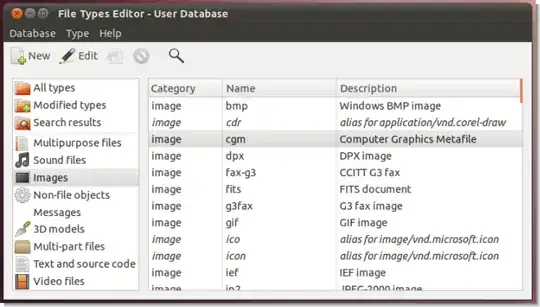
Try to use assoGiate program - a file types editor. To install it from Terminal, use next command:

sudo apt-get install assogiate

assoGiate

Radu Rădeanu
  • 174,437
  • Done that already. File types database is in place and seems to be correct. – Andrew May 09 '13 at 18:32
  • Some additional details.

    `$ file --mime-type -k 144408743.jpg 144408743.jpg: image/jpeg $ xdg-mime query filetype 144408743.jpg application/octet-stream $ mimetype --all --debug 144408743.jpg

    Data dirs are: /home/alomaka/.local/share, /usr/share/gnome, /usr/local/share, /usr/share Checking inode type Checking globs for basename '144408743.jpg' Checking for extension '.jpg' Checking all magic rules File exists, trying default method First 10 bytes of the file contain control chars 144408743.jpg: application/octet-stream $`

    – Andrew May 09 '13 at 18:42
  • It looks like my GNOME doesn't look at system-wide file types database. Only in my personal ~/.local/share/mime. – Andrew May 09 '13 at 18:44
0

Running update-mime-database as root removes 'other' access from some mime database files. Running

chmod -R o+r /usr/share/mime

afterwards will fix this up.

pomsky
  • 70,797
bob
  • 1