I am interested in having Quodlibet show up in the "Default Applications" menu in System Settings > Details, how can I do this?
Asked
Active
Viewed 1,442 times
2 Answers
4
To make any music player that comes with sound indicator integration the default player in there we may from 13.04 install and run unity-tweak-tool 
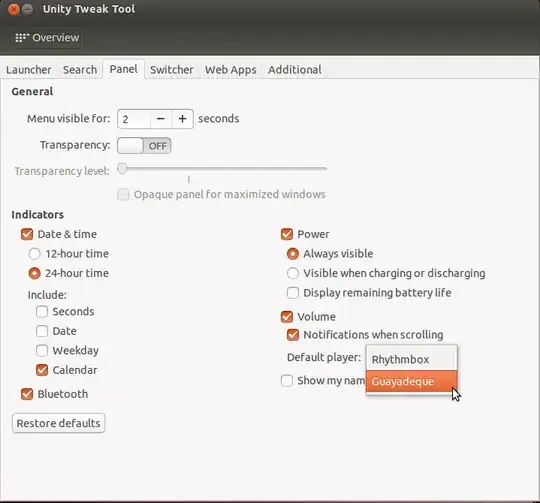
The example above will then make Guayadeque the default player in the sound indicator:
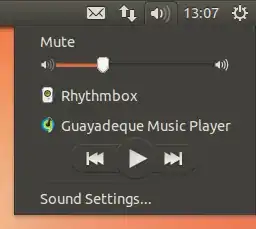
Of course if we prefer not to install an additional application, or if a player such as Quod Libet does not come with full indicator sound integration we can also do this with dconf-editor (from dconf-tools
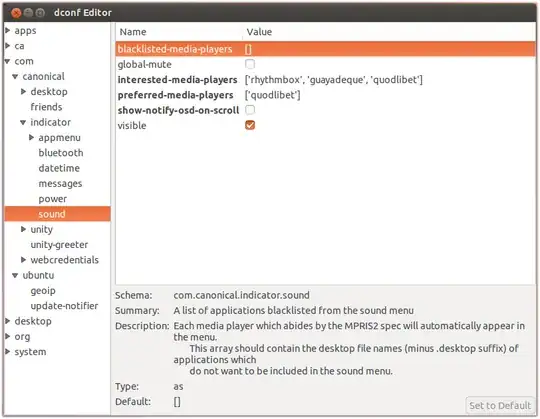
Quod Libet need the MPRIS plugin (quodlibet-plugins
-
Though I'd rather know the inner workings of the system, your post is very complete and will possibly be most helpful for anybody who reads this Q-A, thanks for your effort! – Severo Raz May 12 '13 at 20:40
-
@WolterHellmund you already did the MIME approach nicely. I felt people who come here by Google might also want to hear about Inidicator integration. – Takkat May 12 '13 at 20:44
-
This doesn't work for quod libet, which was the OPs original question. – Dave Sep 18 '13 at 20:42
-
@Takkat - I tried the dconf trick just now and now Quod Libet appears in the menu...which is great. However, when I click on it, nothing happens...just doesn't run it. – Dave Sep 19 '13 at 17:25
-
@Takkat - I asked over at the Quod forum and they said their mpris plugin only works with QL 3.0 which is not in Ubuntu stable yet. Perhaps it is just a matter of time... – Dave Sep 20 '13 at 12:42
-
1Installing and enabling the mpris plugin for Quod on 13.04 now works and has now allowed me perfect control from the sound indicator menu. Start/stop/pause -- everything Just Works. – Dave Sep 30 '13 at 15:07
1
Oh well, read about and found it: just make sure you reference quodlibet.desktop in your mimeapps.list file (local copy at ~/.local/share/applications/mimeapps.list).
You can set it default right away just by having the following line in the mentioned file: audio/x-vorbis+ogg=quodlibet.desktop.
Severo Raz
- 6,131